
PSPGridJpeg: Difference between revisions
From GameBrew
More actions
Created page with "{{Infobox PSP Homebrews |title=PSPGridJpeg |image=pspgridjpeg.png |description=Convert table into images to view on the PSP. |author=LupinⅢ |lastupdated=2005/04/27 |type=File Operation |format= |version=0.7 |license=Mixed |download=https://dlhb.gamebrew.org/psphomebrew/pspgridjpeg.zip |website=https://web.archive.org/web/20051230172245/http://pspgridjpeg.client.jp/ |source= }} PSPGridJpeg (Japanese) is a PC program that can create JPEG from table, allowing you to view..." |
No edit summary |
||
| Line 18: | Line 18: | ||
== Features == | == Features == | ||
* Import CVS or create from scratch. | * Import from a CVS file or create from scratch. | ||
* Add/remove columns. | * Add/remove columns, background color, etc. | ||
* Output options. | * Output options. | ||
* Preview. | * Preview. | ||
Revision as of 03:49, 30 August 2024
| PSPGridJpeg | |
|---|---|
 | |
| General | |
| Author | LupinⅢ |
| Type | File Operation |
| Version | 0.7 |
| License | Mixed |
| Last Updated | 2005/04/27 |
| Links | |
| Download | |
| Website | |
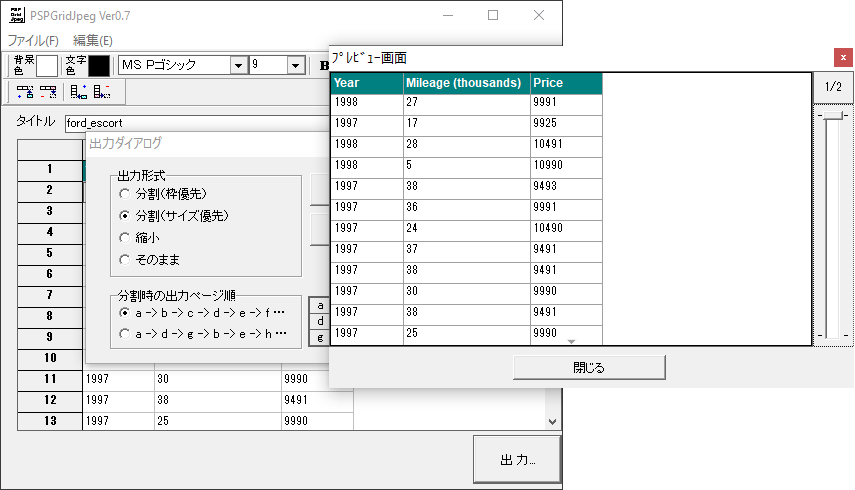
PSPGridJpeg (Japanese) is a PC program that can create JPEG from table, allowing you to view the table directly on the PSP using the PHOTO feature.
Simply import a table or create it within the program, export it as JPEG file, and then transfer that JPEG to your PSP.
Features
- Import from a CVS file or create from scratch.
- Add/remove columns, background color, etc.
- Output options.
- Preview.
- Save/load.
Screenshots
External links
- Official website - http://pspgridjpeg.client.jp/ (archived)