
VITABatteryPlus: Difference between revisions
From GameBrew
More actions
No edit summary |
No edit summary |
||
| Line 17: | Line 17: | ||
|website=https://twitter.com/Electric1447/status/1289155224049836032 | |website=https://twitter.com/Electric1447/status/1289155224049836032 | ||
|source=https://github.com/Electric1447/VITABatteryPlus | |source=https://github.com/Electric1447/VITABatteryPlus | ||
|donation= | |donation= | ||
}} | }} | ||
A simple tai-hen plugin that displays the battery and framerate information on your PS Vita. | A simple tai-hen plugin that displays the battery and framerate information on your PS Vita. | ||
Revision as of 13:48, 16 September 2023
| VITABatteryPlus | |
|---|---|
 | |
| General | |
| Author | Electric, Joel16 |
| Type | Plugins |
| Version | 1.8 |
| License | MIT License |
| Last Updated | 2021/06/13 |
| Links | |
| Download | |
| Website | |
| Source | |
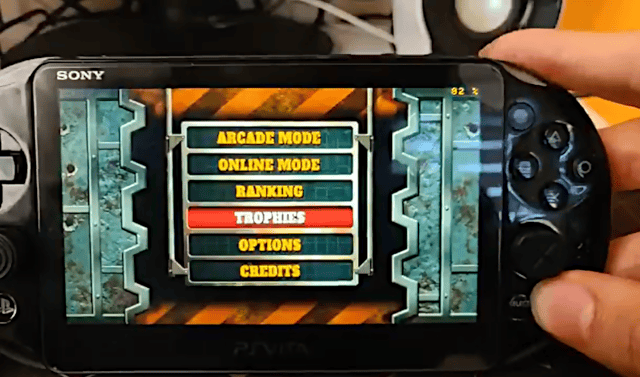
A simple tai-hen plugin that displays the battery and framerate information on your PS Vita.
Features
- Current battery percentage.
- Current battery temperature in Celsius (°C) degrees.
- Remaining battery life time.
- FPS counter.
Installation
Put vitabatteryplus.suprx in ux0:tai/ folder in your PS Vita.
Open ux0:tai/config.txt and add the following
# titleid for your application
*ALL
ux0:tai/vitabatteryplus.suprx
Controls
Start+Up - Cycle mode
Start+Left - Cycle position
Start+Right - Cycle text color
Start+Down - Close VITABatteryPlus display
Screenshots
Changelog
v1.8
- Improved controls.
v1.7
- Fixed issues with Adrenaline.
- Fixed compatibility with some homebrew.
v1.6
- Added FPS counter.
v1.5
- Added position and text color options.
v1.0
- First Release.
Credits
Original credits:
- joel16 for creating VITABattery.
- Rinnegatamante for Framecounter function.