
XMB Icons Enabler Disabler PSP: Difference between revisions
From GameBrew
More actions
No edit summary |
m Text replacement - "|discussion=" to "|donation=" |
||
| Line 10: | Line 10: | ||
|download=https://dlhb.gamebrew.org/psphomebrew/xmbiconsenabler.7z | |download=https://dlhb.gamebrew.org/psphomebrew/xmbiconsenabler.7z | ||
|website=http://redsquirrel87.altervista.org/doku.php/xmb-icons-enabler-disabler | |website=http://redsquirrel87.altervista.org/doku.php/xmb-icons-enabler-disabler | ||
| | |donation=http://redsquirrel87.altervista.org/doku.php/donations | ||
}} | }} | ||
XMB Icons Enabler/Disabler is a simple tool for Microsoft Windows that allows you to change the XMB icons of your PSP. | XMB Icons Enabler/Disabler is a simple tool for Microsoft Windows that allows you to change the XMB icons of your PSP. | ||
Revision as of 01:23, 14 August 2023
| XMB Icons Enabler/Disabler | |
|---|---|
 | |
| General | |
| Author | Red Squirrel |
| Type | Theme Tools |
| Version | 2 |
| License | Mixed |
| Last Updated | 2008/07/02 |
| Links | |
| Download | |
| Website | |
| Support Author | |
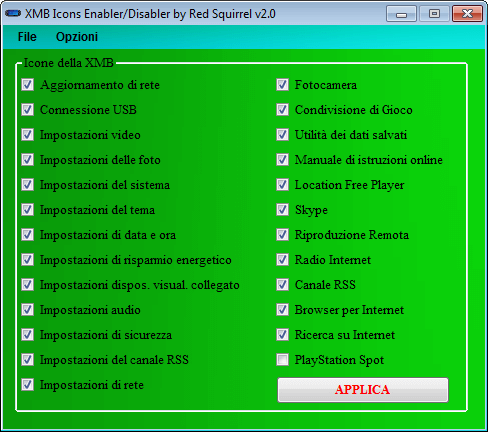
XMB Icons Enabler/Disabler is a simple tool for Microsoft Windows that allows you to change the XMB icons of your PSP.
User guide
This program allows you to add/remove icons from your XMB in the simplest way possible.
It will create a custom vshmain.prx according to your choises.
Copy it and paste it into your Flash0 at /VSH/MODULE/ directory overwriting the original one.
Note: Remember to select your CF under the options menu.
Screenshots
Compatibility
Works with CF 3.90m33, CF 3.95GEN and CF 4.01M33.
External links
- Author's website - http://redsquirrel87.altervista.org/doku.php/xmb-icons-enabler-disabler