
KEx Switch: Difference between revisions
More actions
Created page with "{{Infobox Switch Homebrews |title=kEx |image=kexswitch.png |description=a full-system NAND/SD browser. |author=klockee |lastupdated=2018/07/31 |type=Utilities |version=0.04 |license=GPL-3.0 |download=https://dlhb.gamebrew.org/switchhomebrews/kexswitch.7z |website=https://gbatemp.net/threads/kex-a-full-system-nand-sd-browser.512679/ |source=https://github.com/klockee/kEx |donation= }} {{#seo: |title=Switch Homebrew Apps (Utilities) - GameBrew |title_mode=append |image=kex..." |
No edit summary |
||
| Line 1: | Line 1: | ||
{{Infobox Switch Homebrews | {{Infobox Switch Homebrews | ||
|title=kEx | |title=kEx | ||
|image= | |image=kexnx.png | ||
|description= | |description=A full-system NAND/SD browser. | ||
|author=klockee | |author=klockee | ||
|lastupdated=2018/07/31 | |lastupdated=2018/07/31 | ||
|type= | |type=File Browsers | ||
|version=0.04 | |version=0.04 | ||
|license=GPL-3.0 | |license=GPL-3.0 | ||
|download=https://dlhb.gamebrew.org/switchhomebrews/ | |download=https://dlhb.gamebrew.org/switchhomebrews/kexnx.7z | ||
|website=https://gbatemp.net/threads/kex-a-full-system-nand-sd-browser.512679/ | |website=https://gbatemp.net/threads/kex-a-full-system-nand-sd-browser.512679/ | ||
|source=https://github.com/klockee/kEx | |source=https://github.com/klockee/kEx | ||
|donation= | |donation= | ||
}} | }} | ||
kEx is a full-system filebrowser for the Nintendo Switch, written in C++. | |||
kEx can currently browse the SD card, USER, SYSTEM, and SAFE at the moment, traverse directories, and copy/delete files. This is a very early release and thus missing most major file management features, but I plan on adding them as quickly as I can (text wrapping for folders with too many entries planned for v0.04). | |||
'''Note:''' This can be very dangerous, so use at your own risk. Definitely have a backup saved somewhere before using this. This is also very early release at the moment, and there are bugs present - please be careful. | |||
==Installation== | |||
a | Copy the .nro to your Switch folder and load through the homebrew menu. | ||
==User guide== | |||
There is currently no indicator when copy a file, only after, so give large files some time to copy. | |||
==Controls== | |||
A - Enter a partition/directory | |||
B - Back | |||
Plus - Exit | |||
X - Copy a file | |||
Y - Paste the file either to the SD card, or the same partition (does not work across system partitions) | |||
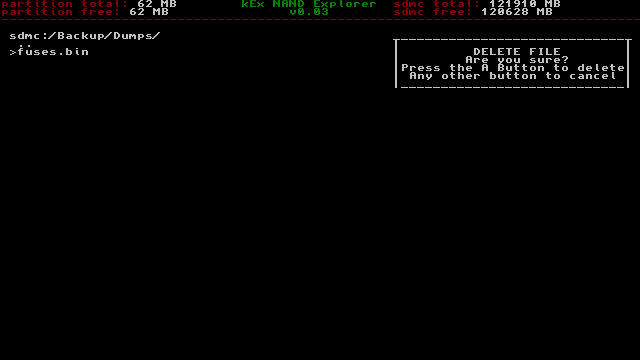
Minus - Delete a file (press A to confirm deletion, any other button to cancel) | |||
==Screenshots== | ==Screenshots== | ||
https://dlhb.gamebrew.org/switchhomebrews/ | https://dlhb.gamebrew.org/switchhomebrews/kexnx.png | ||
==Changelog== | ==Changelog== | ||
''' | '''v0.04 2018/07/31''' | ||
* | *Implemented text wrapping and button repetition. | ||
'''v0.03 2018/07/27''' | |||
*Added file deletion. | |||
'''v0.02 2018/07/27''' | |||
*Added file copying. | |||
'''v0.01 2018/07/26''' | |||
*Initial release. | |||
== External links == | == External links == | ||
* | * GitHub - https://github.com/klockee/kEx | ||
* GBAtemp - https://gbatemp.net/threads/kex-a-full-system-nand-sd-browser.512679/ | |||
Latest revision as of 06:48, 27 April 2023
| kEx | |
|---|---|
 | |
| General | |
| Author | klockee |
| Type | File Browsers |
| Version | 0.04 |
| License | GPL-3.0 |
| Last Updated | 2018/07/31 |
| Links | |
| Download | |
| Website | |
| Source | |
kEx is a full-system filebrowser for the Nintendo Switch, written in C++.
kEx can currently browse the SD card, USER, SYSTEM, and SAFE at the moment, traverse directories, and copy/delete files. This is a very early release and thus missing most major file management features, but I plan on adding them as quickly as I can (text wrapping for folders with too many entries planned for v0.04).
Note: This can be very dangerous, so use at your own risk. Definitely have a backup saved somewhere before using this. This is also very early release at the moment, and there are bugs present - please be careful.
Installation
Copy the .nro to your Switch folder and load through the homebrew menu.
User guide
There is currently no indicator when copy a file, only after, so give large files some time to copy.
Controls
A - Enter a partition/directory
B - Back
Plus - Exit
X - Copy a file
Y - Paste the file either to the SD card, or the same partition (does not work across system partitions)
Minus - Delete a file (press A to confirm deletion, any other button to cancel)
Screenshots
Changelog
v0.04 2018/07/31
- Implemented text wrapping and button repetition.
v0.03 2018/07/27
- Added file deletion.
v0.02 2018/07/27
- Added file copying.
v0.01 2018/07/26
- Initial release.