
DiscordCTR 3DS: Difference between revisions
From GameBrew
More actions
No edit summary |
No edit summary |
||
| Line 23: | Line 23: | ||
Put this in it: | Put this in it: | ||
[Auth] Token=<insert your user/bot token here> | [Auth] Token=<insert your user/bot token here> | ||
Start DiscordCTR. | Start DiscordCTR. | ||
Revision as of 16:39, 4 April 2022
| DiscordCTR | |
|---|---|
 | |
| General | |
| Author | dvdcd |
| Type | Other Apps |
| Version | WIP |
| License | Mixed |
| Last Updated | 2018/07/30 |
| Links | |
| Download | |
| Website | |
| Source | |
 |
This application has been obsoleted by one or more applications that serve the same purpose, but are more stable or maintained. |
DiscordCTR is a Discord client for the 3DS using Secure WebSockets for communication. This is a fork of DiscordCTR by MarcusD (aka Sono).
Note: Do not use or it can get your Discord account banned (see info). The source code is only provided for education purposes.
User guide
Create a file named .DiscordCTR.ini on your 3DS's SDCard.
Put this in it:
[Auth] Token=<insert your user/bot token here>
Start DiscordCTR.
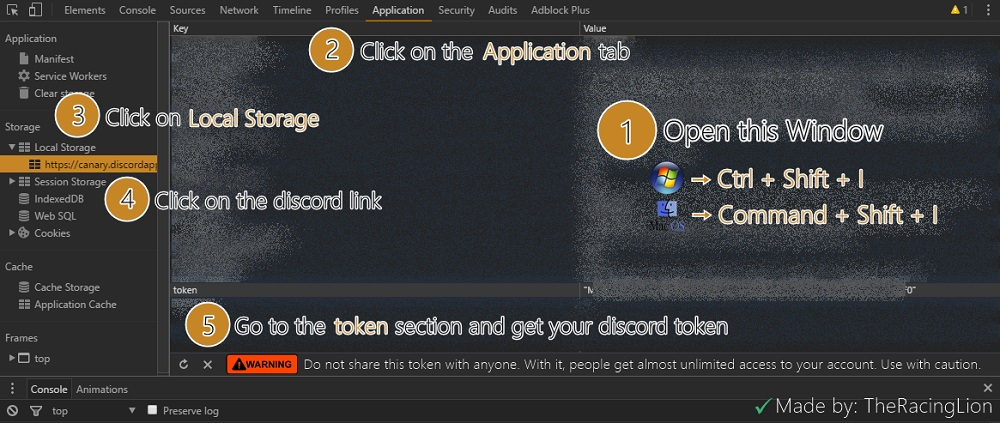
To get your user token, follow the instructions on this image.
Controls
Start - Connect/disconnect
D-Pad Up/Down or X/B - Scroll up and down
A - Select menu option or open keyboard once in chat
Y - Go back in menu
Select - Exit
Hold R/L - Faster scrolling