Toggle menu
Toggle preferences menu
Toggle personal menu
Not logged in
Your IP address will be publicly visible if you make any edits.

ToneSynthDS: Difference between revisions

From GameBrew
No edit summary
No edit summary
Line 21: Line 21:


==User guide==
==User guide==
'''Create a sequence of melody (single score):''' 
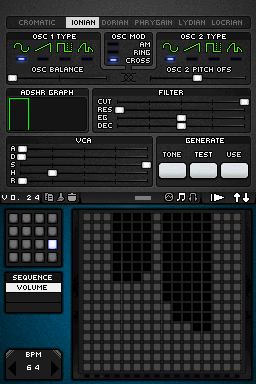
You can change the top and bottom screen to access all the settings by pressing the arrows in the upper right corner.


Made through the large grid, horizontally, each square is a measure (time), and vertically, is the height of the note (high or low) with possibility to put up to 16 in each measure.
'''Create a sequence of melody:''' 
* Each square is a measure of time horizontally, whereas vertically is the height of the note (with the possibility to put up to 16 in each measure).
* Use the small grid in each sequence to create similar or completely different melodies (single or multiple scores).
* When the melody is playing, the play button will change into a rectangle that will serve to stop playback.


'''Create melody (multiple scores):
'''Changing playback speed, volume and pitch:'''
 
* You can increase BPM, located in the lower left corner, up to 250b/m.
The first thing is to know how to change the score, use the small grid in each sequence to create similar or completely different melodies.
* The small grid at the bottom can switch between sequence and volume, and change volume of each note.
 
* Use the Tone/Test/Use buttons to change the pitch.
'''Play/Pause:'''  
 
When the melody is playing, it will change into a rectangle that will serve to stop playback.
 
'''Change playback speed:'''
 
Increase the number located in the lower left corner (BPM), with up to 250b/m.
 
'''Change the volume of a note:'''
 
The small grid at the bottom can switch between sequence and volume, and change volume of each note.
 
'''Changing Screens:'''
 
You can change the top screen with the bottom to access the settings using the touchscreen, press the arrows that appear in the upper right corner.
 
'''Change the playback pitch:'''
 
Test button will show a few seconds what tone you are using, Tone button to adjust, and the button Use is to confirm and play the melody with that tone.


==Controls==
==Controls==

Revision as of 12:14, 6 September 2021

ToneSynthDS
tonesynthds.png
General
Author(s)HotelSinus Sound Design
TypeMusic
Version0.24
LicenceMixed
Links
Download
Website
Advertisements

<htmlet>adsense</htmlet>

Advertising: