DaedalusX64 PSP: Difference between revisions
From GameBrew
More actions
Tag: visualeditor |
No edit summary Tag: visualeditor |
||
| Line 30: | Line 30: | ||
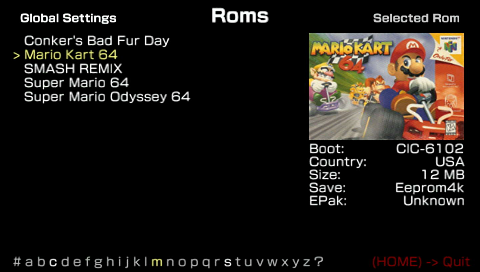
Roms can be placed in two locations, either the Daedalus Folder Rom directory or you can create a directory in the root of the memory stick (e.g. F:/N64/). Daedalus supports most rom formats (V64, Z64, ROM etc). | Roms can be placed in two locations, either the Daedalus Folder Rom directory or you can create a directory in the root of the memory stick (e.g. F:/N64/). Daedalus supports most rom formats (V64, Z64, ROM etc). | ||
Zipped roms are also supported, however if zipped the rom will extract itself onto the memory stick anyway so it defeats the purpose of having a zipped rom. If you are running low on space, it is recommended that you extract the rom you want into the Rom Directory. | Zipped roms are also supported, however if zipped the rom will extract itself onto the memory stick anyway so it defeats the purpose of having a zipped rom. If you are running low on space, it is recommended that you extract the rom you want into the Rom Directory. | ||
Compatibility List can be found [https://daedalusx64.fandom.com/wiki/DaedalusX64_Compatibility_List here]. | Compatibility List can be found [https://daedalusx64.fandom.com/wiki/DaedalusX64_Compatibility_List here]. | ||
| Line 36: | Line 36: | ||
'''Preview Pictures:''' | '''Preview Pictures:''' | ||
All previews are included in a stable release or on subversion. | All previews are included in a stable release or on subversion. | ||
Preview pictures can be found in /Resources/Preview/ which you can modify to your liking. | Preview pictures can be found in /Resources/Preview/ which you can modify to your liking. Pictures are required to be in PNG and 4:3 aspect ratio. | ||
To let Daedalusx64 know which picture to use for each rom, you need to add a line to the corresponding entry in the main roms.ini file, with this format | To let Daedalusx64 know which picture to use for each rom, you need to add a line to the corresponding entry in the main roms.ini file, with this format | ||
| Line 44: | Line 44: | ||
'''Save Games:''' | '''Save Games:''' | ||
| Line 130: | Line 131: | ||
All testers, everyone who have helped, StrmnNrmn for getting the ball rolling with this emulator and for providing tips to developers. | All testers, everyone who have helped, StrmnNrmn for getting the ball rolling with this emulator and for providing tips to developers. | ||
StrmnNrmns (2001-2019) | StrmnNrmns (2001-2019) by 71M, Azimer, Exophase, hlide, laxer3A, Lemmy, Lkb, Raphael, Schibo, Zilmar. | ||
Daedalusx64 (2008-2019) by Howard0su, Salvy, Corn, Hlide, Grazz, Chilly Willy, Maxi_Jack, Wally, Kreationz, z2442, Moto. | |||
==External links== | ==External links== | ||