
Canary3DS: Difference between revisions
More actions
1.1.0 |
No edit summary |
||
| Line 32: | Line 32: | ||
'''Option 2: Manual Install (.3dsx/.cia)''' | '''Option 2: Manual Install (.3dsx/.cia)''' | ||
* 3DSX - Copy .3dsx to /3ds/Canary/ on your SD card, then launch via the Homebrew Launcher. | * Download from [https://github.com/narayanx/Canary3DS/releases Releases]. | ||
* CIA - Copy .cia to your SD card and install it via [[FBI 3DS|FBI]]. | ** 3DSX - Copy .3dsx to /3ds/Canary/ on your SD card, then launch via the Homebrew Launcher. | ||
** CIA - Copy .cia to your SD card and install it via [[FBI 3DS|FBI]]. | |||
== Controls == | == Controls == | ||
| Line 95: | Line 96: | ||
'''v1.0.0''' | '''v1.0.0''' | ||
* First release. | * First release. | ||
== Credits == | |||
* [https://github.com/deltabeard/ctrmus ctrmus] by [https://github.com/deltabeard @deltabeard] for initially inspiring this project | |||
* [https://github.com/joel16/3DShell 3DShell] by [https://github.com/joel16 @joel16] for inspiring the appearance of the player screen and inspiring this project | |||
* [https://github.com/sheepy0125/pomegranate pomegranate] by [https://github.com/sheepy0125 @sheepy0125] for the idea for shoulder button controls and music library indexing | |||
* [https://github.com/Core-2-Extreme/Video_player_for_3DS Video_player_for_3DS]/[https://github.com/Core-2-Extreme/FFmpeg_for_3DS FFmpeg for 3DS] by [https://github.com/Core-2-Extreme @Core-2-Extreme] for the instructions for building FFmpeg which allows aac/m4a support | |||
* [https://github.com/kynex7510/RIP RIP] by [https://github.com/kynex7510 @kynex7510] for the library to convert decoded images into the 3DS internal image format | |||
* [https://github.com/nothings/stb stb_image] by [https://github.com/nothings @nothings] for the image decoding library | |||
Assets: | |||
* [https://iconoir.com/ Iconoir] for user interface icons | |||
* [https://github.com/narayanx @narayanx] for home menu banner music, icon, and pixel art assets | |||
* [https://github.com/yurisizov/boscaceoil-blue Bosca Ceoil Blue] by [https://github.com/YuriSizov @YuriSizov] for the software used to make the banner music | |||
== External links == | == External links == | ||
External links - https://github.com/narayanx/Canary3DS | External links - https://github.com/narayanx/Canary3DS | ||
Latest revision as of 01:59, 3 July 2026
| Canary3DS | |
|---|---|
 | |
| General | |
| Author | narayanx |
| Type | Media Players |
| Version | 1.1.0 |
| License | GPL-3.0 |
| Last Updated | 2026/07/03 |
| Links | |
| Download | |
| Website | |
| Source | |
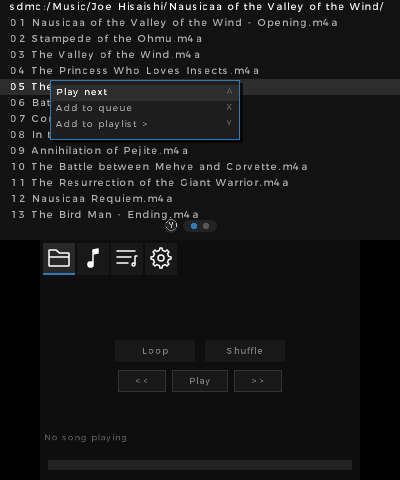
A 3DS music player with modern features.
Features
- Supports many audio file formats:
mp3,flac,m4a,aac,wav,opus,vorbis. - Queue which songs can be added to and played from.
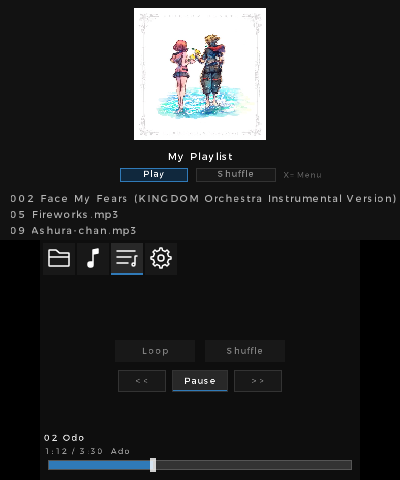
- Creating playlists, which are stored in the standard
m3ufile format. - Playing songs through headphones with the lid closed.
- Powerful context menu allowing bulk operations to add to queue/playlist.
- Automatically plays next file.
- Displaying embedded cover art and setting custom cover art for playlists.
- Settings menu to customize configuration.
- Seeking with a touch seek bar on the bottom touch screen, or using the left/right dpad to seek in steps.
- Pause on headphone disconnect.
Installation
Option 1: Universal Updater (recommended)
- Open Universal Updater on your 3DS.
- Search for the app and install it.
Option 2: Manual Install (.3dsx/.cia)
Controls
Double tap R - Toggle play/pause
Triple tap L or R - Go to previous/next song
Start - Exit program
Select - Toggle displaying debug console (if enabled in settings)
Filebrowser Screen:
A - Song selected - Play selected song and switch to Player Screen. Folder selected - Open selected folder
B - Go to parent folder
X - Open context menu
Y - Switch to Player Screen
Player Screen:
A - Play selected song in sidebar
B - Go back to file
X - Open context menu
Y - Switch to Filebrowser Screen
Playlist Screen:
A - Open playlist/play song in playlist
B - Exit playlist
X - Open context menu
Settings Screen:
A - Modify setting
B - Go to Filebrowser Screen
X - Open context menu
Screenshots
Changelog
v1.1.0
- Added
- Ability for volume to go above 100%
- Setting for enabling/disabling auto switching to the Player screen
- Changed
- Volume to gain mapping to better match human perception of volume
- Fixed
- Bug where volume reset upon song change
v1.0.0
- First release.
Credits
- ctrmus by @deltabeard for initially inspiring this project
- 3DShell by @joel16 for inspiring the appearance of the player screen and inspiring this project
- pomegranate by @sheepy0125 for the idea for shoulder button controls and music library indexing
- Video_player_for_3DS/FFmpeg for 3DS by @Core-2-Extreme for the instructions for building FFmpeg which allows aac/m4a support
- RIP by @kynex7510 for the library to convert decoded images into the 3DS internal image format
- stb_image by @nothings for the image decoding library
Assets:
- Iconoir for user interface icons
- @narayanx for home menu banner music, icon, and pixel art assets
- Bosca Ceoil Blue by @YuriSizov for the software used to make the banner music
External links
External links - https://github.com/narayanx/Canary3DS