
Aleph One Vita: Difference between revisions
More actions
No edit summary |
No edit summary |
||
| Line 4: | Line 4: | ||
|description=Port of Aleph One for PS Vita. | |description=Port of Aleph One for PS Vita. | ||
|author=DrDecki | |author=DrDecki | ||
|lastupdated=2026/ | |lastupdated=2026/07/02 | ||
|type=Shooter | |type=Shooter | ||
|version=1. | |version=1.4 | ||
|license=GPL-3.0 | |license=GPL-3.0 | ||
|download=https://dlhb.gamebrew.org/vitahomebrews/AlephOneVita.7z | |download=https://dlhb.gamebrew.org/vitahomebrews/AlephOneVita.7z | ||
| Line 27: | Line 27: | ||
Get the official Scenarios from the [https://alephone.lhowon.org/ Aleph One Website] and put them into ux0:data/AlephOne/. | Get the official Scenarios from the [https://alephone.lhowon.org/ Aleph One Website] and put them into ux0:data/AlephOne/. | ||
===Add the game data=== | |||
The engine ships '''without''' any game data — you have to provide the scenario files yourself. They are '''not''' included in this download. | |||
The three official Marathon games are free and can be downloaded from the official Aleph One website: | |||
https://alephone.lhowon.org/scenarios.html | |||
Download the scenarios you want and copy each one into its own folder under: | |||
<code>ux0:/data/AlephOne/</code> | |||
The result should look like this: | |||
<pre> | |||
ux0:/data/AlephOne/Marathon/ | |||
ux0:/data/AlephOne/Marathon 2/ | |||
ux0:/data/AlephOne/Marathon Infinity/ | |||
</pre> | |||
Each scenario folder must contain that game's data files (Maps, Shapes, Sounds, Images, etc.) — i.e. the contents that come inside the downloaded scenario, not another folder wrapped around them. | |||
====Third-party scenarios==== | |||
Community scenarios (Eternal, Rubicon X, Tempus Irae, Marathon Phoenix, etc.) work the same way. Obtain them from their respective authors and place each one in its own folder next to the others: | |||
<code>ux0:/data/AlephOne/<Scenario Name>/</code> | |||
You are responsible for obtaining these files from their original sources. | |||
==Cheats== | |||
The port ships with a built-in cheat console, available in every scenario. It requires the <code>Lua/Cheats.lua</code> file from the data package (<code>AlephOne.zip</code>) to be installed under <code>ux0:/data/AlephOne/</code>. | |||
Press '''Triangle''' in-game, type a command (including the parentheses) and confirm with Enter: | |||
{| class="wikitable" | |||
! Command !! Effect | |||
|- | |||
| <code>nrg()</code> || Recharge energy (1x -> 2x -> 3x shields) | |||
|- | |||
| <code>otwo()</code> || Refill oxygen | |||
|- | |||
| <code>nuke()</code> || Invincibility power-up (temporary) | |||
|- | |||
| <code>kyt()</code> || Toggle permanent invincibility | |||
|- | |||
| <code>bye()</code> || Invisibility power-up | |||
|- | |||
| <code>see()</code> || Infravision | |||
|- | |||
| <code>wow()</code> || Extravision | |||
|- | |||
| <code>mag()</code> || Pistol + ammo | |||
|- | |||
| <code>melt()</code> || Fusion pistol + ammo | |||
|- | |||
| <code>rif()</code> || Assault rifle + ammo and grenades | |||
|- | |||
| <code>pow()</code> || Rocket launcher + ammo | |||
|- | |||
| <code>toast()</code> || Flamethrower + fuel | |||
|- | |||
| <code>puff()</code> || Shotgun + ammo | |||
|- | |||
| <code>zip()</code> || SMG + ammo | |||
|- | |||
| <code>pzbxay()</code> || Alien weapon | |||
|- | |||
| <code>ammo()</code> || +10 ammo for all weapons | |||
|- | |||
| <code>shit()</code> || All weapons, all ammo, full shields | |||
|- | |||
| <code>qwe()</code> || Jump | |||
|- | |||
| <code>yourmom()</code> || Save the game anywhere | |||
|- | |||
| <code>sesame()</code> || Activate whatever you are pointing at | |||
|- | |||
| <code>wtf()</code> || Show the level completion state | |||
|} | |||
If the console gets stuck after closing the keyboard without input, press '''Triangle''' and confirm an empty line with Enter to reset it. | |||
==Screenshots== | ==Screenshots== | ||
| Line 38: | Line 119: | ||
==Changelog== | ==Changelog== | ||
'''v1.4''' | |||
* added Cheat console (More Infos in the README) | |||
* fixed automatic Control Mapping, the Circle for changing Weapons didn't map | |||
'''v1.2''' | '''v1.2''' | ||
* Fixed Preferences for the Games. | * Fixed Preferences for the Games. | ||
| Line 68: | Line 153: | ||
* Reddit - https://old.reddit.com/r/vitahacks/comments/1ufngnh/alephone_marathon_trilogy_10_release/ | * Reddit - https://old.reddit.com/r/vitahacks/comments/1ufngnh/alephone_marathon_trilogy_10_release/ | ||
* VitaDB - https://www.rinnegatamante.eu/vitadb/#/info/1421 | * VitaDB - https://www.rinnegatamante.eu/vitadb/#/info/1421 | ||
Revision as of 02:22, 5 July 2026
| Aleph One Vita | |
|---|---|
 | |
| General | |
| Author | DrDecki |
| Type | Shooter |
| Version | 1.4 |
| License | GPL-3.0 |
| Last Updated | 2026/07/02 |
| Links | |
| Download | |
| Website | |
| Source | |
Aleph One is the open source continuation of Bungie's Marathon® 2 and Marathon Infinity game engines.
Aleph One plays Marathon, Marathon 2, Marathon Infinity, and third-party content on a variety of platforms.
Installation
Install the .vpk file through VitaShell.
Get the official Scenarios from the Aleph One Website and put them into ux0:data/AlephOne/.
Add the game data
The engine ships without any game data — you have to provide the scenario files yourself. They are not included in this download.
The three official Marathon games are free and can be downloaded from the official Aleph One website:
https://alephone.lhowon.org/scenarios.html
Download the scenarios you want and copy each one into its own folder under:
ux0:/data/AlephOne/
The result should look like this:
ux0:/data/AlephOne/Marathon/
ux0:/data/AlephOne/Marathon 2/
ux0:/data/AlephOne/Marathon Infinity/
Each scenario folder must contain that game's data files (Maps, Shapes, Sounds, Images, etc.) — i.e. the contents that come inside the downloaded scenario, not another folder wrapped around them.
Third-party scenarios
Community scenarios (Eternal, Rubicon X, Tempus Irae, Marathon Phoenix, etc.) work the same way. Obtain them from their respective authors and place each one in its own folder next to the others:
ux0:/data/AlephOne/<Scenario Name>/
You are responsible for obtaining these files from their original sources.
Cheats
The port ships with a built-in cheat console, available in every scenario. It requires the Lua/Cheats.lua file from the data package (AlephOne.zip) to be installed under ux0:/data/AlephOne/.
Press Triangle in-game, type a command (including the parentheses) and confirm with Enter:
| Command | Effect |
|---|---|
nrg() |
Recharge energy (1x -> 2x -> 3x shields) |
otwo() |
Refill oxygen |
nuke() |
Invincibility power-up (temporary) |
kyt() |
Toggle permanent invincibility |
bye() |
Invisibility power-up |
see() |
Infravision |
wow() |
Extravision |
mag() |
Pistol + ammo |
melt() |
Fusion pistol + ammo |
rif() |
Assault rifle + ammo and grenades |
pow() |
Rocket launcher + ammo |
toast() |
Flamethrower + fuel |
puff() |
Shotgun + ammo |
zip() |
SMG + ammo |
pzbxay() |
Alien weapon |
ammo() |
+10 ammo for all weapons |
shit() |
All weapons, all ammo, full shields |
qwe() |
Jump |
yourmom() |
Save the game anywhere |
sesame() |
Activate whatever you are pointing at |
wtf() |
Show the level completion state |
If the console gets stuck after closing the keyboard without input, press Triangle and confirm an empty line with Enter to reset it.
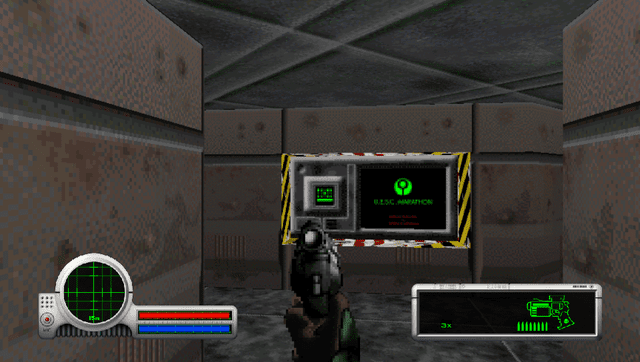
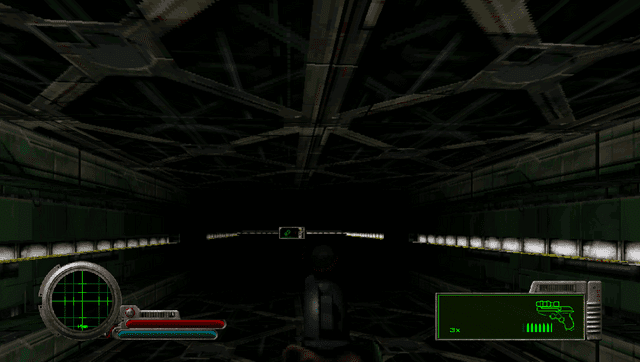
Screenshots
Media
Marathon Review (MandaloreGaming)
Changelog
v1.4
- added Cheat console (More Infos in the README)
- fixed automatic Control Mapping, the Circle for changing Weapons didn't map
v1.2
- Fixed Preferences for the Games.
v1.1
- Fixed random crashes in the Second Game.
v1.0
- The official 1.0 Release
- Added ScenarioChooser Pictures
- Added Live Area Screen
- Optimized it a little more
- Deleted Stretch in the Main Menu
v0.9
- Shooting works
- It is a little bit better optimized, but still kinda slow (Playable)
- Thumbnail needs to be added
- Menu to choose the Game still does not specify which Game your choosing (It is obvious but not what I want)
v0.99
- Optimized the Game better
- Added Widescreen
- No ScenarioChooser Pictures
- Placeholder Live Area
- Finished soon