
VitaWave: Difference between revisions
From GameBrew
More actions
Created page with "{{Infobox Vita Homebrews |title=VitaWave |image=VitaWave.png |description=Music player for PSVita. |author=Stalgix |lastupdated=2026/03/29 |type=Media Players |version=1.0 |license=N/A |download=https://dlhb.gamebrew.org/vitahomebrews/VitaWave.7z |website=https://jyotiraditya-samal.itch.io/vitawave |source=https://github.com/Jyotiraditya-Samal/Vitawave |donation=https://www.reddit.com/r/VitaPiracy/comments/1s6uyp8/the_best_mp3flac_player_on_ps_vita_vitawave/ }} {{#seo: |..." |
|||
| Line 49: | Line 49: | ||
! Button !! Action | ! Button !! Action | ||
|- | |- | ||
| Cross || Play / Pause / Confirm | |||
|- | |- | ||
| Circle || Back | |||
|- | |- | ||
| Triangle || Queue / Open submenu | |||
|- | |- | ||
| Square || Visualizer | |||
|- | |- | ||
| L / R || Volume / EQ adjust | |||
|- | |- | ||
| Select || Settings | |||
|- | |- | ||
| Start || Exit | |||
|} | |} | ||
Revision as of 02:01, 5 April 2026
| VitaWave | |
|---|---|
 | |
| General | |
| Author | Stalgix |
| Type | Media Players |
| Version | 1.0 |
| License | N/A |
| Last Updated | 2026/03/29 |
| Links | |
| Download | |
| Website | |
| Source | |
| Support Author | |
VitaWave is a music player homebrew application for the PlayStation Vita. It plays MP3, FLAC, and OGG Vorbis audio files stored in the ux0:music/ directory. The application is written in C and built using VitaSDK.
Features
- File browser with directory navigation
- Supports MP3 (via libmpg123), FLAC (via dr_flac), and OGG Vorbis (via libvorbisfile) playback
- Now Playing screen displaying album art, title, artist, a progress bar, and scrolling text
- 10-band parametric equalizer with presets and custom preset storage
- Spectrum visualizer (KissFFT) with bars and waveform display modes
- Playlist queue with shuffle, repeat, and crossfade between tracks
- Named playlists saved as M3U files
- Theme system supporting color palettes, background images (PNG, JPG, GIF), and custom fonts
- Animated GIF support for per-screen background images
- Background audio: continues playing when the screen is off or while in LiveArea
- Rebuilds the Vita system music database on startup
- Rounded album art corners and custom button icon rendering
- Multi-script text rendering supporting Latin, Japanese, Korean, and Chinese
Installation
- Download the latest
VitaWave.vpkfrom the releases page. - Copy the
.vpkfile to your Vita. - Install it using VitaShell.
The application installs with Title ID VWAV00001 to ux0:app/VWAV00001/.
Controls
| Button | Action |
|---|---|
| Cross | Play / Pause / Confirm |
| Circle | Back |
| Triangle | Queue / Open submenu |
| Square | Visualizer |
| L / R | Volume / EQ adjust |
| Select | Settings |
| Start | Exit |
Themes
Custom themes can be installed by placing a folder containing a theme.ini file into ux0:data/VitaWave/themes/. Full documentation for creating themes is available in the repository at docs/creating_themes.md.
Fonts
Custom fonts can be swapped at build time or on a per-theme basis. Documentation for changing fonts is available in the repository at docs/changing_fonts.md.
Screenshots
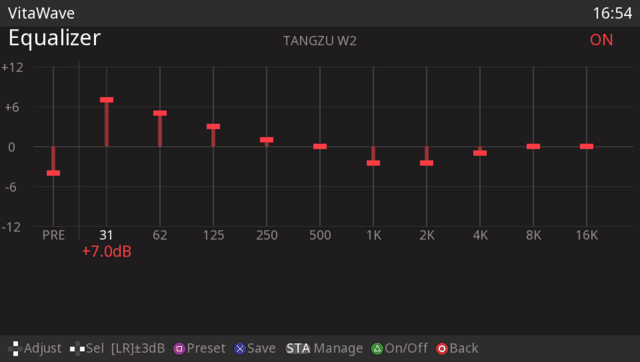
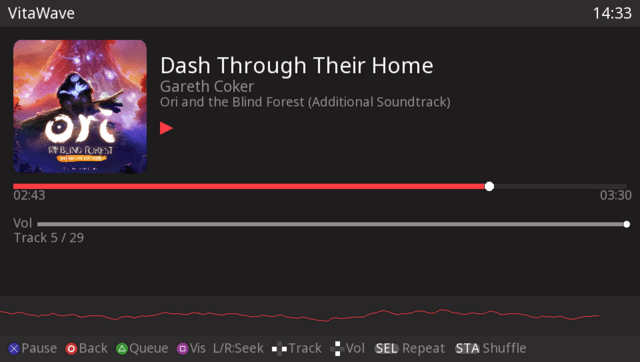
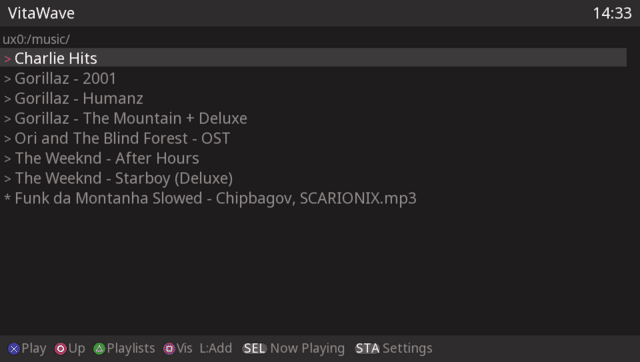
Changelog
v1.0
- First Release.