
Rocket Video Player: Difference between revisions
More actions
No edit summary |
2.3.0 |
||
| Line 4: | Line 4: | ||
|description=A video player for Nintendo DS and DSi. | |description=A video player for Nintendo DS and DSi. | ||
|author=RocketRobz | |author=RocketRobz | ||
|lastupdated=2026/01/ | |lastupdated=2026/01/30 | ||
|type=Media Players | |type=Media Players | ||
|version=2. | |version=2.3.0 | ||
|license=MIT | |license=MIT | ||
|download=https://dlhb.gamebrew.org/dshomebrew2/rocketvideoplayer.7z | |download=https://dlhb.gamebrew.org/dshomebrew2/rocketvideoplayer.7z | ||
| Line 14: | Line 14: | ||
}} | }} | ||
<!--Rocketvideoplayer02.png--> | <!--Rocketvideoplayer02.png--> | ||
Rocket Video Player is a video player for the NDS. It plays video files with an extension called .rvid, bringing you the ultimate in picture quality, thanks to it's lossless frame data. | Rocket Video Player is a video player for the NDS and Game Boy Advance. It plays video files with an extension called .rvid, bringing you the ultimate in picture quality, thanks to it's lossless frame data. | ||
To play videos, you'll need to convert them to the Rocket Video (.rvid) format using [https://github.com/RocketRobz/Vid2RVID/releases Vid2RVID]. | To play videos, you'll need to convert them to the Rocket Video (.rvid) format using [https://github.com/RocketRobz/Vid2RVID/releases Vid2RVID]. | ||
| Line 21: | Line 21: | ||
==Features== | ==Features== | ||
* Support for videos up to 72FPS! | * DS(i) version: | ||
* Both 8 BPP (256 colors) and 16 BPP (RGB555/RGB565) videos are supported. | ** Support for videos up to 72FPS! | ||
** Screen color filters are not supported for 16 BPP videos. | ** Both 8 BPP (256 colors) and 16 BPP (RGB555/RGB565) videos are supported. | ||
* Support for dual-screen videos! | *** Screen color filters are not supported for 16 BPP videos. | ||
* Support for audio up to 32khz Stereo. | ** Support for dual-screen videos! | ||
* The video UI from the | ** Support for audio up to 32khz Stereo. | ||
* Console-based file browser to search for | ** The video UI from the "Nintendo DSi + Internet" app, with the title bar now containing the console's set color. | ||
** Console-based file browser to search for your <code>.rvid</code> file. | |||
* GBA version: | |||
** Support for videos up to 60FPS! | |||
** Both 8 BPP (256 colors) and 16 BPP (RGB555/RGB565) videos are supported. | |||
** Support for audio up to 32khz Mono. | |||
==Controls== | ==Controls== | ||
| Line 40: | Line 45: | ||
D-Pad Left+Down/Up+Right - Jump 15 seconds (2 minutes with R shoulder held) | D-Pad Left+Down/Up+Right - Jump 15 seconds (2 minutes with R shoulder held) | ||
Select - Turn off/on bottom screen backlight (only applies to single-screen videos) | Select (DS(i) version) - Turn off/on bottom screen backlight (only applies to single-screen videos) | ||
B or Return button - Exit video | B or Return button - Exit video | ||
B (GBA version) - Stop video | |||
==Screenshots== | ==Screenshots== | ||
| Line 48: | Line 55: | ||
==Changelog== | ==Changelog== | ||
'''v2.3.0 2026/01/30''' | |||
* What's new? | |||
** Rocket Video Player has been ported over to the GameBoy Advance, bringing over the uncompressed video quality and the existing button controls as a result! | |||
*** To use the GBA version, place <code>rvid.gba</code> in the same place as <code>Vid2RVID.exe</code>, then convert a video to get a new <code>.gba</code> file containing the video. Running the <code>rvid.gba</code> file by itself will only display a red/orange screen. | |||
*** Only 8-bit mono audio is supported. | |||
*** Colors will display differently due to how the GBA screens display colors (see the above mGBA screenshot as a reference). | |||
*** As the GBA version does not have a menu for browsing videos, pressing <code>B</code> will stop the video instead. | |||
*** Refresh rate adjustment is not available. | |||
** '''DS(i):''' If the bottom screen is turned off after pressing <code>SELECT</code>, touching the screen will turn it back on. | |||
** '''DS(i):''' FIFO is now used instead of IPC Sync for playing sound. | |||
* Bug fixes | |||
** '''Re-release, DS(i):''' Fixed where opening a video would cause a crash. | |||
** Fixed a possible bug which caused the top/bottom fields to be swapped in 25/50FPS videos when jumping forwards/backwards. | |||
'''v2.2.0 2026/01/17''' | '''v2.2.0 2026/01/17''' | ||
*What's new? | *What's new? | ||
| Line 116: | Line 137: | ||
==Credits== | ==Credits== | ||
* [https://github.com/AntonioND AntonioND]: [https://github.com/blocksds/sdk BlocksDS]. | DS(i) version: | ||
* [https://github.com/AntonioND AntonioND]: [https://github.com/blocksds/sdk BlocksDS] | |||
* [https://github.com/devkitPro devkitPro]: nds-hb-menu's file browsing code | |||
* [https://github.com/Gericom Gericom]: | * [https://github.com/Gericom Gericom]: | ||
** Frame rate + play bar adjustment code from [https://github.com/Gericom/FastVideoDSPlayer FastVideoDSPlayer] | |||
** Frame rate + play bar adjustment code | ** NDMA code from [https://github.com/Gericom/libtwl libtwl] | ||
** NDMA code | |||
* [https://github.com/devkitPro devkitPro]: | GBA version: | ||
* [https://github.com/devkitPro devkitPro]: libgba and sound frequency code from libnds | |||
* [https://github.com/pinobatch pinobatch] Sound sample playback code from [https://github.com/pinobatch/gsmplayer-gba gsmplayer-gba] | |||
==External links== | ==External links== | ||
Latest revision as of 07:07, 30 January 2026
| Rocket Video Player | |
|---|---|
 | |
| General | |
| Author | RocketRobz |
| Type | Media Players |
| Version | 2.3.0 |
| License | MIT License |
| Last Updated | 2026/01/30 |
| Links | |
| Download | |
| Website | |
| Source | |
| Support Author | |
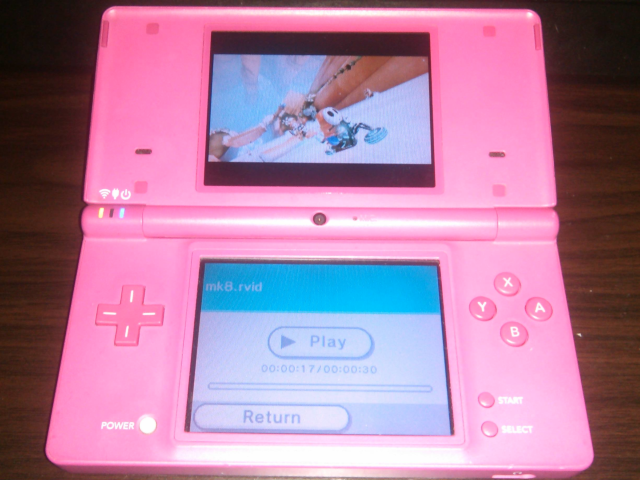
Rocket Video Player is a video player for the NDS and Game Boy Advance. It plays video files with an extension called .rvid, bringing you the ultimate in picture quality, thanks to it's lossless frame data.
To play videos, you'll need to convert them to the Rocket Video (.rvid) format using Vid2RVID.
Read this guide for how to convert a video to the .rvid format.
Features
- DS(i) version:
- Support for videos up to 72FPS!
- Both 8 BPP (256 colors) and 16 BPP (RGB555/RGB565) videos are supported.
- Screen color filters are not supported for 16 BPP videos.
- Support for dual-screen videos!
- Support for audio up to 32khz Stereo.
- The video UI from the "Nintendo DSi + Internet" app, with the title bar now containing the console's set color.
- Console-based file browser to search for your
.rvidfile.
- GBA version:
- Support for videos up to 60FPS!
- Both 8 BPP (256 colors) and 16 BPP (RGB555/RGB565) videos are supported.
- Support for audio up to 32khz Mono.
Controls
A or Play/Pause button - Play/Pause video
L or The left tip of the play bar - Stop video
D-Pad Left/Right - Jump 5 seconds (30 seconds with R shoulder held)
D-Pad Down/Up - Jump 10 seconds (1 minute with R shoulder held)
D-Pad Left+Down/Up+Right - Jump 15 seconds (2 minutes with R shoulder held)
Select (DS(i) version) - Turn off/on bottom screen backlight (only applies to single-screen videos)
B or Return button - Exit video
B (GBA version) - Stop video
Screenshots
Changelog
v2.3.0 2026/01/30
- What's new?
- Rocket Video Player has been ported over to the GameBoy Advance, bringing over the uncompressed video quality and the existing button controls as a result!
- To use the GBA version, place
rvid.gbain the same place asVid2RVID.exe, then convert a video to get a new.gbafile containing the video. Running thervid.gbafile by itself will only display a red/orange screen. - Only 8-bit mono audio is supported.
- Colors will display differently due to how the GBA screens display colors (see the above mGBA screenshot as a reference).
- As the GBA version does not have a menu for browsing videos, pressing
Bwill stop the video instead. - Refresh rate adjustment is not available.
- To use the GBA version, place
- DS(i): If the bottom screen is turned off after pressing
SELECT, touching the screen will turn it back on. - DS(i): FIFO is now used instead of IPC Sync for playing sound.
- Rocket Video Player has been ported over to the GameBoy Advance, bringing over the uncompressed video quality and the existing button controls as a result!
- Bug fixes
- Re-release, DS(i): Fixed where opening a video would cause a crash.
- Fixed a possible bug which caused the top/bottom fields to be swapped in 25/50FPS videos when jumping forwards/backwards.
v2.2.0 2026/01/17
- What's new?
- Longer videos are now supported by reading video files split into a maximum of 4 parts!
- Added stereo audio support.
- Videos up to 72 FPS are now supported!
- Achieved by modifying the frame/refresh rate adjustment code to support past 60hz, and moving every 3D-rendered UI graphic to be drawn directly on the bottom screen image (with both the play bar slider and video timestamp rendered by OAM).
- Not playable on 3DS due to frameskips when going above 60hz, or DSi in DS mode due to detection of DSi/3DS in DS mode not being possible.
- 12 FPS & 24 FPS videos are now played with the screen refresh rate at 72hz in order to remove the horizontal line artifacts (and possibly reduced eyestrain).
- Does not affect 3DS (or DSi in DS mode), where 48hz will continue to be used, and no such artifacts exist on 3DS.
- Reduced memory usage in DS mode by only loading needed 512-byte sectors of the frame offset and compressed frame size tables.
- Increased 16BPP frame buffer count (16 -> 32) for DS mode. (DSi mode has always used 32.)
- Added single-screen/GBMacro support. Activated when the top screen is turned off and the bottom screen remains turned on.
- Macro Mode can be activated in the TWLMenu++ Settings menu.
- Bug fixes
- For playing 16BPP RGB565 videos in DSi mode, NDMA is now used instead of regular DMA in order to fix possible HBlank scanline skips.
- Audio is now played after the frame is DMA-copied to the screen instead of before, fixing a possible sync issue.
- Fixed a possible bug where loading 256-color frame palettes may overwrite other data.
- Fixed crashing when closing a video which does not contain audio.
v2.1.2 2026/01/03
- Fixed a BlocksDS bug where holding the DSi POWER button after being booted from a homebrew menu (such as TWLMenu++) would cause the console to boot into boot.nds instead of turning off the DSi.
- Fixed last vertical line being shown on the top of the screen when playing interlaced dual-screen 16BPP RGB565 videos in 4:3.
v2.1.1 2025/12/30
- What's new?
- The screen refresh rate is now adjusted based on the video's frame rate (using code from FastVideoDSPlayer) to remove judder! (Tested with 24 FPS and 25 FPS videos.)
- Added support for videos which play in the native DS refresh/frame rate! (Tested with the first 11 minutes of a Sonic Rush gameplay video from WorldOfLongplays.)
- Bug fixes
- Fixed 25 FPS & 50 FPS videos playing at the wrong speed.
- Fixed last vertical line being shown on the top of the screen when playing 16BPP RGB565 videos in 4:3.
- Fixed brief glitched sound playing when unpausing videos containing 8-bit audio stream.
v2.1.0 2025/12/25
- What's new?
- Switched over from devkitARM/libnds to BlocksDS!
- Load speeds have doubled.
- Progressive scan 8BPP 60FPS videos, interlaced 16BPP 60FPS videos, and dual-screen (but interlaced) 60FPS videos are now playable (without issues)!
- Filesize has been reduced slightly (combined with switching to THUMB code).
- Untested: Re-added support for old Rocket Video files.
- Support for old compressed Rocket Video files is still disabled.
- Switched over from devkitARM/libnds to BlocksDS!
- Bug fixes
- Fixed interlaced 16BPP RGB565 videos not playing properly.
- Fixed filling of top/bottom borders of non-4:3 interlaced videos being a pixel off.
- As a result of switching to BlocksDS:
- Videos should no longer freeze randomly when playing back from the DSi/3DS SD card slot.
- 16BPP RGB565 videos no longer have vertical shaking pixels on the right-side of the screen when playing back from the DSi/3DS SD card slot.
v2.0.0
- What's new?
- Videos up to 60 FPS can now be played on DS & DS Lite systems (all without memory expansion)!
- This has been achieved by allowing the
.rvidformat to support 256 (8 bits-per-pixel) on-screen colors (combined with dithering for reduced color banding). - Dual-screen videos are now supported (at half the supported FPS)!
- Added support for playing 16 BPP videos with the RGB565 color mode!
- Added support for 8-bit audio playback.
- The bottom screen backlight can now be turned off by pressing the
SELECTbutton. .rvidis no longer shown as part of the video's title.- The video's title is now centered if it fits within the screen.
- The bar where the video title is shown now contains your set color in the system settings!
- The full play bar is now visible (complete with the slider)!
- Videos can now be jumped towards some seconds or minutes! (Scroll down to
Video UI Controlsfor how to jump.) - NitroFS has been removed, allowing a
.ciabuild of this application to be made available for 3DS users! - The logo for Rocket Video Player has a brand new look!
- Due to the many changes within the
.rvidformat, old versions are no longer supported.
- Bug fixes:
- Fixed an overlooked bug in libfat where files larger than 2GB would not be read properly.
- Fixed video/audio desync issues by removing the MaxMod library and reading the correct amount of samples per-second.
- Known issues
- 16 BPP RGB565 videos will have the horizontal lines on the right-side of the screen shimmer when playing back from the DSi or 3DS SD card slot. This does not occur when playing back from flashcards.
- Since prior versions, when playing back from the DSi or 3DS SD card slot, there's a rare chance of freezing (with corrupted colors for 8 BPP videos). Closing the console's lid and opening it back up (or pressing
HOMEtwice on 3DS systems) will un-freeze the video.
Credits
DS(i) version:
- AntonioND: BlocksDS
- devkitPro: nds-hb-menu's file browsing code
- Gericom:
- Frame rate + play bar adjustment code from FastVideoDSPlayer
- NDMA code from libtwl
GBA version:
- devkitPro: libgba and sound frequency code from libnds
- pinobatch Sound sample playback code from gsmplayer-gba