
Neighbours from Hell Vita: Difference between revisions
From GameBrew
More actions
No edit summary |
|||
| Line 2: | Line 2: | ||
|title=Neighbours from Hell | |title=Neighbours from Hell | ||
|image=NeighboursfromHellVita.png | |image=NeighboursfromHellVita.png | ||
|description=Port of Neighbours From Hell for | |description=Port of Neighbours From Hell for PS Vita. | ||
|author=MaloneCZSD | |author=MaloneCZSD | ||
|lastupdated=2025/12/27 | |lastupdated=2025/12/27 | ||
| Line 19: | Line 19: | ||
|image_alt=Neighbours from Hell | |image_alt=Neighbours from Hell | ||
}} | }} | ||
Port of the Android version of Neighbours from Hell to the PS Vita. Based on the free 1.5/1.1.5 version of Neighbours From Hell. | |||
All Season 1 levels are unlocked. Season 2 levels are disabled as they are missing from the game files. Social buttons have been disabled because they caused crashes. | |||
== Installation == | |||
* Download Neighbours From Hell VPK from [https://github.com/MaloneCZSD/NFH-PS-VITA/releases GitHub] or [https://www.rinnegatamante.eu/vitadb/#/info/1354 VitaDB] and install it. | |||
* Download <code>NeighboursFromHellANDROID.zip</code> from [https://github.com/MaloneCZSD/NFH-PS-VITA/releases Releases]. | |||
* Extract the zip file, put the <code>.xapk</code> inside the extracted folder and name it <code>NFH(.xapk)</code>. | |||
== | |||
* Download Neighbours From Hell VPK from [https://github.com/MaloneCZSD/NFH-PS-VITA/releases | |||
* | |||
* Extract | |||
* Launch <code>ApplyPatch.bat</code> and wait (Can take several minutes depending on your system). | * Launch <code>ApplyPatch.bat</code> and wait (Can take several minutes depending on your system). | ||
* Let it finish and there should be a .ZIP file named <code>NFH_FILES.zip</code>. | * Let it finish and there should be a .ZIP file named <code>NFH_FILES.zip</code>. | ||
* Open VitaShell, connect your PS Vita to your PC and copy the contents of the .ZIP file (Not the ZIP file itself, just files after the NFHB26 folder inside it) over to <code>ux0:app/HELL12345/</code>. | * Open [[VitaShell]], connect your PS Vita to your PC and copy the contents of the .ZIP file (Not the ZIP file itself, just files after the NFHB26 folder inside it) over to <code>ux0:app/HELL12345/</code>. | ||
'''Note:''' For the best experience, use overclocking to reduce stutters as much as possible. | |||
''' | |||
==Screenshots== | ==Screenshots== | ||
| Line 48: | Line 38: | ||
https://dlhb.gamebrew.org/vitahomebrews/images/NeighboursfromHellVita-02.png | https://dlhb.gamebrew.org/vitahomebrews/images/NeighboursfromHellVita-02.png | ||
==Known | ==Media== | ||
'''Neighbours back From Hell // Official Gameplay Trailer''' ([https://www.youtube.com/watch?v=2rAh4SkvOWM HandyGames]) <br> | |||
<youtube width="640">2rAh4SkvOWM</youtube> | |||
==Known issues== | |||
* Text can glitch and need to be refreshed by hovering buttons or just reloading the menu. | * Text can glitch and need to be refreshed by hovering buttons or just reloading the menu. | ||
* There is some stutters that lower the framerate with the camera. | * There is some stutters that lower the framerate with the camera. | ||
| Line 62: | Line 56: | ||
== External links == | == External links == | ||
* | * GitHub - https://github.com/MaloneCZSD/NFH-PS-VITA | ||
* VitaDB - https://www.rinnegatamante.eu/vitadb/#/info/1354 | * VitaDB - https://www.rinnegatamante.eu/vitadb/#/info/1354 | ||
[[Category:Mobile game ports on Vita]] | |||
[[Category:Vita game ports]] | |||
Revision as of 02:50, 29 December 2025
| Neighbours from Hell | |
|---|---|
 | |
| General | |
| Author | MaloneCZSD |
| Type | Puzzle |
| Version | 1.0 |
| License | N/A |
| Last Updated | 2025/12/27 |
| Links | |
| Download | |
| Website | |
| Support Author | |
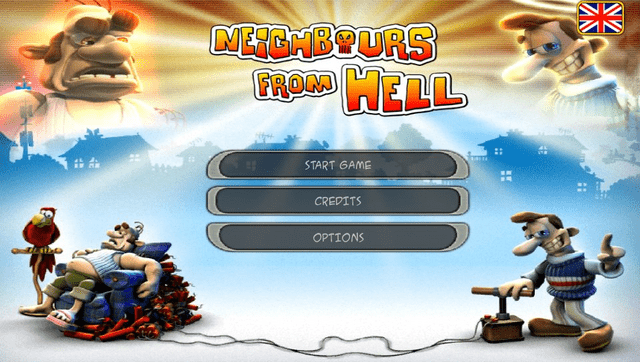
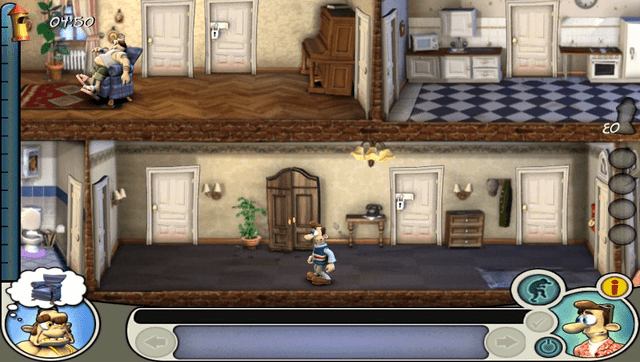
Port of the Android version of Neighbours from Hell to the PS Vita. Based on the free 1.5/1.1.5 version of Neighbours From Hell.
All Season 1 levels are unlocked. Season 2 levels are disabled as they are missing from the game files. Social buttons have been disabled because they caused crashes.
Installation
- Download Neighbours From Hell VPK from GitHub or VitaDB and install it.
- Download
NeighboursFromHellANDROID.zipfrom Releases. - Extract the zip file, put the
.xapkinside the extracted folder and name itNFH(.xapk). - Launch
ApplyPatch.batand wait (Can take several minutes depending on your system). - Let it finish and there should be a .ZIP file named
NFH_FILES.zip. - Open VitaShell, connect your PS Vita to your PC and copy the contents of the .ZIP file (Not the ZIP file itself, just files after the NFHB26 folder inside it) over to
ux0:app/HELL12345/.
Note: For the best experience, use overclocking to reduce stutters as much as possible.
Screenshots
Media
Neighbours back From Hell // Official Gameplay Trailer (HandyGames)
Known issues
- Text can glitch and need to be refreshed by hovering buttons or just reloading the menu.
- There is some stutters that lower the framerate with the camera.
- Last level isn't included.
Changelog
v1.0
- First Release.
Credits
- Thanks to PatnosD for everything.
- Have fun ! Port by MaloneCZSD.