
Strikebox Vita: Difference between revisions
More actions
Created page with "{{Infobox Vita Homebrews |title=Strikebox |image=StrikeboxVita.png |description=This is a port of Strikebox which is another ChaloApps game to the PSVITA. |author=nonogamer9 |lastupdated=2025/11/15 |type=Shooter |version=1.0 |license=N/A |downloadraw=[https://nonogamer9-youtube.itch.io/strikebox-psvita-port Download on itch.io] |website=https://nonogamer9-youtube.itch.io/strikebox-psvita-port |source= |donation= }} {{#seo: |title=Vita Homebrew Games (Shooter) - GameBrew..." |
No edit summary |
||
| Line 20: | Line 20: | ||
}} | }} | ||
<!--https://dlhb.gamebrew.org/vitahomebrews/StrikeboxVita.7z--> | <!--https://dlhb.gamebrew.org/vitahomebrews/StrikeboxVita.7z--> | ||
StrikeBox | Port of ChaloApps's StrikeBox to the PS Vita. This port was based on Version 1.0.8 of StrikeBox which came out in 2019. | ||
Every sound and texture is converted for PS Vita's GPU which is a PowerVR SGX543MP4+. It also added Vita controls. | |||
==Installation== | ==Installation== | ||
To install a VPK file on a modded PS Vita, first transfer the .vpk file to your Vita (commonly to the ux0:/vpk/ folder) using VitaShell via USB or FTP, then open VitaShell on your Vita, navigate to the location of the .vpk file, select it, and press the Cross button to install—confirming any permission prompts that appear. | To install a VPK file on a modded PS Vita, first transfer the .vpk file to your Vita (commonly to the ux0:/vpk/ folder) using [[VitaShell]] via USB or FTP, then open VitaShell on your Vita, navigate to the location of the .vpk file, select it, and press the Cross button to install—confirming any permission prompts that appear. | ||
For users on Vita3K (the PlayStation Vita emulator for PC), simply drag and drop the .vpk file into the Vita3K window or use the menu option File > Install .vpk/.zip to select and install your VPK; ensure the game folder is named after the correct Title ID for proper booting | For users on Vita3K (the PlayStation Vita emulator for PC), simply drag and drop the .vpk file into the Vita3K window or use the menu option File > Install .vpk/.zip to select and install your VPK; ensure the game folder is named after the correct Title ID for proper booting | ||
==Screenshots== | ==Screenshots== | ||
{| style="max-width:80%; margin-left:0em;" | {| style="max-width:80%; margin-left:0em;" | ||
| | |https://dlhb.gamebrew.org/vitahomebrews/images/StrikeboxVita-02.png | ||
https://dlhb.gamebrew.org/vitahomebrews/images/StrikeboxVita-02.png | |||
|} | |} | ||
==Media== | |||
'''THE SNIPER IN THE AIR BALLON BY STRIKEBOX SANDBOX GAMEPLAY''' ([https://www.youtube.com/watch?v=WU32ww0T4Ro Official_ChenYangLim ]) <br> | |||
<youtube width="640">WU32ww0T4Ro</youtube> | |||
==Changelog== | ==Changelog== | ||
| Line 43: | Line 43: | ||
== External links == | == External links == | ||
* | * itch.io - https://nonogamer9-youtube.itch.io/strikebox-psvita-port | ||
* Reddit - https://www.reddit.com/r/vitahacks/comments/1oxp4kn/new_psvita_port_by_nonogamer9_strikebox_psvita/ | * Reddit - https://www.reddit.com/r/vitahacks/comments/1oxp4kn/new_psvita_port_by_nonogamer9_strikebox_psvita/ | ||
Latest revision as of 04:14, 30 November 2025
| Strikebox | |
|---|---|
 | |
| General | |
| Author | nonogamer9 |
| Type | Shooter |
| Version | 1.0 |
| License | N/A |
| Last Updated | 2025/11/15 |
| Links | |
| Download on itch.io | |
| Website | |
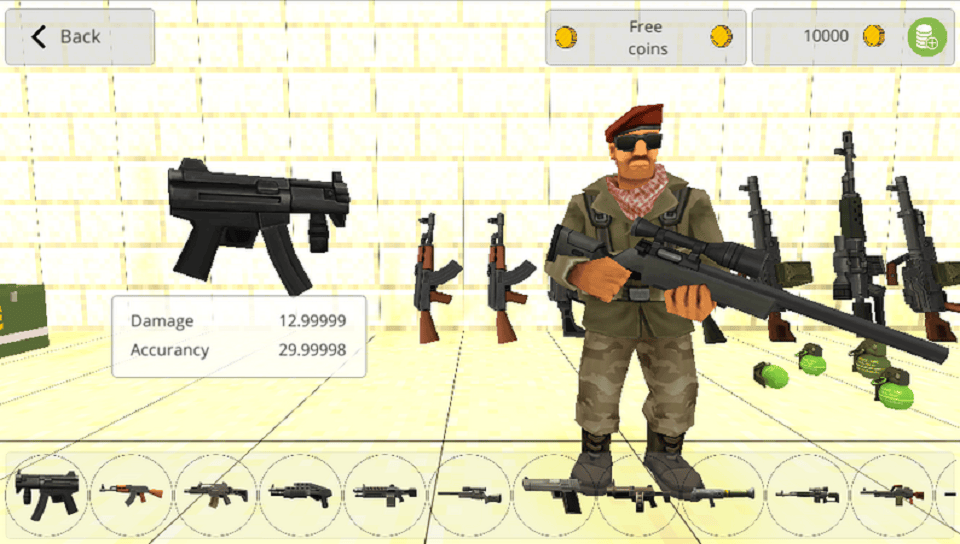
Port of ChaloApps's StrikeBox to the PS Vita. This port was based on Version 1.0.8 of StrikeBox which came out in 2019.
Every sound and texture is converted for PS Vita's GPU which is a PowerVR SGX543MP4+. It also added Vita controls.
Installation
To install a VPK file on a modded PS Vita, first transfer the .vpk file to your Vita (commonly to the ux0:/vpk/ folder) using VitaShell via USB or FTP, then open VitaShell on your Vita, navigate to the location of the .vpk file, select it, and press the Cross button to install—confirming any permission prompts that appear.
For users on Vita3K (the PlayStation Vita emulator for PC), simply drag and drop the .vpk file into the Vita3K window or use the menu option File > Install .vpk/.zip to select and install your VPK; ensure the game folder is named after the correct Title ID for proper booting
Screenshots
|
Media
THE SNIPER IN THE AIR BALLON BY STRIKEBOX SANDBOX GAMEPLAY (Official_ChenYangLim )
Changelog
v1.0
- First Release.