
PSV Cleaner Vita: Difference between revisions
From GameBrew
More actions
Created page with "{{Infobox Vita Homebrews |title=PSV Cleaner |image=PSVCleanerVita.png |description=PSV Cleaner is a powerful and user-friendly temporary files cleaner designed specifically for the PlayStation Vita. |author=theheroGAC |lastupdated=2025/09/20 |type=Utilities |version=1.0.1 |license=N/A |download=https://dlhb.gamebrew.org/vitahomebrews/PSVCleanerVita.7z |website=https://theherogac00.itch.io/psv-cleaner-playstation-vita-temporary-files-cleaner |source=https://github.com/the..." |
No edit summary |
||
| Line 2: | Line 2: | ||
|title=PSV Cleaner | |title=PSV Cleaner | ||
|image=PSVCleanerVita.png | |image=PSVCleanerVita.png | ||
|description= | |description=A powerful and user-friendly temporary files cleaner. | ||
|author=theheroGAC | |author=theheroGAC | ||
|lastupdated=2025/09/20 | |lastupdated=2025/09/20 | ||
| Line 19: | Line 19: | ||
|image_alt=PSV Cleaner | |image_alt=PSV Cleaner | ||
}} | }} | ||
A powerful and user-friendly temporary files cleaner for the PS Vita. It can help you free up valuable storage space by safely removing temporary files, cache data, and system dumps that accumulate over time. | |||
What it cleans: | |||
* System temporary files and cache. | |||
* VitaShell file manager cache and logs. | |||
* PKGi package installer temporary files. | |||
* RetroArch emulator cache and logs. | |||
* Crash dump files (<code>psp2core</code>, <code>psp2dmp</code>). | |||
* Browser cache and temporary files. | |||
* Homebrew application logs and cache. | |||
* USB storage temporary files. | |||
* Download incomplete files. | |||
* System update temporary files. | |||
* | == Features == | ||
* | * Removes 45+ types of temporary files including system cache, homebrew logs, and application data. | ||
* | * Only deletes temporary files, never touches your games, saves, or important data. | ||
* | * Choose what to clean with an intuitive options menu. | ||
* | * Provide real-time statistics of how much space you can free before cleaning. | ||
* GPU Optimized | * Clean, professional UI with smooth animations. | ||
* GPU Optimized. | |||
== | == Installation == | ||
Download the VPK file. | |||
Install using VitaShell or PKGi. | |||
== | == User guide == | ||
'''Important notes:''' | |||
* | * Backup important data before first use (though it's safe, it's always good practice). | ||
* | * Works best with regular use to maintain optimal performance. | ||
* | * Compatible with all major PS Vita homebrew applications. | ||
'''How to use:''' | |||
*Launch the application. | |||
* | *View how much space can be freed (calculated recursively). | ||
* | *Press Cross to preview all files that will be deleted. | ||
*Review the detailed file list with sizes. | |||
*Press Cross again to confirm and start cleaning. | |||
*Watch the progress bar complete. | |||
*See results and updated space available. | |||
* | |||
* | |||
* | |||
* | |||
Optional: Press Triangle on main screen to access selective cleaning options. | |||
==Screenshots== | ==Screenshots== | ||
[[image:PSVCleanerVita.png|640px]] | [[image:PSVCleanerVita.png|640px|link=]] | ||
==Changelog== | ==Changelog== | ||
| Line 98: | Line 73: | ||
== External links == | == External links == | ||
* | * itch.io - https://theherogac00.itch.io/psv-cleaner-playstation-vita-temporary-files-cleaner | ||
* | * GitHub - https://github.com/theheroGAC/PSV-Cleaner | ||
Revision as of 02:59, 2 October 2025
| PSV Cleaner | |
|---|---|
 | |
| General | |
| Author | theheroGAC |
| Type | Utilities |
| Version | 1.0.1 |
| License | N/A |
| Last Updated | 2025/09/20 |
| Links | |
| Download | |
| Website | |
| Source | |
A powerful and user-friendly temporary files cleaner for the PS Vita. It can help you free up valuable storage space by safely removing temporary files, cache data, and system dumps that accumulate over time.
What it cleans:
- System temporary files and cache.
- VitaShell file manager cache and logs.
- PKGi package installer temporary files.
- RetroArch emulator cache and logs.
- Crash dump files (
psp2core,psp2dmp). - Browser cache and temporary files.
- Homebrew application logs and cache.
- USB storage temporary files.
- Download incomplete files.
- System update temporary files.
Features
- Removes 45+ types of temporary files including system cache, homebrew logs, and application data.
- Only deletes temporary files, never touches your games, saves, or important data.
- Choose what to clean with an intuitive options menu.
- Provide real-time statistics of how much space you can free before cleaning.
- Clean, professional UI with smooth animations.
- GPU Optimized.
Installation
Download the VPK file.
Install using VitaShell or PKGi.
User guide
Important notes:
- Backup important data before first use (though it's safe, it's always good practice).
- Works best with regular use to maintain optimal performance.
- Compatible with all major PS Vita homebrew applications.
How to use:
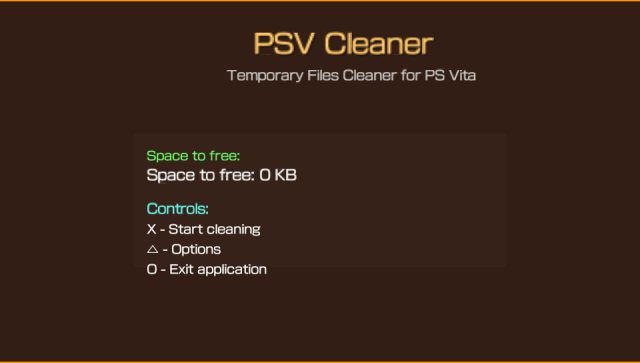
- Launch the application.
- View how much space can be freed (calculated recursively).
- Press Cross to preview all files that will be deleted.
- Review the detailed file list with sizes.
- Press Cross again to confirm and start cleaning.
- Watch the progress bar complete.
- See results and updated space available.
Optional: Press Triangle on main screen to access selective cleaning options.
Screenshots
Changelog
v1.01
- Bug fix and other features.
v1.0
- First Release.