
Cube Adventures 3DS: Difference between revisions
From GameBrew
More actions
Created page with "{{Infobox 3DS Homebrews |title=Cube Adventures |image=CubeAdventures3DS.png |description=A simple 2D platformer for the 3DS system. |author=TheHighTide |lastupdated=2025/03/30 |type=Platform |version=0.1.0 |license=Apache-2.0 |download=https://dlhb.gamebrew.org/3dshomebrews/CubeAdventures3DS.7z |website=https://github.com/TheHighTide/CubeAdventures |source=https://github.com/TheHighTide/CubeAdventures |donation= }} {{#seo: |title= (Platform) - GameBrew |title_mode=append..." |
No edit summary |
||
| Line 19: | Line 19: | ||
|image_alt=Cube Adventures | |image_alt=Cube Adventures | ||
}} | }} | ||
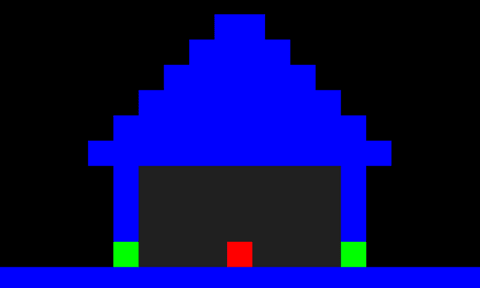
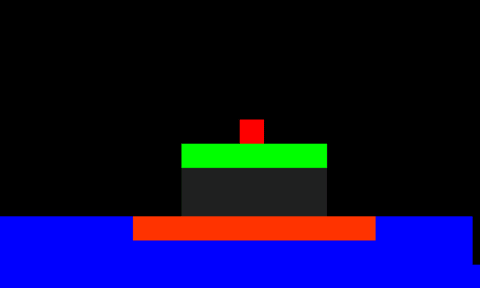
Cube Adventures is a basic 2d platformer where your goal is to get through all the levels as a red cube. You have to find a path through the levels that | Cube Adventures is a basic 2d platformer where your goal is to get through all the levels as a red cube. | ||
You have to find a path through the levels that doesn't involve getting sent back to the start via (example) touching a lava tile. | |||
==Features== | ==Features== | ||
* Simple graphics style using only colors and squares. | |||
* A number of unique levels for you to explore. | |||
* Dev Mode (displays player's x & y velocity and position coordinates). | |||
==Controls== | |||
A - Jump, Menu select | |||
D-Pad Left/Right - Move left/right | |||
Start - Return to main menu | |||
R+L - Toggle dev mode | |||
Select - Change level (Only usable while dev mode is active) | |||
==Screenshots== | ==Screenshots== | ||
| Line 38: | Line 43: | ||
https://dlhb.gamebrew.org/3dshomebrews/images/CubeAdventures3DS-02.png | https://dlhb.gamebrew.org/3dshomebrews/images/CubeAdventures3DS-02.png | ||
==Compatibility== | |||
Playable on every 3DS console in the family (including the 2DS systems). | |||
==Changelog== | ==Changelog== | ||
| Line 44: | Line 52: | ||
== External links == | == External links == | ||
* | * GitHub - https://github.com/TheHighTide/CubeAdventures | ||
Latest revision as of 05:29, 10 August 2025
| Cube Adventures | |
|---|---|
 | |
| General | |
| Author | TheHighTide |
| Type | Platform |
| Version | 0.1.0 |
| License | Apache-2.0 |
| Last Updated | 2025/03/30 |
| Links | |
| Download | |
| Website | |
| Source | |
Cube Adventures is a basic 2d platformer where your goal is to get through all the levels as a red cube.
You have to find a path through the levels that doesn't involve getting sent back to the start via (example) touching a lava tile.
Features
- Simple graphics style using only colors and squares.
- A number of unique levels for you to explore.
- Dev Mode (displays player's x & y velocity and position coordinates).
Controls
A - Jump, Menu select
D-Pad Left/Right - Move left/right
Start - Return to main menu
R+L - Toggle dev mode
Select - Change level (Only usable while dev mode is active)
Screenshots
Compatibility
Playable on every 3DS console in the family (including the 2DS systems).
Changelog
v0.1.0
- First Release.