
Vita Moonlight Motion: Difference between revisions
From GameBrew
More actions
Created page with "{{Infobox Vita Homebrews |title=Vita Moonlight Motion |image=VitaMoonlightMotion.png |description=NVIDIA Gamestream client for PlayStation Vita, based on moonlight-embedded. |author=AorsiniYT, MetalfaceScout, xyzz, d3m3vilurr, ShadowPrince |lastupdated=2025/06/25 |type=Other Apps |version=0.12.0 |license=GPL-3.0 |download=https://dlhb.gamebrew.org/vitahomebrews/VitaMoonlightMotion.7z |website=https://github.com/AorsiniYT/vita-moonlight-motion |source=https://github.com/A..." |
No edit summary |
||
| Line 19: | Line 19: | ||
|image_alt=Vita Moonlight Motion | |image_alt=Vita Moonlight Motion | ||
}} | }} | ||
Vita Moonlight Motion is | Vita Moonlight Motion is a port of Moonlight for PlayStation Vita. It allows you to stream and play your PC games (NVIDIA GameStream or Sunshine) with low latency and high quality. | ||
It features tablet-style multitouch support, absolute mouse mode with gestures, an elevated floating keyboard, advanced control mapping, customizable hotkeys, and hardware video decoding. | It features tablet-style multitouch support, absolute mouse mode with gestures, an elevated floating keyboard, advanced control mapping, customizable hotkeys, and hardware video decoding. | ||
== Features == | == Features == | ||
* '''Multi-touch touchscreen mode | * '''Multi-touch touchscreen mode''' - New tablet-style mode compatible with Sunshine, with true multitouch support and native gestures (e.g. pinch-to-zoom). | ||
* '''Improved Absolute Mouse mode | * '''Improved Absolute Mouse mode''' - Cursor always follows the main finger, right click with two-finger tap, natural two-finger scrolling. | ||
* '''Exclusive touch mode selection | * '''Exclusive touch mode selection''' - Choose between "Touch Mouse Absolute" (mouse gestures) or "Touchscreen (Sunshine multitouch)" (multitouch tablet) in the settings menu. | ||
* '''No ghost cursor | * '''No ghost cursor''' - In touchscreen mode, the host cursor is hidden and no mouse clicks are sent. | ||
* '''Physical controls always active | * '''Physical controls always active''' - Gamepad controls work in both touch modes. | ||
* '''Refined gesture and touch experience | * '''Refined gesture and touch experience''' - Improved logic for right click, scrolling, and multitouch gestures. | ||
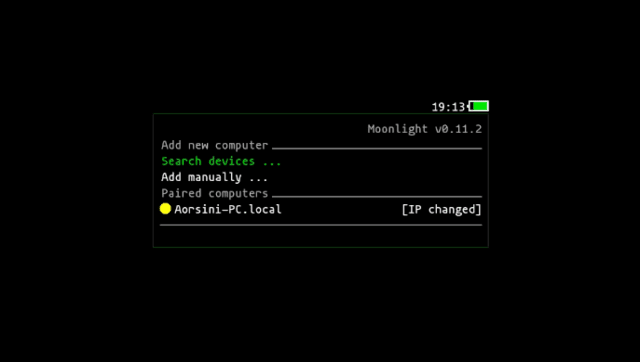
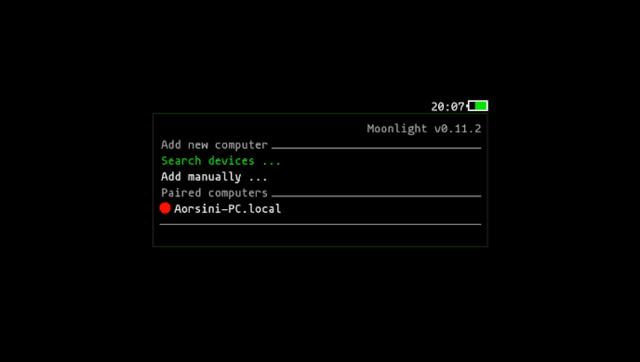
* '''Host status indicator dots | * '''Host status indicator dots''' - Green (online), yellow (IP change pending), red (offline/disconnected). | ||
* '''Robust host status checking | * '''Robust host status checking''' - Background scan thread and mDNS sniffer. | ||
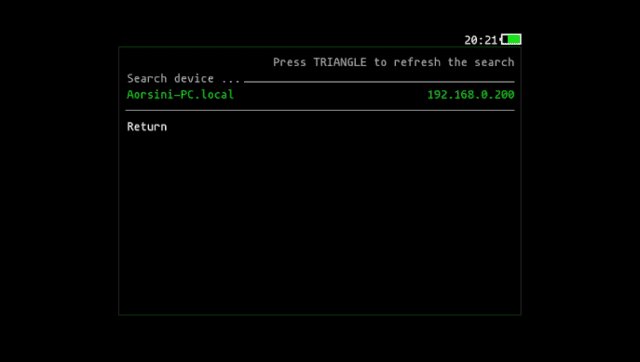
* '''Manual refresh | * '''Manual refresh''' - Press Triangle in the main menu or device search to refresh host/device status instantly. | ||
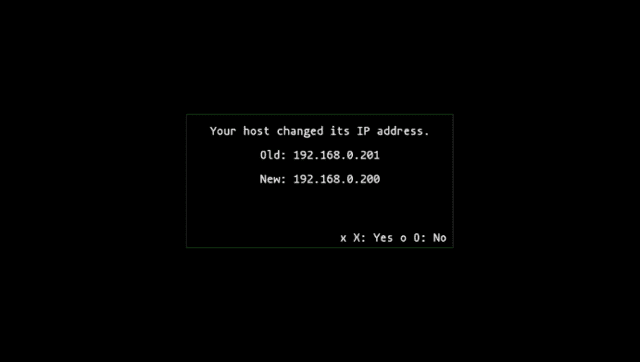
* '''IP change confirmation dialog | * '''IP change confirmation dialog''' - Always shows old and new IP, and always asks for confirmation. | ||
* '''UI and logic robust to missing/empty host fields.''' | * '''UI and logic robust to missing/empty host fields.''' | ||
* '''Improved debug logging and error handling.''' | * '''Improved debug logging and error handling.''' | ||
* '''Automatic pairing fixed | * '''Automatic pairing fixed''' - The pairing process is now more reliable and user-friendly. You can now pair your PC directly from the Vita using "Search device", no more manual pairing required! | ||
* '''Elevated floating keyboard | * '''Elevated floating keyboard''' - The virtual keyboard now appears above the app, never covering the main screen (see screenshot below). | ||
* '''Updated libraries | * '''Updated libraries''' - All dependencies and core libraries (moonlight-common-c, enet, inih) have been updated for better compatibility and stability. | ||
* '''New modular mDNS sniffer | * '''New modular mDNS sniffer''' - Fast and reliable device discovery on your local network. | ||
* '''Many bugfixes and code cleanups.''' | * '''Many bugfixes and code cleanups.''' | ||
== | ==Controls== | ||
Start+L+R - Open Pause menu | |||
Start+Left - Open the elevated floating keyboard at any time | |||
==Screenshots== | ==Screenshots== | ||
| Line 107: | Line 91: | ||
== External links == | == External links == | ||
* | * GitHub - https://github.com/AorsiniYT/vita-moonlight-motion | ||
* VitaDB - https://www.rinnegatamante.eu/vitadb/#/info/1277 | * VitaDB - https://www.rinnegatamante.eu/vitadb/#/info/1277 | ||
Revision as of 07:50, 29 June 2025
| Vita Moonlight Motion | |
|---|---|
 | |
| General | |
| Author | AorsiniYT, MetalfaceScout, xyzz, d3m3vilurr, ShadowPrince |
| Type | Other Apps |
| Version | 0.12.0 |
| License | GPL-3.0 |
| Last Updated | 2025/06/25 |
| Links | |
| Download | |
| Website | |
| Source | |
Vita Moonlight Motion is a port of Moonlight for PlayStation Vita. It allows you to stream and play your PC games (NVIDIA GameStream or Sunshine) with low latency and high quality.
It features tablet-style multitouch support, absolute mouse mode with gestures, an elevated floating keyboard, advanced control mapping, customizable hotkeys, and hardware video decoding.
Features
- Multi-touch touchscreen mode - New tablet-style mode compatible with Sunshine, with true multitouch support and native gestures (e.g. pinch-to-zoom).
- Improved Absolute Mouse mode - Cursor always follows the main finger, right click with two-finger tap, natural two-finger scrolling.
- Exclusive touch mode selection - Choose between "Touch Mouse Absolute" (mouse gestures) or "Touchscreen (Sunshine multitouch)" (multitouch tablet) in the settings menu.
- No ghost cursor - In touchscreen mode, the host cursor is hidden and no mouse clicks are sent.
- Physical controls always active - Gamepad controls work in both touch modes.
- Refined gesture and touch experience - Improved logic for right click, scrolling, and multitouch gestures.
- Host status indicator dots - Green (online), yellow (IP change pending), red (offline/disconnected).
- Robust host status checking - Background scan thread and mDNS sniffer.
- Manual refresh - Press Triangle in the main menu or device search to refresh host/device status instantly.
- IP change confirmation dialog - Always shows old and new IP, and always asks for confirmation.
- UI and logic robust to missing/empty host fields.
- Improved debug logging and error handling.
- Automatic pairing fixed - The pairing process is now more reliable and user-friendly. You can now pair your PC directly from the Vita using "Search device", no more manual pairing required!
- Elevated floating keyboard - The virtual keyboard now appears above the app, never covering the main screen (see screenshot below).
- Updated libraries - All dependencies and core libraries (moonlight-common-c, enet, inih) have been updated for better compatibility and stability.
- New modular mDNS sniffer - Fast and reliable device discovery on your local network.
- Many bugfixes and code cleanups.
Controls
Start+L+R - Open Pause menu
Start+Left - Open the elevated floating keyboard at any time
Screenshots
Changelog
v0.12.0
- Multi-touch touchscreen mode: True tablet-style multitouch, compatible with Sunshine. Enjoy native gestures like pinch-to-zoom, and use your Vita as a real drawing tablet!
- Improved Absolute Mouse mode: The cursor always follows your main finger. Right click with a two-finger tap, and scroll naturally with two fingers—just like a modern touchpad.
- Exclusive touch mode selection: Choose between "Touch Mouse Absolute" (mouse gestures) or "Touchscreen (Sunshine multitouch)" (multitouch tablet) in the settings menu. Only one mode is active at a time.
- No ghost cursor: In touchscreen mode, the host cursor is hidden and no mouse clicks are sent, for a true tablet experience.
- Physical controls always active: Gamepad controls work in both touch modes, so you never lose access to physical buttons.
- Refined gesture and touch experience: Improved logic for right click, scrolling, and multitouch gestures. Gestures are more natural and reliable.
- Many bugfixes and code cleanups: More stability, better logs, and a smoother experience overall.
v0.11.4
- Host status indicator dots: Instantly see if your PC is online (green), offline (red), or needs IP update (yellow).
- Robust host status checking: Background scan thread and modular mDNS sniffer for reliable device discovery.
- Manual refresh: Press TRIANGLE (△) in the main menu or device search to refresh host/device status instantly.
- IP change confirmation dialog: Always shows old and new IP, and asks for confirmation before updating.
- Menu and status only refresh on real changes: UI updates only when status changes or the user requests it.
- Improved debug logging: Detailed logs for all host and menu transitions.
- UI and logic robust to missing/empty host fields: Works smoothly even with incomplete host data.
v0.11.2
- More reliable and user-friendly automatic pairing.
- Experimental absolute touch controls (beta).
- Floating virtual keyboard that no longer covers the main screen.
- Updated libraries and dependencies for improved compatibility and stability.
- New modular UDP mDNS sniffer for device discovery (replaces legacy mdns code).
- Improved debug logging, especially for device search and reconnect flows.
- Cleanup of legacy code and dependencies.
Credits
- Current improvements and maintenance: AorsiniYT
- Based on the work of: