
Amagami Vita - English Translation: Difference between revisions
From GameBrew
More actions
Created page with "{{Infobox Vita Homebrews |title=Amagami |image=AmagamiVitaEngTrans.png |description=Amagami in English for PS Vita. |author=FineThenIWill |lastupdated=2025/03/20 |type=Translations |version=1.0 |license=N/A |download=https://dlhb.gamebrew.org/vitahomebrews/AmagamiVitaEngTrans.7z |website=https://gbatemp.net/threads/release-amagami-english-version.668601/ |source= |donation= }} {{#seo: |title=Vita Homebrew Rom Hacks (Translations) - GameBrew |title_mode=append |image=Amag..." |
No edit summary |
||
| Line 19: | Line 19: | ||
|image_alt=Amagami | |image_alt=Amagami | ||
}} | }} | ||
This is an English patch for Amagami on the PlayStation Vita created based on the work of [https://nishishitranslations.wordpress.com/ Nishishi Translations' PS2 version], which includes the original translation as well as their code modifications. | |||
Modifications implemented: | |||
* Game Scripts | * Game Scripts. | ||
* Graphics | * Graphics. | ||
* Menus | * Menus. | ||
* Name Changing | * Name Changing. | ||
* Touch Controls | * Touch Controls. | ||
Trophies have not been modified. | |||
==Installation== | |||
What you need: | |||
* AMAGAMI (PCSG00291) with update 1.01 | |||
* [[RePatch reDux0 Vita|rePatch]] | |||
* | |||
For USB transfer: | For USB transfer: | ||
* Open [[VitaShell]] (or MolecularShell) and navigate to the folder ux0:app. | |||
* Highlight PCSG00291 by hitting the square button, then hitting the triangle button and click "Open Decrypted" | |||
* Copy and paste both the graph folder and SCENARIO.CPK into any folder on the Vitaby using square to mark the files then triangle to copy/paste. | |||
* Now head outside the folder you pasted your files into. And head to the ux0 folder, then "patch". If you do not see a PCSG00291, that means you have not installed the 1.01 patch. | |||
* Copy and paste AMAGAMI.IMG into the folder you copied both the graph folder and SCENARIO.CPK into. | |||
* Connect your Vita to your computer via USB. | |||
* Navigate your Vita on your computer to the folder containing all three files you copied. | |||
* Move the graph folder, AMAGAMI.IMG, and SCENARIO.CPK into the !!input folder found in the patcher folder. | |||
* Run either windows.bat or linux.sh depending on your operating system. If you see no invalid input in the console, that means the operation was successful. | |||
* Drag the rePatch folder found within the patcher folder into your Vita's ux0 folder. | |||
* Boot up the game on your Vita, if you see the initial startup images in English then you have successfully patched the game. | |||
For FTP transfer: | For FTP transfer: | ||
* Open [[VitaShell]] (or MolecularShell) and navigate to the folder ux0:app. | |||
* Highlight PCSG00291 by hitting the square button, then hitting the triangle button and click "Open Decrypted" | |||
* Press SELECT to open the FTP server and copy and paste both the graph folder and SCENARIO.CPK into the !!input folder found within the patch. | |||
* Now head outside the folder you pasted your files into. And head to the ux0 folder, then "patch". If you do not see a PCSG00291, that means you have not installed the 1.01 patch. | |||
* Press SELECT to open the FTP server and copy and paste AMAGAMI.IMG into the !!input folder found in the patcher folder. | |||
* Run either windows.bat or linux.sh depending on your operating system. If you see no invalid input in the console, that means the operation was successful. | |||
* Drag the rePatch folder found within the patcher folder into your Vita's ux0 folder. | |||
* Boot up the game on your Vita, if you see the initial startup images in English then you have successfully patched the game. | |||
==Screenshots== | ==Screenshots== | ||
| Line 91: | Line 66: | ||
https://dlhb.gamebrew.org/vitahomebrews/images/AmagamiVitaEngTrans-04.png | https://dlhb.gamebrew.org/vitahomebrews/images/AmagamiVitaEngTrans-04.png | ||
==Media== | |||
'''Amagami EbKore+ English Translation Released (VITA) played on vita3k Emulator''' ([https://www.youtube.com/watch?v=WUYLnhrmZT0 RetroGameTalk]) <br> | |||
<youtube width='640'>WUYLnhrmZT0</youtube> | |||
==Known Issues== | ==Known Issues== | ||
| Line 101: | Line 80: | ||
* First Release. | * First Release. | ||
== | ==Credits== | ||
badspot | [https://nishishitranslations.wordpress.com/about/ Nishishi Translations] | ||
FTIW | |||
Palevo | Vita Credits: | ||
Phantom | *badspot - Image editing and playtesting. | ||
vimiani | *FTIW - Hacking and image editing. | ||
wacker | *Palevo - Playtesting. | ||
*Phantom - Translation assistance. | |||
*vimiani - Logo design and image editing. | |||
*wacker - Playtesting. | |||
== External links == | == External links == | ||
* | * GBAtemp - https://gbatemp.net/threads/release-amagami-english-version.668601/ | ||
* Reddit - https://www.reddit.com/r/vitahacks/comments/1jf89ki/release_amagami_english_patch/ | * Reddit - https://www.reddit.com/r/vitahacks/comments/1jf89ki/release_amagami_english_patch/ | ||
Revision as of 07:17, 23 March 2025
| Amagami | |
|---|---|
 | |
| General | |
| Author | FineThenIWill |
| Type | Translations |
| Version | 1.0 |
| License | N/A |
| Last Updated | 2025/03/20 |
| Links | |
| Download | |
| Website | |
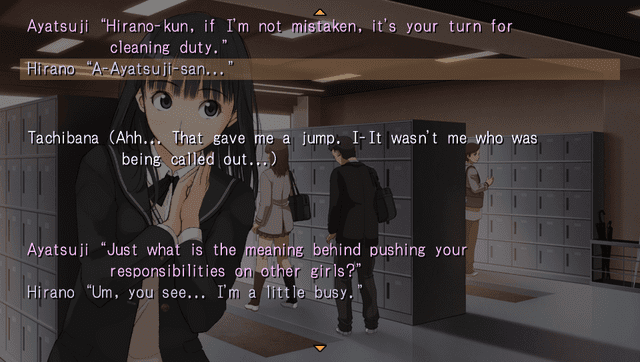
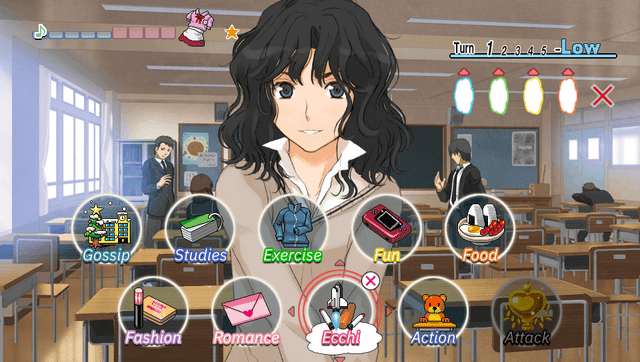
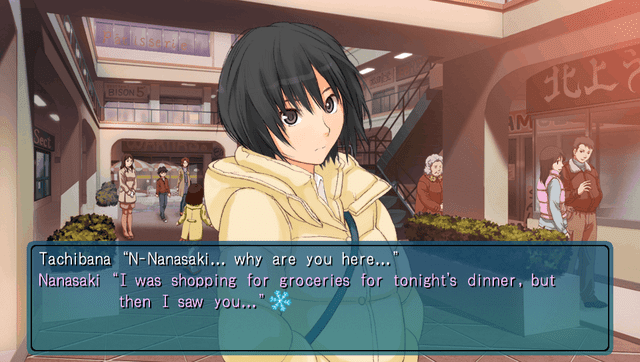
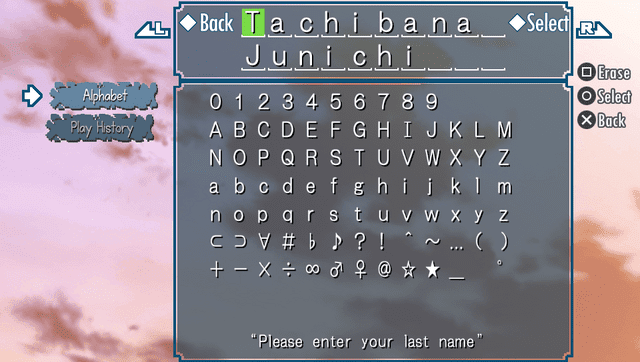
This is an English patch for Amagami on the PlayStation Vita created based on the work of Nishishi Translations' PS2 version, which includes the original translation as well as their code modifications.
Modifications implemented:
- Game Scripts.
- Graphics.
- Menus.
- Name Changing.
- Touch Controls.
Trophies have not been modified.
Installation
What you need:
- AMAGAMI (PCSG00291) with update 1.01
- rePatch
For USB transfer:
- Open VitaShell (or MolecularShell) and navigate to the folder ux0:app.
- Highlight PCSG00291 by hitting the square button, then hitting the triangle button and click "Open Decrypted"
- Copy and paste both the graph folder and SCENARIO.CPK into any folder on the Vitaby using square to mark the files then triangle to copy/paste.
- Now head outside the folder you pasted your files into. And head to the ux0 folder, then "patch". If you do not see a PCSG00291, that means you have not installed the 1.01 patch.
- Copy and paste AMAGAMI.IMG into the folder you copied both the graph folder and SCENARIO.CPK into.
- Connect your Vita to your computer via USB.
- Navigate your Vita on your computer to the folder containing all three files you copied.
- Move the graph folder, AMAGAMI.IMG, and SCENARIO.CPK into the !!input folder found in the patcher folder.
- Run either windows.bat or linux.sh depending on your operating system. If you see no invalid input in the console, that means the operation was successful.
- Drag the rePatch folder found within the patcher folder into your Vita's ux0 folder.
- Boot up the game on your Vita, if you see the initial startup images in English then you have successfully patched the game.
For FTP transfer:
- Open VitaShell (or MolecularShell) and navigate to the folder ux0:app.
- Highlight PCSG00291 by hitting the square button, then hitting the triangle button and click "Open Decrypted"
- Press SELECT to open the FTP server and copy and paste both the graph folder and SCENARIO.CPK into the !!input folder found within the patch.
- Now head outside the folder you pasted your files into. And head to the ux0 folder, then "patch". If you do not see a PCSG00291, that means you have not installed the 1.01 patch.
- Press SELECT to open the FTP server and copy and paste AMAGAMI.IMG into the !!input folder found in the patcher folder.
- Run either windows.bat or linux.sh depending on your operating system. If you see no invalid input in the console, that means the operation was successful.
- Drag the rePatch folder found within the patcher folder into your Vita's ux0 folder.
- Boot up the game on your Vita, if you see the initial startup images in English then you have successfully patched the game.
Screenshots
Media
Amagami EbKore+ English Translation Released (VITA) played on vita3k Emulator (RetroGameTalk)
Known Issues
- Mahjong is not translated (If you're willing to translate this behemoth of a script, feel free to reach out).
- Gallery captions are not translated.
- Some lines may be untranslated or formatted weird.
Changelog
v1.0
- First Release.
Credits
Vita Credits:
- badspot - Image editing and playtesting.
- FTIW - Hacking and image editing.
- Palevo - Playtesting.
- Phantom - Translation assistance.
- vimiani - Logo design and image editing.
- wacker - Playtesting.