
Pfile PSP: Difference between revisions
From GameBrew
More actions
Created page with "{{Infobox PSP Homebrews |title=pfile |image=pfilepsp.png |description=File manager that works on anywhere (vsh ,game, pops) |author=hiroi01 |lastupdated=2016/03/06 |type=Plugins |format= |version=0.02 |license=Mixed |download=https://dlhb.gamebrew.org/psphomebrew/pfilepsp.7z |website=https://hiroi01.com/?p=prx#pfile |source=https://github.com/hiroi01/pfile-prx }}{{lowercase title}} This is a file manager that works on anywhere (vsh ,game, pops) and anytime. == Installat..." |
|||
| Line 23: | Line 23: | ||
This plugin needs cmlibMenu. Download [http://code.google.com/p/prx-common-libraries/downloads/list here], and copy the lib directory (containing cmlibmenu.prx and the font directory) in ms0:/seplugins. | This plugin needs cmlibMenu. Download [http://code.google.com/p/prx-common-libraries/downloads/list here], and copy the lib directory (containing cmlibmenu.prx and the font directory) in ms0:/seplugins. | ||
Insert the following path in vsh.txt, game.txt and/or | Insert the following path in vsh.txt, game.txt and/or pops.txt: | ||
ms0:/seplugins/pfile.prx | ms0:/seplugins/pfile.prx | ||
Revision as of 08:00, 19 December 2024
| pfile | |
|---|---|
 | |
| General | |
| Author | hiroi01 |
| Type | Plugins |
| Version | 0.02 |
| License | Mixed |
| Last Updated | 2016/03/06 |
| Links | |
| Download | |
| Website | |
| Source | |
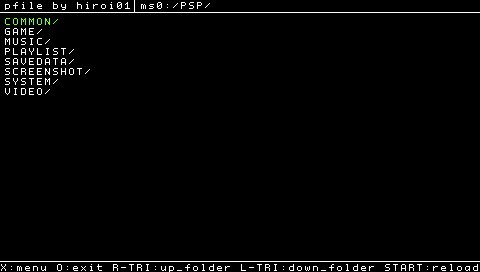
This is a file manager that works on anywhere (vsh ,game, pops) and anytime.
Installation
Place the following files in ms0:/seplugins:
- pfile.prx
- pfile_ini.txt
- pfile_theme.txt
This plugin needs cmlibMenu. Download here, and copy the lib directory (containing cmlibmenu.prx and the font directory) in ms0:/seplugins.
Insert the following path in vsh.txt, game.txt and/or pops.txt:
ms0:/seplugins/pfile.prx
Enable the plugin in the Recovery Menu.
User guide
Options:
- copy file
- cut file
- delete file
- paste file
Not implemented:
- copy/move folder
- copy/move multiple files
- delete folder
Controls
L+Note - Open file manager
Cross - Menu, Select
Circle - Cancel, Back to XMB
R - Go up a directory
L - Enter a directory
Start - Reload
Screenshots
Changelog
ver.0.02
- Support sceIoMove; you can move(cut-and-paste) file quickly in same storage.
ver.0.01
- Release.
Credits
Credits to Total_Noob for the sceIoMove API.
External links
- Author's website - https://hiroi01.com
- GitHub - https://github.com/hiroi01/pfile-prx