Lua Based Command Prompt PSP: Difference between revisions
From GameBrew
More actions
Created page with "{{Infobox PSP Homebrews |title=Lua Based Command Prompt |image=luapromptpsp.png |description=Command Prompt for the PSP. |author=alatnet |lastupdated=2006/10/11 |type=Other |format= |version=0.1 |license=Mixed |download=https://dlhb.gamebrew.org/psphomebrew/luapromptpsp.7z |website=http://forums.qj.net/f-psp-development-forum-11/t-release-lua-based-command-prompt-ver-01-74067.html |source=https://dlhb.gamebrew.org/psphomebrew/luapromptpsp.7z }} Command Prompt for the PSP..." |
No edit summary |
||
| Line 31: | Line 31: | ||
== External links == | == External links == | ||
* QuickJump - http://forums.qj.net/f-psp-development-forum-11/t-release-lua-based-command-prompt-ver-01-74067.html | * QuickJump - http://forums.qj.net/f-psp-development-forum-11/t-release-lua-based-command-prompt-ver-01-74067.html | ||
[[Category:Lua applications on PSP]] | |||
Revision as of 10:24, 25 November 2024
| Lua Based Command Prompt | |
|---|---|
 | |
| General | |
| Author | alatnet |
| Type | Other |
| Version | 0.1 |
| License | Mixed |
| Last Updated | 2006/10/11 |
| Links | |
| Download | |
| Website | |
| Source | |
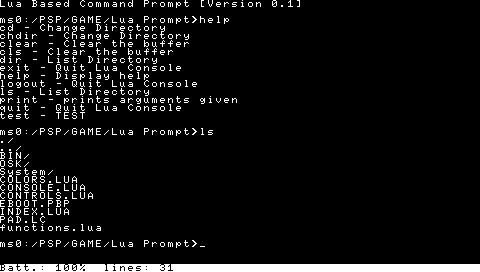
Command Prompt for the PSP.
You are able to expand its commands by creating lua files and putting them into the bin folder.
There are two examples in there.
Text input is done via TwinTail Input Methods (from ttlde).
Controls
R - Bring up osk
Cross - Enter
Screenshots