
Rocket Video Player: Difference between revisions
More actions
m Text replacement - "|download=https://dlhb.gamebrew.org/dshomebrew/" to "|download=https://dlhb.gamebrew.org/dshomebrew2/" |
No edit summary |
||
| Line 4: | Line 4: | ||
|description=A video player for Nintendo DS and DSi. | |description=A video player for Nintendo DS and DSi. | ||
|author=RocketRobz | |author=RocketRobz | ||
|lastupdated= | |lastupdated=2025/08/15 | ||
|type=Media Players | |type=Media Players | ||
|version= | |version=2.0.0 | ||
|license=MIT | |license=MIT | ||
|download=https://dlhb.gamebrew.org/dshomebrew2/rocketvideoplayer.7z | |download=https://dlhb.gamebrew.org/dshomebrew2/rocketvideoplayer.7z | ||
| Line 16: | Line 16: | ||
Rocket Video Player is a video player for the NDS. It plays video files with an extension called .rvid, bringing you the ultimate in picture quality, thanks to it's lossless frame data. | Rocket Video Player is a video player for the NDS. It plays video files with an extension called .rvid, bringing you the ultimate in picture quality, thanks to it's lossless frame data. | ||
' | To play videos, you'll need to convert them to the Rocket Video (.rvid) format using [https://github.com/RocketRobz/Vid2RVID/releases Vid2RVID]. | ||
[https://wiki.ds-homebrew.com/ds-index/rocketvideo Read this guide] for how to convert a video to the .rvid format. | |||
==Features== | ==Features== | ||
* | * Support for videos up to 60FPS (compatible with even the DS & DS Lite systems)! | ||
* | * Both 8 BPP (256 colors) and 16 BPP (RGB555/RGB565) videos are supported. | ||
* | ** Your video's height must be 108px or less in order to use 16 BPP. | ||
* Support for videos up to | ** Screen filters are not supported for 16 BPP videos. | ||
* | * Support for dual-screen videos (up to 30FPS)! | ||
* | * Support for audio up to 32khz Mono. | ||
* | * The video UI from the "Nintendo DSi + Internet" app, with the title bar now containing the console's set color. | ||
* Console-based file browser to search for your <code>.rvid</code> file. | |||
== | ==Controls== | ||
A or Play/Pause button - Play/Pause video | |||
L or The left tip of the play bar - Stop video | |||
D-Pad Left/Right - Jump 5 seconds (30 seconds with R shoulder held) | |||
D-Pad Down/Up - Jump 10 seconds (1 minute with R shoulder held) | |||
D-Pad Left+Down/Up+Right - Jump 15 seconds (2 minutes with R shoulder held) | |||
Select - Turn off/on bottom screen backlight (only applies to single-screen videos) | |||
B or Return button - Exit video | |||
==Screenshots== | ==Screenshots== | ||
https://dlhb.gamebrew.org/dshomebrew/rocketvideoplayer4.png | https://dlhb.gamebrew.org/dshomebrew/rocketvideoplayer4.png | ||
== | ==Changelog== | ||
'''v2.0.0''' | |||
What's new? | |||
* Videos up to 60 FPS can now be played on DS & DS Lite systems (all without memory expansion)! | |||
** This has been achieved by allowing the <code>.rvid</code> format to support 256 (8 bits-per-pixel) on-screen colors (combined with dithering for reduced color banding). | |||
* Dual-screen videos are now supported (at half the supported FPS)! | |||
* Added support for playing 16 BPP videos with the RGB565 color mode! | |||
* Added support for 8-bit audio playback. | |||
* The bottom screen backlight can now be turned off by pressing the <code>SELECT</code> button. | |||
* <code>.rvid</code> is no longer shown as part of the video's title. | |||
* The video's title is now centered if it fits within the screen. | |||
* The bar where the video title is shown now contains your set color in the system settings! | |||
* The full play bar is now visible (complete with the slider)! | |||
* Videos can now be jumped towards some seconds or minutes! (Scroll down to <code>Video UI Controls</code> for how to jump.) | |||
* NitroFS has been removed, allowing a <code>.cia</code> build of this application to be made available for 3DS users! | |||
* The logo for Rocket Video Player has a brand new look! | |||
* Due to the many changes within the <code>.rvid</code> format, old versions are no longer supported. | |||
Bug fixes: | |||
* Fixed an overlooked bug in libfat where files larger than 2GB would not be read properly. | |||
* Fixed video/audio desync issues by removing the MaxMod library and reading the correct amount of samples per-second. | |||
== Known issues == | |||
* 16 BPP RGB565 videos will have the horizontal lines on the right-side of the screen shimmer when playing back from the DSi or 3DS SD card slot. This does not occur when playing back from flashcards. | |||
* Since prior versions, when playing back from the DSi or 3DS SD card slot, there's a rare chance of freezing (with corrupted colors for 8 BPP videos). Closing the console's lid and opening it back up (or pressing <code>HOME</code> twice on 3DS systems) will un-freeze the video. | |||
==Credits== | ==Credits== | ||
* | * [https://github.com/Gericom Gericom]: LZ77 decompressor code from [https://github.com/Gericom/EveryFileExplorer EFE/EveryFileExplorer], and frame rate + play bar adjustment code from [https://github.com/Gericom/FastVideoDSPlayer FastVideoDSPlayer] (though not used for 24FPS/48FPS videos). | ||
* devkitPro | * [https://github.com/devkitPro devkitPro]: nds-hb-menu's file browsing code, and the use of devkitPro, devkitARM, libnds, and libfat. | ||
==External links== | ==External links== | ||
* GitHub - https://github.com/RocketRobz/RocketVideoPlayer | * GitHub - https://github.com/RocketRobz/RocketVideoPlayer | ||
* GBAtemp - https://gbatemp.net/threads/release-rocket-video-player-play-videos-with-the-ultimate-in-picture-quality.539163 | * GBAtemp - https://gbatemp.net/threads/release-rocket-video-player-play-videos-with-the-ultimate-in-picture-quality.539163 | ||
[[Category:Support the author]] | [[Category:Support the author]] | ||
Revision as of 11:10, 16 August 2025
| Rocket Video Player | |
|---|---|
 | |
| General | |
| Author | RocketRobz |
| Type | Media Players |
| Version | 2.0.0 |
| License | MIT License |
| Last Updated | 2025/08/15 |
| Links | |
| Download | |
| Website | |
| Source | |
| Support Author | |
Rocket Video Player is a video player for the NDS. It plays video files with an extension called .rvid, bringing you the ultimate in picture quality, thanks to it's lossless frame data.
To play videos, you'll need to convert them to the Rocket Video (.rvid) format using Vid2RVID.
Read this guide for how to convert a video to the .rvid format.
Features
- Support for videos up to 60FPS (compatible with even the DS & DS Lite systems)!
- Both 8 BPP (256 colors) and 16 BPP (RGB555/RGB565) videos are supported.
- Your video's height must be 108px or less in order to use 16 BPP.
- Screen filters are not supported for 16 BPP videos.
- Support for dual-screen videos (up to 30FPS)!
- Support for audio up to 32khz Mono.
- The video UI from the "Nintendo DSi + Internet" app, with the title bar now containing the console's set color.
- Console-based file browser to search for your
.rvidfile.
Controls
A or Play/Pause button - Play/Pause video
L or The left tip of the play bar - Stop video
D-Pad Left/Right - Jump 5 seconds (30 seconds with R shoulder held)
D-Pad Down/Up - Jump 10 seconds (1 minute with R shoulder held)
D-Pad Left+Down/Up+Right - Jump 15 seconds (2 minutes with R shoulder held)
Select - Turn off/on bottom screen backlight (only applies to single-screen videos)
B or Return button - Exit video
Screenshots
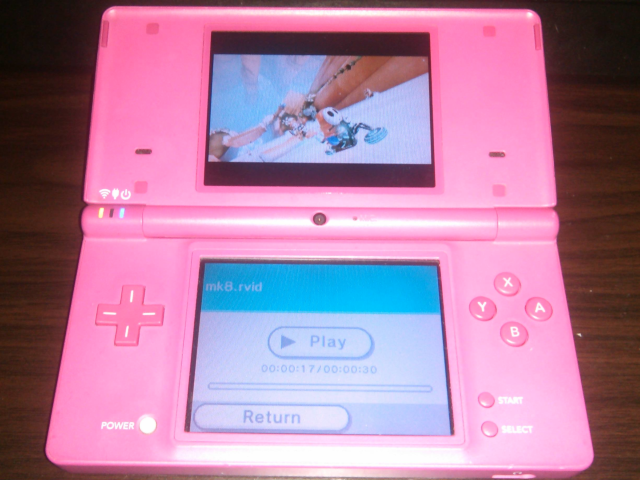
Changelog
v2.0.0 What's new?
- Videos up to 60 FPS can now be played on DS & DS Lite systems (all without memory expansion)!
- This has been achieved by allowing the
.rvidformat to support 256 (8 bits-per-pixel) on-screen colors (combined with dithering for reduced color banding).
- This has been achieved by allowing the
- Dual-screen videos are now supported (at half the supported FPS)!
- Added support for playing 16 BPP videos with the RGB565 color mode!
- Added support for 8-bit audio playback.
- The bottom screen backlight can now be turned off by pressing the
SELECTbutton. .rvidis no longer shown as part of the video's title.- The video's title is now centered if it fits within the screen.
- The bar where the video title is shown now contains your set color in the system settings!
- The full play bar is now visible (complete with the slider)!
- Videos can now be jumped towards some seconds or minutes! (Scroll down to
Video UI Controlsfor how to jump.) - NitroFS has been removed, allowing a
.ciabuild of this application to be made available for 3DS users! - The logo for Rocket Video Player has a brand new look!
- Due to the many changes within the
.rvidformat, old versions are no longer supported.
Bug fixes:
- Fixed an overlooked bug in libfat where files larger than 2GB would not be read properly.
- Fixed video/audio desync issues by removing the MaxMod library and reading the correct amount of samples per-second.
Known issues
- 16 BPP RGB565 videos will have the horizontal lines on the right-side of the screen shimmer when playing back from the DSi or 3DS SD card slot. This does not occur when playing back from flashcards.
- Since prior versions, when playing back from the DSi or 3DS SD card slot, there's a rare chance of freezing (with corrupted colors for 8 BPP videos). Closing the console's lid and opening it back up (or pressing
HOMEtwice on 3DS systems) will un-freeze the video.
Credits
- Gericom: LZ77 decompressor code from EFE/EveryFileExplorer, and frame rate + play bar adjustment code from FastVideoDSPlayer (though not used for 24FPS/48FPS videos).
- devkitPro: nds-hb-menu's file browsing code, and the use of devkitPro, devkitARM, libnds, and libfat.