
NDSSFC: Difference between revisions
From GameBrew
More actions
m Text replacement - "↵Category:Console Emulators on DS" to "" |
m Text replacement - "|source=https://dlhb.gamebrew.org/dshomebrew/" to "|source=https://dlhb.gamebrew.org/dshomebrew2/" |
||
| Line 10: | Line 10: | ||
|download=https://dlhb.gamebrew.org/dshomebrew/ndssfc.7z?k33p0fil35 | |download=https://dlhb.gamebrew.org/dshomebrew/ndssfc.7z?k33p0fil35 | ||
|website=http://eng.supercard.sc/manual/dstwo/plugin/snes.htm | |website=http://eng.supercard.sc/manual/dstwo/plugin/snes.htm | ||
|source=https://dlhb.gamebrew.org/ | |source=https://dlhb.gamebrew.org/dshomebrew2/ndssfc.7z | ||
}} | }} | ||
NDSSFC is a SNES emulator only for DSTWO with Real-Time-Save(RTS), Cheats, Screen Snapshot and etc functions. | NDSSFC is a SNES emulator only for DSTWO with Real-Time-Save(RTS), Cheats, Screen Snapshot and etc functions. | ||
Revision as of 03:56, 16 August 2024
| NDSSFC | |
|---|---|
| Error creating thumbnail: Unable to save thumbnail to destination | |
| General | |
| Author | Supercard team |
| Type | Console |
| Version | 1.05 |
| License | Mixed |
| Last Updated | 2010/09/10 |
| Links | |
| Download | |
| Website | |
| Source | |

NDSSFC is a SNES emulator only for DSTWO with Real-Time-Save(RTS), Cheats, Screen Snapshot and etc functions.
Installation
Download and unzip, then copy the /NDSSFC/ and /_dstwoplug/ folder to the root of your microSD card.
It is suggested that you to put SNES Roms under /NDSSFC/gamepak, it's easy to search games.
User guide
You should click Exit when you want to quit, or you can't save with the original normal save function in-game.
To save power, the CPU level is at level 2 by default. If you feel the sound is not synchronized, please try to set it to level 4.
Menu options
- Video/Audio:
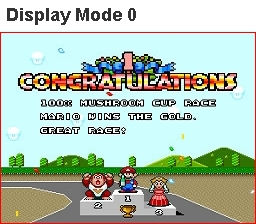
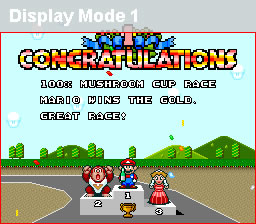
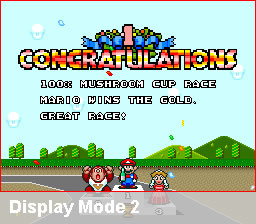
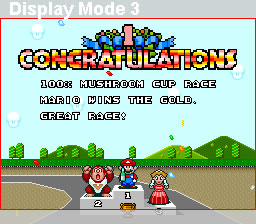
- Graphic - There are 4 display modes to choose from.
- Game Fase Forward - Game speed becomes faster, but the sound will be off.
- Save State - Save/Load/Delete Real-Time-Save.
- Cheats - Supports .cht format cheat files.
- Tools - Screen Snapshot options.
- Other:
- CPU Frequence - 0-4 levels, game runs better with the higher level, and will cost more power.
- Language - Chinses/English.
- SD Card Capacity - Show the space of your card.
- Restore Default Settings.
- Version infomation.
- Exit - Back to the desktop of DSTWO.
Controls
Touchscreen - In-game menu
Screenshots
Display modes 0-3
External links
- Supercard.Sc - http://eng.supercard.sc/manual/dstwo/plugin/snes.htm