
Plog Vita: Difference between revisions
From GameBrew
More actions
No edit summary |
m Text replacement - "|discussion=" to "|donation=" |
||
| Line 11: | Line 11: | ||
|website=https://github.com/isage/plog | |website=https://github.com/isage/plog | ||
|source=https://github.com/isage/plog | |source=https://github.com/isage/plog | ||
| | |donation= | ||
}} | }} | ||
{{#seo: | {{#seo: | ||
Latest revision as of 00:57, 14 August 2023
| Plog | |
|---|---|
 | |
| General | |
| Author | isage |
| Type | Utilities |
| Version | 1.0 |
| License | GPL-3.0 |
| Last Updated | 2023/07/05 |
| Links | |
| Download | |
| Website | |
| Source | |
PLog, also known as PrincessLog, is a complete logging solution for any homebrew, user plugin, kernel plugin.
It is overall more efficient than ShipLog.
User guide
How to setup:
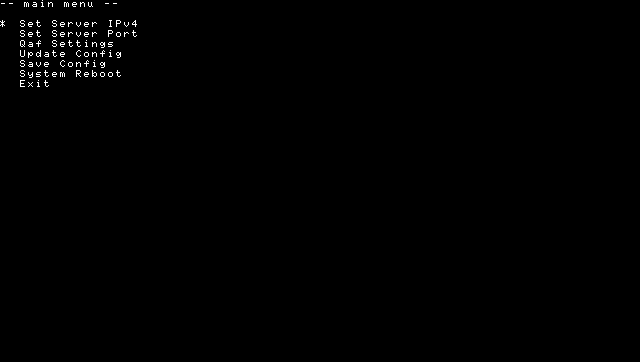
- Install NetLoggingMgrSettings.vpk.
- Launch the app and configure your settings. Be sure to save.
- Add net_logging_mgr.skprx to your config.txt.
- Run
NetDbgLogPc.exe <port>- Note: If no port is specified, 9999 will be used by default.
- To use on other platforms, use netcat or similar. Example netcat command:
nc -kl -w 3 <port>.
- Reboot. (If the plugin is already installed and you wish to update the configuration, you may use Update Configuration (along with saving it) without rebooting your system).
Usage:
- In the application you wish to log, use ksceKernelPrintf, printf (when SceLibc is included such as in games), or sceClibPrintf.
- QAF Settings: There is options to make more verbose logs used in QA. You can enable these in the manager app.
Note: While being much faster than ShipLog, if there is massive amounts of logs the logger may not be able to process them completely and will freeze (ex: taiHEN hexdump). This is unlikely in normal usage.
Screenshots
Changelog
v1.0
- First Release.
- Fixed config issue.
- Log ksceKernelPrintfLevelWithInfo.
Credits
Princess-of-Sleeping, cuevavirus, Cat.
External links
- GitHub - https://github.com/isage/plog