
Miku Vu Vita: Difference between revisions
From GameBrew
More actions
No edit summary |
No edit summary |
||
| Line 19: | Line 19: | ||
|image_alt=Miku Vu | |image_alt=Miku Vu | ||
}} | }} | ||
An application that displays random images taken Hatsune Miku and allows to save them on your Vita. | |||
Images are sourced from Konachan. | |||
==Installation== | |||
Install the VPK on your homebrew enabled PS Vita or PS TV. | |||
Saved images are located in ux0:data/MikuVU/SAVED/. | |||
==Controls== | ==Controls== | ||
L/R - Save current image (By ID) | |||
Up/Triangle - Toggle timer on/off | |||
Right/Circle - Increase timer duration (up to 60 seconds) | |||
Left/Square - Decrease timer duration (down to 5 seconds) | |||
Down/X - Next image | |||
==Screenshots== | ==Screenshots== | ||
https://dlhb.gamebrew.org/vitahomebrews/mikuvuvita-01.png | https://dlhb.gamebrew.org/vitahomebrews/mikuvuvita-01.png | ||
==Changelog== | ==Changelog== | ||
| Line 46: | Line 56: | ||
== External links == | == External links == | ||
* Archive - https://archive.org/details/miku-vu | * Internet Archive - https://archive.org/details/miku-vu | ||
* VitaDB - https://vitadb.rinnegatamante.it/#/info/1073 | * VitaDB - https://vitadb.rinnegatamante.it/#/info/1073 | ||
Revision as of 10:08, 10 May 2023
| Miku Vu | |
|---|---|
 | |
| General | |
| Author | Null, SonicMastr |
| Type | Other Apps |
| Version | 1.2 |
| License | Mixed |
| Last Updated | 2023/05/05 |
| Links | |
| Download | |
| Website | |
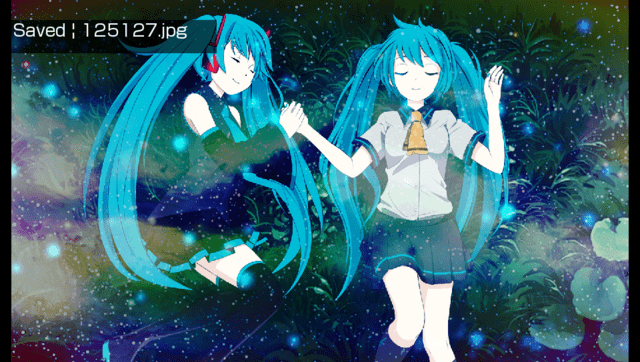
An application that displays random images taken Hatsune Miku and allows to save them on your Vita.
Images are sourced from Konachan.
Installation
Install the VPK on your homebrew enabled PS Vita or PS TV.
Saved images are located in ux0:data/MikuVU/SAVED/.
Controls
L/R - Save current image (By ID)
Up/Triangle - Toggle timer on/off
Right/Circle - Increase timer duration (up to 60 seconds)
Left/Square - Decrease timer duration (down to 5 seconds)
Down/X - Next image
Screenshots
Changelog
v.1.2
- changes to param.sfo/file paths.
v.1.1
- Updated error handler.
v.1.0
- First Release.
Credits
- Original code - https://github.com/SonicMastr
- Consulting - https://github.com/Avellea
- Support - Henkaku Discord
External links
- Internet Archive - https://archive.org/details/miku-vu
- VitaDB - https://vitadb.rinnegatamante.it/#/info/1073