
SwitchView UI Vita: Difference between revisions
From GameBrew
More actions
No edit summary |
m Text replacement - "https://vitadb.rinnegatamante.it/" to "https://www.rinnegatamante.eu/vitadb/" |
||
| (10 intermediate revisions by the same user not shown) | |||
| Line 1: | Line 1: | ||
{{#seo: | {{#seo: | ||
|title=Vita Homebrew Apps (Title Launchers) - GameBrew | |title=Vita Homebrew Apps (Title Launchers) - GameBrew | ||
|title_mode=append | |title_mode=append | ||
|image= | |image=switchviewuivita2.png | ||
|image_alt=SwitchView UI | |image_alt=SwitchView UI | ||
}} | }} | ||
{{Infobox Vita Homebrews | {{Infobox Vita Homebrews | ||
|title=SwitchView UI | |title=SwitchView UI | ||
|image= | |image=switchviewuivita2.png | ||
|description=Alternative app launcher. | |description=Alternative app launcher with an UI similar to the Nintendo Switch one. | ||
|author=VitaHEX games | |author=VitaHEX games | ||
|lastupdated=2017/ | |lastupdated=2017/11/03 | ||
|type=Title Launchers | |type=Title Launchers | ||
|version=0.1.2 | |version=0.1.2 | ||
| Line 17: | Line 17: | ||
|website=https://wololo.net/talk/viewtopic.php?f=116&t=48629 | |website=https://wololo.net/talk/viewtopic.php?f=116&t=48629 | ||
|source= | |source= | ||
|donation=https://www.patreon.com/vitahex | |||
}} | }} | ||
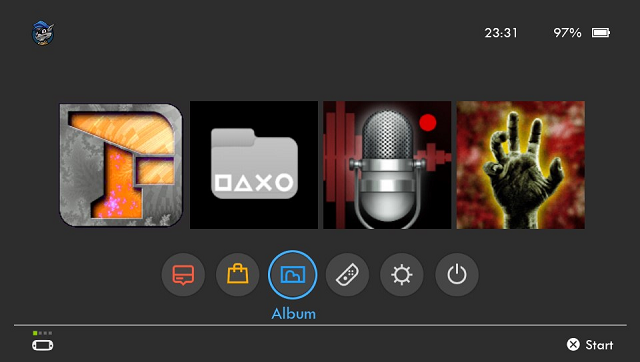
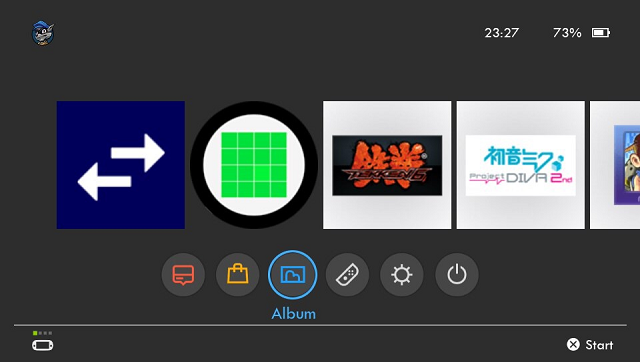
SwitchView UI is an alternative application launcher with an UI similar to the Nintendo Switch one. | |||
It is not a replacement for the Vita's LiveArea it is just a homebrew app. It lists all the games/apps in your ux0 location (not system apps), and shows them in a menu very similar to the Switch UI. | |||
The buttons bellow the main game thumbs are the system apps like the PS Store, Photos, Settings app etc. | |||
With a little customization you can turn this in to a PS4 or Xbox One interface by simply replacing the images and adjusting the positions. | With a little customization you can turn this in to a PS4 or Xbox One interface by simply replacing the images and adjusting the positions. | ||
==Features== | |||
* High quality icons and interface. | |||
* Lists all your games/apps and displays their icon. | |||
* Touch screen support. | |||
* Clock and battery percentage display on top right corner. | |||
* Navigation using the arrow keys and select with X. | |||
== | ==Screenshots== | ||
https://dlhb.gamebrew.org/vitahomebrews/switchviewuivita3.png | |||
https://dlhb.gamebrew.org/vitahomebrews/switchviewuivita4.png | |||
==Media== | ==Media== | ||
'''PS Vita Apps: SwitchView UI v0.1.2 by VitaHEX''' ([https://www.youtube.com/watch?v=RC6i-jnrLZ0 ONLIESVAN]) <br> | |||
<youtube>RC6i-jnrLZ0</youtube> | <youtube>RC6i-jnrLZ0</youtube> | ||
== | ==Changelog== | ||
'''v0.1.2''' | '''v0.1.2''' | ||
* Added touch screen support. Useful for faster scrolling. | |||
* Improved navigation controls | * Improved navigation controls. | ||
* You can now navigate using the L/R triggers for 5x scrolling | * You can now navigate using the L/R triggers for 5x scrolling. | ||
* Added a Setting Menu by pressing the Start button | * Added a Setting Menu by pressing the Start button. | ||
* Added a loading splash image on start up | * Added a loading splash image on start up. | ||
* Added a wifi icon when you have the option enabled | * Added a wifi icon when you have the option enabled. | ||
''' | '''v1.0''' | ||
* First Release. | * First Release. | ||
==Credits== | ==Credits== | ||
* Rinnegatamante for Lua Player Plus | * Rinnegatamante for Lua Player Plus. | ||
* SKGleba | * SKGleba. | ||
* MyLegGuy | * MyLegGuy. | ||
== External links == | == External links == | ||
* Author's website - https://vitahex.weebly.com/ | |||
* Twitter - https://twitter.com/vitahex | |||
* Youtube - https://www.youtube.com/@vitahexgames6800 | |||
* VitaDB - https://www.rinnegatamante.eu/vitadb/#/info/338 | |||
* Wololo - https://wololo.net/talk/viewtopic.php?f=116&t=48629 | * Wololo - https://wololo.net/talk/viewtopic.php?f=116&t=48629 | ||
[[Category:Support the author]] | |||
Latest revision as of 04:38, 5 January 2025
| SwitchView UI | |
|---|---|
 | |
| General | |
| Author | VitaHEX games |
| Type | Title Launchers |
| Version | 0.1.2 |
| License | Mixed |
| Last Updated | 2017/11/03 |
| Links | |
| Download | |
| Website | |
| Support Author | |
SwitchView UI is an alternative application launcher with an UI similar to the Nintendo Switch one.
It is not a replacement for the Vita's LiveArea it is just a homebrew app. It lists all the games/apps in your ux0 location (not system apps), and shows them in a menu very similar to the Switch UI.
The buttons bellow the main game thumbs are the system apps like the PS Store, Photos, Settings app etc.
With a little customization you can turn this in to a PS4 or Xbox One interface by simply replacing the images and adjusting the positions.
Features
- High quality icons and interface.
- Lists all your games/apps and displays their icon.
- Touch screen support.
- Clock and battery percentage display on top right corner.
- Navigation using the arrow keys and select with X.
Screenshots
Media
PS Vita Apps: SwitchView UI v0.1.2 by VitaHEX (ONLIESVAN)
Changelog
v0.1.2
- Added touch screen support. Useful for faster scrolling.
- Improved navigation controls.
- You can now navigate using the L/R triggers for 5x scrolling.
- Added a Setting Menu by pressing the Start button.
- Added a loading splash image on start up.
- Added a wifi icon when you have the option enabled.
v1.0
- First Release.
Credits
- Rinnegatamante for Lua Player Plus.
- SKGleba.
- MyLegGuy.
External links
- Author's website - https://vitahex.weebly.com/
- Twitter - https://twitter.com/vitahex
- Youtube - https://www.youtube.com/@vitahexgames6800
- VitaDB - https://www.rinnegatamante.eu/vitadb/#/info/338
- Wololo - https://wololo.net/talk/viewtopic.php?f=116&t=48629