
Vita Volume: Difference between revisions
From GameBrew
More actions
No edit summary |
No edit summary |
||
| (8 intermediate revisions by 2 users not shown) | |||
| Line 1: | Line 1: | ||
{{Infobox Vita Homebrews | {{Infobox Vita Homebrews | ||
|title=Vita Volume | |title=Vita Volume | ||
|image= | |image=vitavolume2.png | ||
|description= | |description=Set your vita volume level without using the buttons. | ||
|author=inthecatsdreams | |author=inthecatsdreams | ||
|lastupdated= | |lastupdated=2025/05/31 | ||
|type=Utilities | |type=Utilities | ||
|version=1.4. | |version=1.4.1 | ||
|license=GPL-3.0 | |license=GPL-3.0 | ||
|download=https://dlhb.gamebrew.org/vitahomebrews/vitavolume.7z | |download=https://dlhb.gamebrew.org/vitahomebrews/vitavolume.7z | ||
|website= | |website=https://github.com/inthecatsdreams/vita-volume | ||
|source=https://github.com/inthecatsdreams/vita-volume | |source=https://github.com/inthecatsdreams/vita-volume | ||
}} | }} | ||
{{#seo: | |||
|title=Vita Homebrew Apps (Utilities) - GameBrew | |||
|title_mode=append | |||
|image=vitavolume2.png | |||
|image_alt=Vita Volume | |||
}} | |||
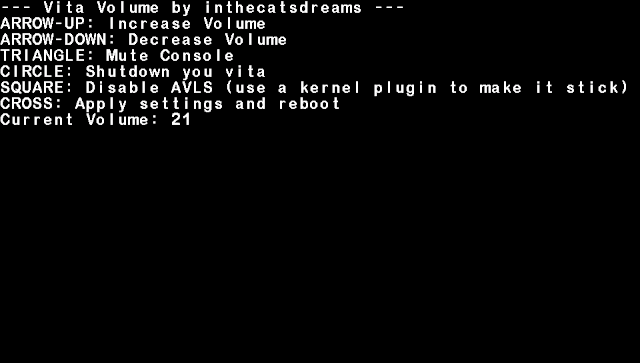
Vita Volume is an application to set your Vita volume level without using the volume buttons, useful if they are broken. | |||
== | ==User guide== | ||
Set the value you want, 0 being the lowest and 30 the maximum (25 for AVLS forced Vitas) and then press Cross to reboot. | |||
You can also disable AVLS for a short while, it's basically a shortcut to the option you have in the settings app. | |||
==Screenshots== | ==Screenshots== | ||
https://dlhb.gamebrew.org/vitahomebrews/ | https://dlhb.gamebrew.org/vitahomebrews/images/vitavolume5.png | ||
==Changelog== | |||
'''v1.4.1''' | |||
*Added two new features. | |||
'''v1.4.0''' | |||
*Changed keys and bg and such. | |||
'''v1.3.0''' | |||
*You can now mute the console. | |||
'''v1.2.1''' | |||
*Fixed indent. | |||
'''v1.2''' | |||
*Fixed the minimum volume. | |||
'''v1.1''' | |||
*Removed sceKerneldelay. | |||
'''v1.0''' | |||
''' | *First version. | ||
* First | |||
== External links == | ==External links== | ||
* | * GitHub - https://github.com/inthecatsdreams/vita-volume | ||
* CBPS Forums - https://forum.devchroma.nl/index.php?topic=147.0 | |||
* | |||
Latest revision as of 02:23, 1 June 2025
| Vita Volume | |
|---|---|
 | |
| General | |
| Author | inthecatsdreams |
| Type | Utilities |
| Version | 1.4.1 |
| License | GPL-3.0 |
| Last Updated | 2025/05/31 |
| Links | |
| Download | |
| Website | |
| Source | |
Vita Volume is an application to set your Vita volume level without using the volume buttons, useful if they are broken.
User guide
Set the value you want, 0 being the lowest and 30 the maximum (25 for AVLS forced Vitas) and then press Cross to reboot.
You can also disable AVLS for a short while, it's basically a shortcut to the option you have in the settings app.
Screenshots
Changelog
v1.4.1
- Added two new features.
v1.4.0
- Changed keys and bg and such.
v1.3.0
- You can now mute the console.
v1.2.1
- Fixed indent.
v1.2
- Fixed the minimum volume.
v1.1
- Removed sceKerneldelay.
v1.0
- First version.
External links
- GitHub - https://github.com/inthecatsdreams/vita-volume
- CBPS Forums - https://forum.devchroma.nl/index.php?topic=147.0