
FontInstaller Vita: Difference between revisions
More actions
No edit summary |
m Text replacement - "https://vitadb.rinnegatamante.it/" to "https://www.rinnegatamante.eu/vitadb/" |
||
| (10 intermediate revisions by the same user not shown) | |||
| Line 1: | Line 1: | ||
{{#seo: | {{#seo: | ||
|title=Vita Homebrew Apps (Other Apps) - GameBrew | |title=Vita Homebrew Apps (Other Apps) - GameBrew | ||
|title_mode=append | |title_mode=append | ||
|image= | |image=fontinstallervita2.png | ||
|image_alt=fontInstaller | |image_alt=fontInstaller | ||
}} | }} | ||
{{Infobox Vita Homebrews | {{Infobox Vita Homebrews | ||
|title=fontInstaller | |title=fontInstaller | ||
|image= | |image=fontinstallervita2.png | ||
|description=fontRedirect plugin manager. | |description=fontRedirect plugin manager. | ||
|author=cxziaho | |author=cxziaho | ||
| Line 16: | Line 15: | ||
|license=MIT | |license=MIT | ||
|download=https://dlhb.gamebrew.org/vitahomebrews/fontinstallervita.7z | |download=https://dlhb.gamebrew.org/vitahomebrews/fontinstallervita.7z | ||
|website= | |website=https://github.com/cxziaho/fontInstaller | ||
|source=https://github.com/cxziaho/fontInstaller | |source=https://github.com/cxziaho/fontInstaller | ||
}} | }} | ||
fontRedirect plugin | An app for installing the [[FontRedirect Vita|fontRedirect]] plugin, and selecting fonts using a GUI. | ||
fontInstaller reads fonts in ux0:data/font/. And it reads up to 256 font files before stopping. | |||
==Installation== | |||
Add fonts to ux0:data/font/, which can be either .otf or .ttf. | |||
Install the VPK file, open it and wait for the plugin to be installed. | |||
==User guide== | |||
Open the app, select a font and press start, then your enter button (Circle/Cross). | |||
Your Vita should restart with this new font, and will keep this font unless you boot without plugins or change font. | |||
Notes: | |||
*Your config.txt is backed up to ux0:data/font/backup.txt, so if this corrupts it for some reason your config will be there. | |||
*The current font name is stored in ux0:data/font/config.txt so you can change that directly. | |||
==Controls== | |||
Cross - Select font | |||
Square - Change font scale | |||
L/R - Change page | |||
Triangle - Info | |||
Start - Restart from anywhere in the app | |||
Select - Remove fonts (still leaves plugin) | |||
==Screenshots== | |||
https://dlhb.gamebrew.org/vitahomebrews/fontinstallervita3.png | |||
https://dlhb.gamebrew.org/vitahomebrews/fontinstallervita4.png | |||
https://dlhb.gamebrew.org/vitahomebrews/fontinstallervita5.png | |||
==Media== | ==Media== | ||
'''★Font Installer - Ps vita[Обзор] Меняем Шрифт''' ([https://www.youtube.com/watch?v=MyW3vbxHU6Q Playstationalist]) <br> | |||
<youtube>MyW3vbxHU6Q</youtube> | <youtube>MyW3vbxHU6Q</youtube> | ||
==Known issues== | |||
Currently, the fontRedirect plugin causes certain games to crash on openening them (Gravity Rush, Ys 8 JP English Patched and Hyperdimension Neptunia Re;Birth1 for example), there is no fix for it, just uninstall the plugin if you come across any issue. | |||
== | ==Changelog== | ||
'''v1.0''' | |||
''' | |||
* First Release. | * First Release. | ||
* Certain games still broken. | |||
== External links == | == External links == | ||
* | * GitHub - https://github.com/cxziaho/fontInstaller | ||
* VitaDB - https://www.rinnegatamante.eu/vitadb/#/info/327 | |||
* VitaDB - https:// | |||
Latest revision as of 04:37, 5 January 2025
| fontInstaller | |
|---|---|
 | |
| General | |
| Author | cxziaho |
| Type | Other Apps |
| Version | 1.0 |
| License | MIT License |
| Last Updated | 2017/09/29 |
| Links | |
| Download | |
| Website | |
| Source | |
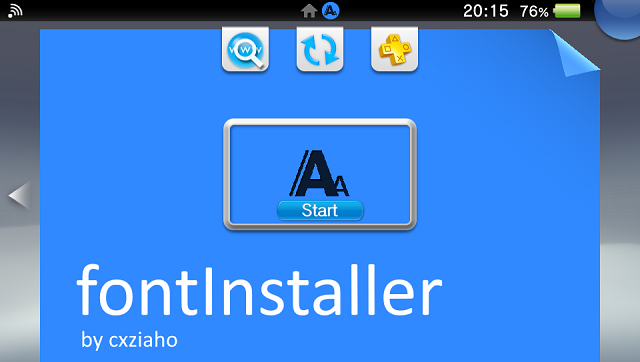
An app for installing the fontRedirect plugin, and selecting fonts using a GUI.
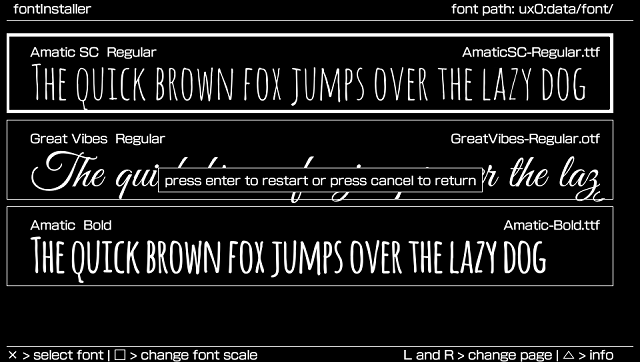
fontInstaller reads fonts in ux0:data/font/. And it reads up to 256 font files before stopping.
Installation
Add fonts to ux0:data/font/, which can be either .otf or .ttf.
Install the VPK file, open it and wait for the plugin to be installed.
User guide
Open the app, select a font and press start, then your enter button (Circle/Cross).
Your Vita should restart with this new font, and will keep this font unless you boot without plugins or change font.
Notes:
- Your config.txt is backed up to ux0:data/font/backup.txt, so if this corrupts it for some reason your config will be there.
- The current font name is stored in ux0:data/font/config.txt so you can change that directly.
Controls
Cross - Select font
Square - Change font scale
L/R - Change page
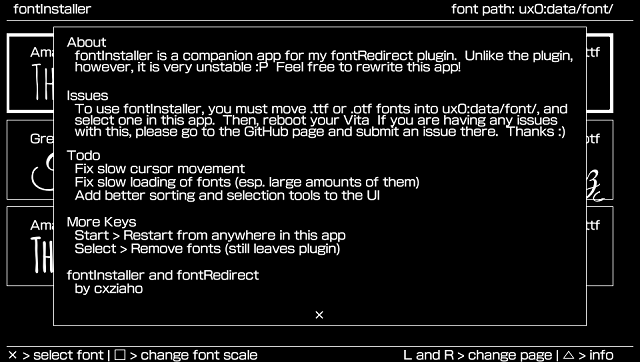
Triangle - Info
Start - Restart from anywhere in the app
Select - Remove fonts (still leaves plugin)
Screenshots
Media
★Font Installer - Ps vita[Обзор] Меняем Шрифт (Playstationalist)
Known issues
Currently, the fontRedirect plugin causes certain games to crash on openening them (Gravity Rush, Ys 8 JP English Patched and Hyperdimension Neptunia Re;Birth1 for example), there is no fix for it, just uninstall the plugin if you come across any issue.
Changelog
v1.0
- First Release.
- Certain games still broken.