
Manga Downloader Vita: Difference between revisions
From GameBrew
More actions
No edit summary |
m Text replacement - "https://vitadb.rinnegatamante.it/" to "https://www.rinnegatamante.eu/vitadb/" |
||
| (5 intermediate revisions by the same user not shown) | |||
| Line 1: | Line 1: | ||
{{ | {{obsolete}} | ||
{{#seo: | {{#seo: | ||
|title=Vita Homebrew Apps (Other Apps) - GameBrew | |title=Vita Homebrew Apps (Other Apps) - GameBrew | ||
|title_mode=append | |title_mode=append | ||
|image= | |image=mangadownloadervita2.png | ||
|image_alt=Manga Downloader | |image_alt=Manga Downloader | ||
}} | }} | ||
{{Infobox Vita Homebrews | {{Infobox Vita Homebrews | ||
|title=Manga Downloader | |title=Manga Downloader | ||
|image= | |image=mangadownloadervita2.png | ||
|description=Manga downloader for | |description=Manga downloader for PS VIta. | ||
|author=MyLegGuy | |author=MyLegGuy | ||
|lastupdated=2019/03/07 | |lastupdated=2019/03/07 | ||
| Line 16: | Line 16: | ||
|license=GPL-3.0 | |license=GPL-3.0 | ||
|download=https://dlhb.gamebrew.org/vitahomebrews/mangadownloadervita.7z | |download=https://dlhb.gamebrew.org/vitahomebrews/mangadownloadervita.7z | ||
|website | |website=https://github.com/MyLegGuy/MangaDownloader-Vita | ||
|source= | |||
}} | }} | ||
Application that allows you to download your favourite mangas from different websites. | |||
'''Note:''' Use [[Noboru Vita]] - a similar application but it's much better. | |||
==User guide== | |||
Supported sites: | |||
*mangareader.net | |||
*dynasty-scans.com | |||
How to use: | |||
*Select Download. | |||
*Select website and download mode. | |||
*Select manga series and chapter. | |||
*Press done and wait for download to finish. | |||
== | Refer to the digital manual for more information. It can be accessed from the LiveArea. | ||
'''( | |||
Downloads are saved to ux0:data/LUAMANGAS/Manga/. | |||
==Screenshot== | |||
https://dlhb.gamebrew.org/vitahomebrews/mangadownloadervita3.png | |||
https://dlhb.gamebrew.org/vitahomebrews/mangadownloadervita4.png | |||
==Changelog== | |||
'''v2.5''' | |||
*Fix a script. | |||
*Remove a broken script. | |||
*Use system font instead of Liberation Sans. | |||
*Add repeat to dpad. | |||
'''v2.4''' | |||
*Fix loading grayscale JPEG images. This means mangahere is now usable. | |||
*Fix loading some PNG images that crash thanks to a libvita2d fix by @rozenmad. | |||
*Add webtoons.com support. | |||
*Fix the crash that happens when you run a downloading script after already using one. | |||
*When viewing images normally, square and triangle can now be used to change pages. | |||
*Add instruction manual pages for the image viewer. | |||
'''v2.3''' | |||
*Fix "fourth option". | |||
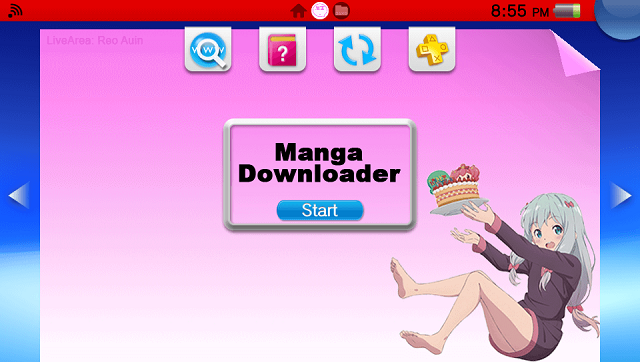
*LiveArea is pink now. | |||
'''v2.2''' | |||
* Fix mangareader.net by switching links to use https. (Thanks to @ShroomKing). | |||
'''v2.1''' | |||
*Add experimental "Read" mode. | |||
*Fix cover viewing. | |||
*Update manual. | |||
'''v2.0''' | |||
*The next search result button is now R. | |||
*On supported sites, you can now press triangle to see the manga's cover. Remember, always judge a book by its cover. | |||
*Add experimental "as I go" mode. It downloads pages and lets you view them as it downloads them. May crash sometimes. | |||
*Add MangaHere support that doesn't really work that well. It can download the images and everything, but the image viewers on the PS Vita right now don't view them properly. | |||
*Fix list selection greater than 255, a bug discovered by @SHROOMKINGonDMT. | |||
*Pressing the next search result button won't cause a crash if you hadn't already made a search anymore. | |||
'''v1.0''' | |||
* First Release. | * First Release. | ||
== External links == | == External links == | ||
* | * GitHub - https://github.com/MyLegGuy/MangaDownloader-Vita | ||
* VitaDB - https://www.rinnegatamante.eu/vitadb/#/info/348 | |||
* VitaDB - https:// | |||
Latest revision as of 04:37, 5 January 2025
| This application has been obsoleted by one or more applications that serve the same purpose, but are more stable or maintained. |

| Manga Downloader | |
|---|---|
 | |
| General | |
| Author | MyLegGuy |
| Type | Other Apps |
| Version | 2.5 |
| License | GPL-3.0 |
| Last Updated | 2019/03/07 |
| Links | |
| Download | |
| Website | |
Application that allows you to download your favourite mangas from different websites.
Note: Use Noboru Vita - a similar application but it's much better.
User guide
Supported sites:
- mangareader.net
- dynasty-scans.com
How to use:
- Select Download.
- Select website and download mode.
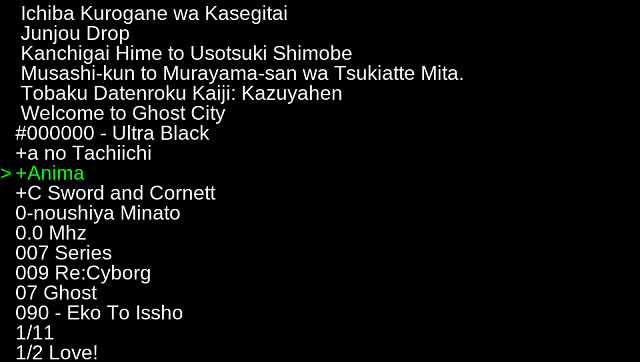
- Select manga series and chapter.
- Press done and wait for download to finish.
Refer to the digital manual for more information. It can be accessed from the LiveArea.
Downloads are saved to ux0:data/LUAMANGAS/Manga/.
Screenshot
Changelog
v2.5
- Fix a script.
- Remove a broken script.
- Use system font instead of Liberation Sans.
- Add repeat to dpad.
v2.4
- Fix loading grayscale JPEG images. This means mangahere is now usable.
- Fix loading some PNG images that crash thanks to a libvita2d fix by @rozenmad.
- Add webtoons.com support.
- Fix the crash that happens when you run a downloading script after already using one.
- When viewing images normally, square and triangle can now be used to change pages.
- Add instruction manual pages for the image viewer.
v2.3
- Fix "fourth option".
- LiveArea is pink now.
v2.2
- Fix mangareader.net by switching links to use https. (Thanks to @ShroomKing).
v2.1
- Add experimental "Read" mode.
- Fix cover viewing.
- Update manual.
v2.0
- The next search result button is now R.
- On supported sites, you can now press triangle to see the manga's cover. Remember, always judge a book by its cover.
- Add experimental "as I go" mode. It downloads pages and lets you view them as it downloads them. May crash sometimes.
- Add MangaHere support that doesn't really work that well. It can download the images and everything, but the image viewers on the PS Vita right now don't view them properly.
- Fix list selection greater than 255, a bug discovered by @SHROOMKINGonDMT.
- Pressing the next search result button won't cause a crash if you hadn't already made a search anymore.
v1.0
- First Release.