
NoAVLS Vita: Difference between revisions
From GameBrew
More actions
Created page with "{{cleanup|article|Needs cleanup}} {{#seo: |title=Vita Homebrew Apps (Plugins) - GameBrew! |title_mode=append |image=ps-vita-logo.jpg |image_alt=NoAVLS }} {{Infobox Vita Homebr..." |
No edit summary |
||
| (9 intermediate revisions by 2 users not shown) | |||
| Line 1: | Line 1: | ||
{{Infobox Vita Homebrews | {{Infobox Vita Homebrews | ||
|title=NoAVLS | |title=NoAVLS | ||
|image= | |image=noavlsvita2.png | ||
|description= | |description=Permanantly disable AVLS on AVLS-Forced Vitas. | ||
|author= | |author=Li | ||
|lastupdated=2017/ | |lastupdated=2017/10/08 | ||
|type=Plugins | |type=Plugins | ||
|version=0.1 | |version=0.1 | ||
|license=MIT | |license=MIT | ||
|download=https://dlhb.gamebrew.org/vitahomebrews/noavlsvita.7z | |download=https://dlhb.gamebrew.org/vitahomebrews/noavlsvita.7z | ||
|website= | |website=https://bitbucket.org/SilicaAndPina/noavls | ||
|source=https://bitbucket.org/SilicaAndPina/noavls | |source=https://bitbucket.org/SilicaAndPina/noavls | ||
}} | }} | ||
NoAVLS is a plugin that will | {{#seo: | ||
|title=Vita Homebrew Apps (Plugins) - GameBrew | |||
|title_mode=append | |||
|image=noavlsvita2.png | |||
|image_alt=NoAVLS | |||
}} | |||
NoAVLS is a plugin that will permanently disable AVLS on AVLS-Forced Vitas. | |||
AVLS (Automatic Volume Limiter System) is an option that limits the maximum volume level on your headphones. | |||
If your Vita has forced AVLS, you can use this plugin to disable the setting. The affected models are: | |||
*Later European PSVita Fat (1000) models with a Wolfson Microelectronics WM1804E. | |||
*All European PSVita Slim (2000) models as they have the audio DAC chip mentioned above. | |||
==Installation== | |||
Place noavls.skprx into ux0:tai/ or ur0:tai/. | |||
Add the following lines to tai/config.txt (change to ur0 if you store the plugin there) | |||
*KERNEL | |||
ux0:tai/noavls.skprx | |||
== | ==User guide== | ||
After installing, AVLS will still be checked in settings however it will not limit volume. | |||
Volume may be set to 21 at boot, however AVLS should be disabled. | |||
==Screenshots== | ==Screenshots== | ||
https://dlhb.gamebrew.org/vitahomebrews/ | https://dlhb.gamebrew.org/vitahomebrews/noavlsvita3.png | ||
== | ==Credits== | ||
*SilicaAndPina - Project Manager. | |||
*dots-tb - RE and Dev. | |||
== External links == | == External links == | ||
* | * Bitnucket - https://bitbucket.org/SilicaAndPina/noavls | ||
Latest revision as of 00:28, 10 May 2025
| NoAVLS | |
|---|---|
 | |
| General | |
| Author | Li |
| Type | Plugins |
| Version | 0.1 |
| License | MIT License |
| Last Updated | 2017/10/08 |
| Links | |
| Download | |
| Website | |
| Source | |
NoAVLS is a plugin that will permanently disable AVLS on AVLS-Forced Vitas.
AVLS (Automatic Volume Limiter System) is an option that limits the maximum volume level on your headphones.
If your Vita has forced AVLS, you can use this plugin to disable the setting. The affected models are:
- Later European PSVita Fat (1000) models with a Wolfson Microelectronics WM1804E.
- All European PSVita Slim (2000) models as they have the audio DAC chip mentioned above.
Installation
Place noavls.skprx into ux0:tai/ or ur0:tai/.
Add the following lines to tai/config.txt (change to ur0 if you store the plugin there)
*KERNEL
ux0:tai/noavls.skprx
User guide
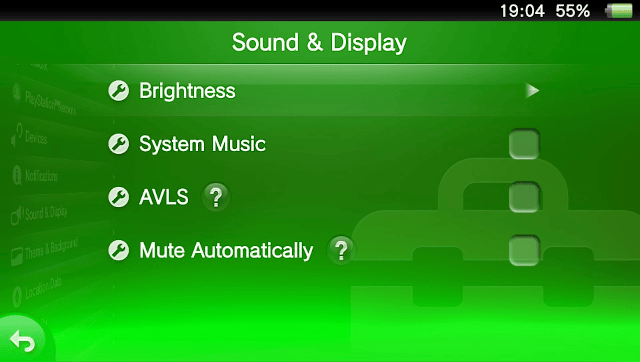
After installing, AVLS will still be checked in settings however it will not limit volume.
Volume may be set to 21 at boot, however AVLS should be disabled.
Screenshots
Credits
- SilicaAndPina - Project Manager.
- dots-tb - RE and Dev.
External links
- Bitnucket - https://bitbucket.org/SilicaAndPina/noavls