Ps4linkcontrols-gui Vita: Difference between revisions
From GameBrew
More actions
Created page with "{{#seo: |title=Vita Homebrew Apps (Other Apps) - GameBrew! |title_mode=append |image=ps4linkcontrolsguivita.jpg |image_alt=ps4linkcontrols-gui }} {{Infobox Vita Homebrews |tit..." |
m Text replacement - "https://vitadb.rinnegatamante.it/" to "https://www.rinnegatamante.eu/vitadb/" |
||
| (10 intermediate revisions by the same user not shown) | |||
| Line 1: | Line 1: | ||
{{#seo: | {{#seo: | ||
|title=Vita Homebrew Apps (Other Apps) - GameBrew | |title=Vita Homebrew Apps (Other Apps) - GameBrew | ||
|title_mode=append | |title_mode=append | ||
|image= | |image=ps4linkcontrolsguivita2.png | ||
|image_alt=ps4linkcontrols-gui | |image_alt=ps4linkcontrols-gui | ||
}} | }} | ||
{{Infobox Vita Homebrews | {{Infobox Vita Homebrews | ||
|title=ps4linkcontrols-gui | |title=ps4linkcontrols-gui | ||
|image= | |image=ps4linkcontrolsguivita2.png | ||
|description=GUI for ps4linkcontrols plugin. | |description=Configurator GUI for ps4linkcontrols plugin. | ||
|author=keltar | |author=keltar | ||
|lastupdated=2020/06/12 | |lastupdated=2020/06/12 | ||
| Line 15: | Line 15: | ||
|license=Mixed | |license=Mixed | ||
|download=https://dlhb.gamebrew.org/vitahomebrews/ps4linkcontrolsguivita.7z | |download=https://dlhb.gamebrew.org/vitahomebrews/ps4linkcontrolsguivita.7z | ||
|website= | |website=https://github.com/keltar/ps4linkcontrols-gui | ||
|source=https://github.com/keltar/ps4linkcontrols-gui | |source=https://github.com/keltar/ps4linkcontrols-gui | ||
}} | }} | ||
ps4linkcontrols-gui is configuration tool for [[vita-ps4linkcontrols|ps4linkcontrols plugin]] to modify vita's PS4 remote play control scheme. | |||
Requires extended (unsafe) permissions to access image files for control schemes, and to write ux0:ps4linkcontrols.txt. | |||
==User guide== | |||
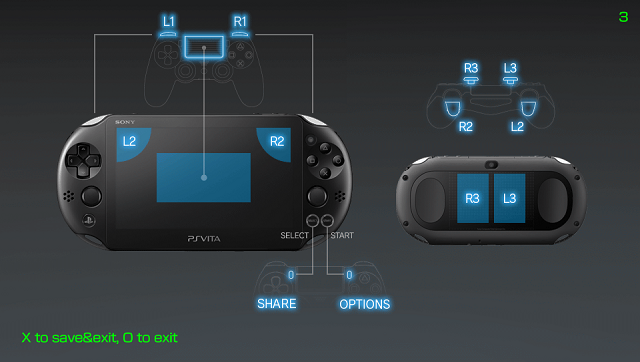
With this application you get a preview of control mapping. | |||
Simple launch, select control scheme, press X, then launch PS4 Link. | |||
You can view Vita's built-in mapping description images at vs0:app/NPXS10013/keymap/. | |||
==Controls== | |||
D-Pad Left/Right or L/R - Switch control scheme | |||
Cross - Save and Exit | |||
Circle - Exit without saving | |||
==Screenshots== | ==Screenshots== | ||
https://dlhb.gamebrew.org/vitahomebrews/ | https://dlhb.gamebrew.org/vitahomebrews/ps4linkcontrolsguivita3.png | ||
https:// | ==External links== | ||
* GitHub - https://github.com/keltar/ps4linkcontrols-gui | |||
https:// | * VitaDB - https://www.rinnegatamante.eu/vitadb/#/info/560 | ||
* Wololo - https://wololo.net/talk/viewtopic.php?t=50156 | |||
https:// | |||
= | |||
Latest revision as of 04:38, 5 January 2025
| ps4linkcontrols-gui | |
|---|---|
 | |
| General | |
| Author | keltar |
| Type | Other Apps |
| Version | 0.1 |
| License | Mixed |
| Last Updated | 2020/06/12 |
| Links | |
| Download | |
| Website | |
| Source | |
ps4linkcontrols-gui is configuration tool for ps4linkcontrols plugin to modify vita's PS4 remote play control scheme.
Requires extended (unsafe) permissions to access image files for control schemes, and to write ux0:ps4linkcontrols.txt.
User guide
With this application you get a preview of control mapping.
Simple launch, select control scheme, press X, then launch PS4 Link.
You can view Vita's built-in mapping description images at vs0:app/NPXS10013/keymap/.
Controls
D-Pad Left/Right or L/R - Switch control scheme
Cross - Save and Exit
Circle - Exit without saving
Screenshots