
A2DS: Difference between revisions
From GameBrew
More actions
No edit summary |
m Text replacement - "|download=https://dlhb.gamebrew.org/dshomebrew/" to "|download=https://dlhb.gamebrew.org/dshomebrew2/" |
||
| (14 intermediate revisions by the same user not shown) | |||
| Line 1: | Line 1: | ||
{{Infobox | {{Infobox DS Homebrews | ||
| title | |title=Apple2DS | ||
| image | |image=a2ds.png | ||
| type | |description=Apple II Emulator. | ||
| version | |author=Grizzly Adams | ||
| | |lastupdated=2008/09/08 | ||
| | |type=Computer | ||
| website | |version=2008 | ||
| | |license=Mixed | ||
|download=https://dlhb.gamebrew.org/dshomebrew2/a2ds.7z | |||
|website=http://homebrew.thewaffleiron.net/GrizzlyAdams/DS | |||
|source=https://dlhb.gamebrew.org/dshomebrew2/a2ds.7z | |||
}} | }} | ||
A2DS is an Apple 2 emulator for the Nintendo DS. | A2DS is an Apple 2 emulator for the Nintendo DS. | ||
| Line 16: | Line 17: | ||
==Features== | ==Features== | ||
*Apple II+ Hardware | * Apple II+ Hardware. | ||
*MOS 65C02 CPU (Written in 100% ARM Assembly) | * MOS 65C02 CPU (Written in 100% ARM Assembly). | ||
*Text, LoRes, HiRes, Mixed graphics | * Text, LoRes, HiRes, Mixed graphics. | ||
*Onscreen Keyboard | * Onscreen Keyboard. | ||
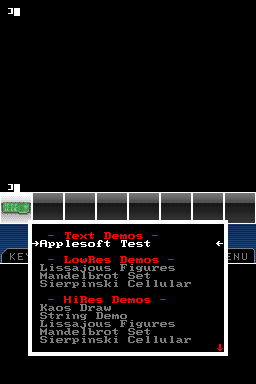
*12 Built-In Applesoft Demos | * 12 Built-In Applesoft Demos. | ||
*Apple 16KB RAM "Language Card" | * Apple 16KB RAM "Language Card". | ||
==Controls== | ==Controls== | ||
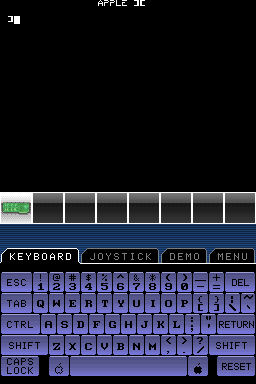
'''Keyboard Tab:''' | '''Keyboard Tab:''' | ||
Touchscreen - Keyboard | |||
Start - Menu | |||
Defaults to Control-Reset and Shift-Mods enabled. | Defaults to Control-Reset and Shift-Mods enabled. | ||
'''Joystick Tab:''' | '''Joystick Tab:''' | ||
Touchscreen - Player 0 & 1 Analog Joysticks | |||
D-Pad - Player 0 Digital Joystick | |||
A/B/X/Y - player 1 Digital Joystick | |||
L - Player 0 Button | |||
R - Player 1 Button | |||
Start - Menu | |||
Select - Fullscreen Analog Joystick Mode Toggle | |||
Defaults to Auto-Center enabled. | Defaults to Auto-Center enabled. | ||
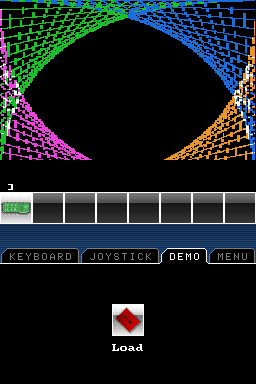
'''Demo Tab:''' | '''Demo Tab:''' | ||
Icon or A - Demo list | |||
D-Pad/A/B - Demo list controls | |||
'''Menu Tab:''' | '''Menu Tab:''' | ||
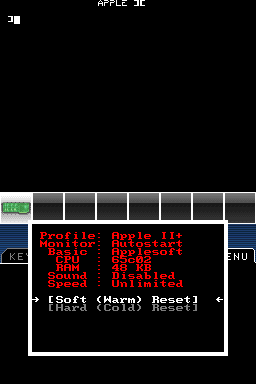
==Known | System Icon - Display profile, Soft/hard reset | ||
Peripheral Icon - Display slot contents | |||
==Screenshots== | |||
https://dlhb.gamebrew.org/dshomebrew/a2ds2.png | |||
https://dlhb.gamebrew.org/dshomebrew/a2ds3.png | |||
https://dlhb.gamebrew.org/dshomebrew/a2ds4.png | |||
https://dlhb.gamebrew.org/dshomebrew/a2ds5.png | |||
==Known issues== | |||
The disk emulation isn't complete, with small bugs and missing sound. | The disk emulation isn't complete, with small bugs and missing sound. | ||
==External links== | |||
* Author's website - http://homebrew.thewaffleiron.net/GrizzlyAdams/DS | |||
Latest revision as of 04:13, 16 August 2024
| Apple2DS | |
|---|---|
| Error creating thumbnail: Unable to save thumbnail to destination | |
| General | |
| Author | Grizzly Adams |
| Type | Computer |
| Version | 2008 |
| License | Mixed |
| Last Updated | 2008/09/08 |
| Links | |
| Download | |
| Website | |
| Source | |

A2DS is an Apple 2 emulator for the Nintendo DS.
It was participated in the Retroemu Contest 2008.
Features
- Apple II+ Hardware.
- MOS 65C02 CPU (Written in 100% ARM Assembly).
- Text, LoRes, HiRes, Mixed graphics.
- Onscreen Keyboard.
- 12 Built-In Applesoft Demos.
- Apple 16KB RAM "Language Card".
Controls
Keyboard Tab:
Touchscreen - Keyboard
Start - Menu
Defaults to Control-Reset and Shift-Mods enabled.
Joystick Tab:
Touchscreen - Player 0 & 1 Analog Joysticks
D-Pad - Player 0 Digital Joystick
A/B/X/Y - player 1 Digital Joystick
L - Player 0 Button
R - Player 1 Button
Start - Menu
Select - Fullscreen Analog Joystick Mode Toggle
Defaults to Auto-Center enabled.
Demo Tab:
Icon or A - Demo list
D-Pad/A/B - Demo list controls
Menu Tab:
System Icon - Display profile, Soft/hard reset
Peripheral Icon - Display slot contents
Screenshots
Known issues
The disk emulation isn't complete, with small bugs and missing sound.
External links
- Author's website - http://homebrew.thewaffleiron.net/GrizzlyAdams/DS