
Flags & Nations: Difference between revisions
From GameBrew
More actions
Created page with "{{Infobox homebrew | title = Flags & Nations | image = File:Flagsnnationds.jpg | type = Trivia | version = 1.0 15/9/2009 | licence = Mixed | aut..." |
No edit summary |
||
| (19 intermediate revisions by the same user not shown) | |||
| Line 1: | Line 1: | ||
{{Infobox | {{Infobox DS Homebrews | ||
| title | |title=Flags & Nations | ||
| image | |image=flagsandnations.png | ||
| type | |description=Offers 9 amusing minigames based upon flags and nations. | ||
| version | |author=Object65 | ||
| | |lastupdated=2009/09/15 | ||
| | |type=Trivia | ||
| website | |version=1.0 | ||
|license=Mixed | |||
|download=https://dlhb.gamebrew.org/dshomebrew2/flagsandnations.zip | |||
}} | |website=http://www.object65.it/FlagsDS.aspx?lang=eng | ||
}} | |||
Flags & Nations is a Nintendo DS homebrew that offers 9 amusing minigames based upon flags and nations. | Flags & Nations is a Nintendo DS homebrew that offers 9 amusing minigames based upon flags and nations. | ||
==User guide== | ==User guide== | ||
There are 9 games in total: | |||
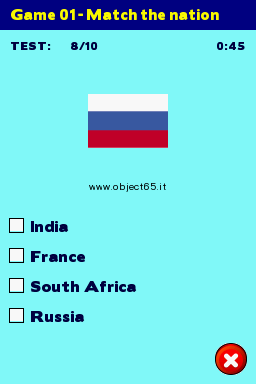
* Game 01 - Match the proposed flag to the nation, selecting it with the stylus. | |||
* Game 02 - Write the letters that compose the nation's name. Use the help key to see the flag. | |||
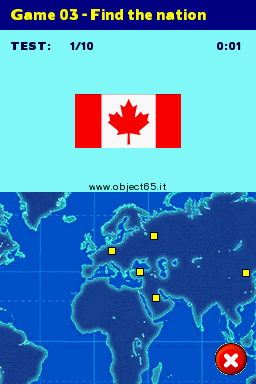
* Game 03 - Select on the map the capital city of the nation related to the proposed flag. Use the stylus to scroll the map. | |||
* Game 04 - Write the name of the nation whose letters are showed in random order. Use the help key to see the flag. | |||
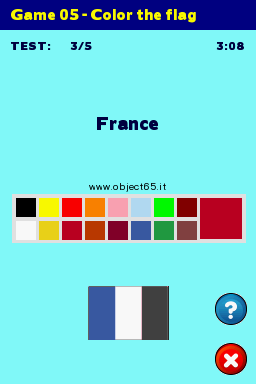
* Game 05 - Paint the proposed flag selecting the colors on the palette and touching with the stylus the area to paint. | |||
* Game 06 - Press the rotation key to adjust the flag position, then go to the next flag. | |||
* Game 07 - Remember a flag's sequence and then select with the stylus the requested one. | |||
* Game 08 - Match the proposed nation with its flag, selecting it with the stylus. | |||
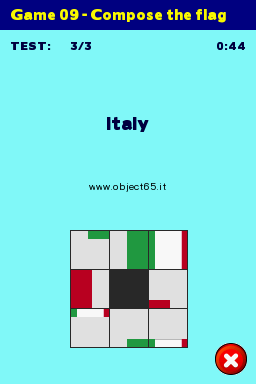
* Game 09 - It is a puzzle, compose the flag moving its parts with the stylus. Selecting a cell, it moves on the empty one. | |||
The game can be played at 2 levels: in easy mode only the G20's flags are proposed, in standard mode all the 197 defined flags are used and the difficulty increases. | The game can be played at 2 levels: in easy mode only the G20's flags are proposed, in standard mode all the 197 defined flags are used and the difficulty increases. | ||
Besides to minigames Flags & Nations allows to look up the flag's archive, it offers the possibility to check onto the map the position of the flag's related country. | Besides to minigames Flags & Nations allows to look up the flag's archive, it offers the possibility to check onto the map the position of the flag's related country. | ||
==Controls== | |||
Operate with Stylus. | |||
Select - View the flag's archive | |||
==Screenshots== | |||
https://dlhb.gamebrew.org/dshomebrew/flagsandnations2.png | |||
https://dlhb.gamebrew.org/dshomebrew/flagsandnations3.png | |||
https://dlhb.gamebrew.org/dshomebrew/flagsandnations4.png | |||
https://dlhb.gamebrew.org/dshomebrew/flagsandnations5.png | |||
<!--BEGIN Online Emulator Section--> | |||
==Online emulator== | |||
{{EmulatorJS Main | |||
|width=515px | |||
|height=384px | |||
|EJS_backgroundImage=https://www.gamebrew.org/images/c/ce/Flagsandnations.png | |||
|EJS_core=desmume2015 | |||
|EJS_gameName=Flags & Nations | |||
|EJS_gameUrl=https://dlhb.gamebrew.org/onlineemulators/nds/flagsandnations.7z | |||
}} | |||
{{DS Control Settings}} | |||
<!--END Online Emulator Section--> | |||
==Compatibility== | ==Compatibility== | ||
Tested on | Tested on TTDSi (firmware 1.17). | ||
==External links== | |||
* Author's website - http://www.object65.it/FlagsDS.aspx?lang=eng | |||

Latest revision as of 12:58, 20 August 2024
| Flags & Nations | |
|---|---|
 | |
| General | |
| Author | Object65 |
| Type | Trivia |
| Version | 1.0 |
| License | Mixed |
| Last Updated | 2009/09/15 |
| Links | |
| Download | |
| Website | |
Flags & Nations is a Nintendo DS homebrew that offers 9 amusing minigames based upon flags and nations.
User guide
There are 9 games in total:
- Game 01 - Match the proposed flag to the nation, selecting it with the stylus.
- Game 02 - Write the letters that compose the nation's name. Use the help key to see the flag.
- Game 03 - Select on the map the capital city of the nation related to the proposed flag. Use the stylus to scroll the map.
- Game 04 - Write the name of the nation whose letters are showed in random order. Use the help key to see the flag.
- Game 05 - Paint the proposed flag selecting the colors on the palette and touching with the stylus the area to paint.
- Game 06 - Press the rotation key to adjust the flag position, then go to the next flag.
- Game 07 - Remember a flag's sequence and then select with the stylus the requested one.
- Game 08 - Match the proposed nation with its flag, selecting it with the stylus.
- Game 09 - It is a puzzle, compose the flag moving its parts with the stylus. Selecting a cell, it moves on the empty one.
The game can be played at 2 levels: in easy mode only the G20's flags are proposed, in standard mode all the 197 defined flags are used and the difficulty increases.
Besides to minigames Flags & Nations allows to look up the flag's archive, it offers the possibility to check onto the map the position of the flag's related country.
Controls
Operate with Stylus.
Select - View the flag's archive
Screenshots
Online emulator
| Nintendo DS | Keyboard |
|---|---|

|

|

|

|

|

|

|

|

|

|

|

|

|

|

|

|

|

|
Compatibility
Tested on TTDSi (firmware 1.17).
External links
- Author's website - http://www.object65.it/FlagsDS.aspx?lang=eng