NTRCCompiler 3DS: Difference between revisions
From GameBrew
More actions
m Text replacement - "image = https://dlhb.gamebrew.org/3dshomebrew/" to "image = " |
No edit summary |
||
| (10 intermediate revisions by the same user not shown) | |||
| Line 1: | Line 1: | ||
{{Infobox 3DS Homebrews | {{Infobox 3DS Homebrews | ||
| title = NTRCCompiler | |title=NTRCCompiler | ||
| image = | |image=Ntrccompiler2.png | ||
| | |description=Cheats maker. | ||
| | |author=David Zocchi | ||
| lastupdated = 2017/02/27 | |lastupdated=2017/02/27 | ||
| | |type=Hack Utilities | ||
| | |version=2.0 | ||
| website = https://gbatemp.net/threads/release-ntrccompiler-2-0.462445 | |license=Mixed | ||
|download=https://dlhb.gamebrew.org/3dshomebrews/ntrccompiler.zip | |||
|website=https://gbatemp.net/threads/release-ntrccompiler-2-0.462445 | |||
}} | }} | ||
{{Obsolete}} | |||
NTRCCompiler is a program for creating plugins. | |||
Note: | '''Note:''' The program loads the database from Fort42, which is no longer a valid domain. | ||
==Prerequisites | ==User guide== | ||
===Prerequisites=== | |||
* If you have devkitPro installed you don't need to do anything. | * If you have devkitPro installed you don't need to do anything. | ||
* If you | * If you don't then click the "copy devkitPro" button. | ||
==How to use | ===How to use=== | ||
* Click Load Games (from Fort42). | |||
* Click a Game you want. | |||
* If you want to save as a Plugin for immediate use, click Save as Plugin, click open the plugin folder and move the cheat to your plugin folder. | |||
* If you want to save for editing Later or for manual plugin making, Save as Text. | |||
==How to edit/make a cheat | ===How to edit/make a cheat=== | ||
* Move the file to the editor, or open a text file in the Cheat Editor Tab. | |||
* Edit your codes. | |||
* Save as text, or as a plugin. | |||
===Create plugin using text files=== | |||
* Click open NTR folder. | |||
* Drag the 0000000XXXXXX.txt file on to Gateshark2NTR.exe. | |||
* It will ask for your name then it create the plugin in the plugin folder. | |||
== | ==Screenshots== | ||
https://dlhb.gamebrew.org/3dshomebrews/ntrccompiler3.png | |||
== | ==External links== | ||
* GBAtemp - https://gbatemp.net/threads/release-ntrccompiler-2-0.462445 | |||
Latest revision as of 11:27, 22 June 2024
| NTRCCompiler | |
|---|---|
 | |
| General | |
| Author | David Zocchi |
| Type | Hack Utilities |
| Version | 2.0 |
| License | Mixed |
| Last Updated | 2017/02/27 |
| Links | |
| Download | |
| Website | |
 |
This application has been obsoleted by one or more applications that serve the same purpose, but are more stable or maintained. |
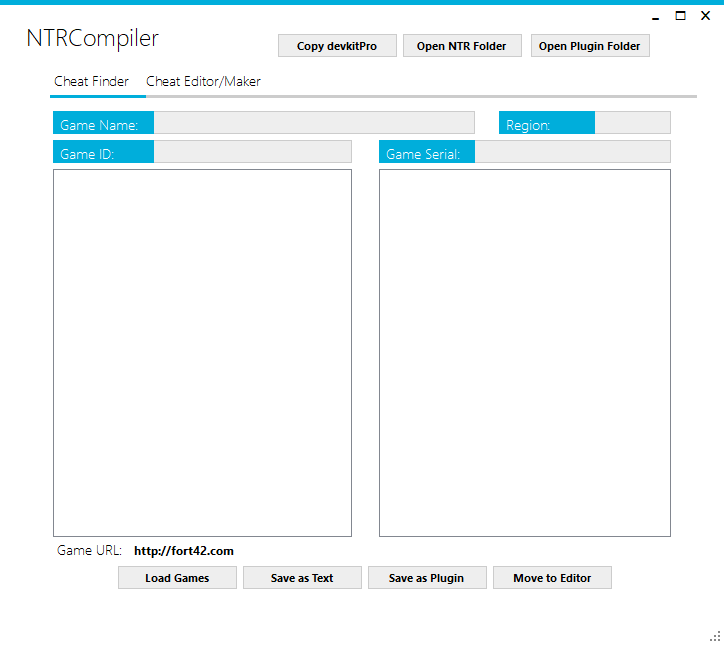
NTRCCompiler is a program for creating plugins.
Note: The program loads the database from Fort42, which is no longer a valid domain.
User guide
Prerequisites
- If you have devkitPro installed you don't need to do anything.
- If you don't then click the "copy devkitPro" button.
How to use
- Click Load Games (from Fort42).
- Click a Game you want.
- If you want to save as a Plugin for immediate use, click Save as Plugin, click open the plugin folder and move the cheat to your plugin folder.
- If you want to save for editing Later or for manual plugin making, Save as Text.
How to edit/make a cheat
- Move the file to the editor, or open a text file in the Cheat Editor Tab.
- Edit your codes.
- Save as text, or as a plugin.
Create plugin using text files
- Click open NTR folder.
- Drag the 0000000XXXXXX.txt file on to Gateshark2NTR.exe.
- It will ask for your name then it create the plugin in the plugin folder.
Screenshots