
Png2bclim 3DS: Difference between revisions
From GameBrew
More actions
Created page with "{{Infobox-3DS-Homebrews | title = png2bclim | image = https://dlhb.gamebrew.org/3dshomebrew/png2bclim-3DS.jpg|250px | type = PC Utilities | version = v1.1.0 | lastupdated = 20..." |
m Text replacement - "Category:PC utilities for 3DS homebrew" to "" |
||
| (11 intermediate revisions by the same user not shown) | |||
| Line 1: | Line 1: | ||
{{Infobox | {{Infobox 3DS Homebrews | ||
| title = png2bclim | |title=png2bclim | ||
| image = | |image=png2bclim3.png | ||
| | |description=(3DS) BCLIM Converter (to/from PNG). | ||
| | |author=kwsch | ||
| lastupdated = 2014/10/12 | |lastupdated=2014/10/12 | ||
| | |type=File Operation | ||
| | |version=1.1.0 | ||
| | |license=Mixed | ||
| | |download=https://dlhb.gamebrew.org/3dshomebrews/png2bclim.7z | ||
| source = https://github.com/kwsch/png2bclim | |website=https://github.com/kwsch/png2bclim | ||
|source=https://github.com/kwsch/png2bclim | |||
}} | }} | ||
png2bclim is a BCLIM Converter (to/from PNG). | |||
==User guide== | |||
Convert PNG to BCLIM: | |||
* Drag & Drop (or via the Open Button) to convert a PNG to BCLIM. | |||
* Output format should be specified via the ComboBox dropdowns. | |||
* A new BCLIM file will be saved in the same directory as "new_[filename].bclim". | |||
BCLIM | Convert BCLIM to PNG: | ||
* Drag & Drop (or via the Open Button) to convert a BCLIM to PNG. | |||
* Input format should be automatically detected, note this program currently does not support bclim creation for Ericsson Compressed BCLIMs (etc1/etc1A4) or HILO8. | |||
* A new PNG file will be saved in the same directory as "[filename].png". | |||
==Screenshots== | |||
https://dlhb.gamebrew.org/3dshomebrews/png2bclim3.png | |||
==Changelog== | |||
'''v1.1.0''' | |||
* Adding ETC1(A4) to PNG conversion. BCLIM creation not supported. | |||
==External links== | |||
* GitHub - https://github.com/kwsch/png2bclim | |||
Latest revision as of 04:23, 6 May 2024
| png2bclim | |
|---|---|
 | |
| General | |
| Author | kwsch |
| Type | File Operation |
| Version | 1.1.0 |
| License | Mixed |
| Last Updated | 2014/10/12 |
| Links | |
| Download | |
| Website | |
| Source | |
png2bclim is a BCLIM Converter (to/from PNG).
User guide
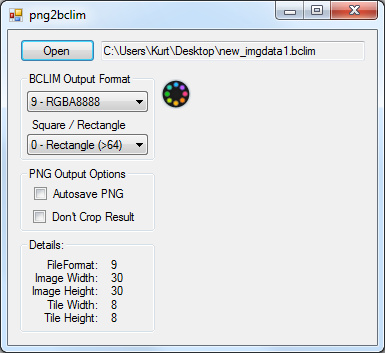
Convert PNG to BCLIM:
- Drag & Drop (or via the Open Button) to convert a PNG to BCLIM.
- Output format should be specified via the ComboBox dropdowns.
- A new BCLIM file will be saved in the same directory as "new_[filename].bclim".
Convert BCLIM to PNG:
- Drag & Drop (or via the Open Button) to convert a BCLIM to PNG.
- Input format should be automatically detected, note this program currently does not support bclim creation for Ericsson Compressed BCLIMs (etc1/etc1A4) or HILO8.
- A new PNG file will be saved in the same directory as "[filename].png".
Screenshots
Changelog
v1.1.0
- Adding ETC1(A4) to PNG conversion. BCLIM creation not supported.
External links
- GitHub - https://github.com/kwsch/png2bclim