
CalculaThreeDS 3DS: Difference between revisions
From GameBrew
More actions
m Text replacement - "Infobox 3DS homebrew" to "Infobox-3DS-Homebrews" |
m Text replacement - "Category:Homebrew maths applications on 3DS" to "" |
||
| (13 intermediate revisions by the same user not shown) | |||
| Line 1: | Line 1: | ||
{{Infobox | {{Infobox 3DS Homebrews | ||
| title = CalculaThreeDS | |title=CalculaThreeDS | ||
| image = | |image=Calculathreeds2.png | ||
| type = Math | |description=3DS homebrew scientific calculator. | ||
| version = | |author=LiquidFenrir (Théo B.) | ||
| | |lastupdated=2021/01/10 | ||
| | |type=Math | ||
|version=0.2 | |||
| | |license=Mixed | ||
| source = https:// | |download=https://dlhb.gamebrew.org/3dshomebrews/calculathreeds.7z | ||
|website=https://github.com/LiquidFenrir/CalculaThreeDS | |||
|source=https://github.com/LiquidFenrir/CalculaThreeDS | |||
}} | }} | ||
CalculaThreeDS is a scientific calculator homebrew written in C++17 for the 3DS. | |||
= | ==User guide== | ||
The interface is split between 4 parts: | |||
* Memory on the top screen, up to 12 calculations can be remembered and copied back to the working board. | |||
* Input area on the bottom screen, where what you type will appear, using a custom pretty-printing system (freely sized fractions, exponents, and square roots). | |||
* Keyboard panel selector on a black background. | |||
* An intuitive touch keyboard with all the inputs you will ever need. | |||
The touch keyboard consists of 3 different panels: | |||
* Basic input, for operations and digits. | |||
* Functions (don't forget to put parentheses after). | |||
* User variables (10 of them) and user functions (3, TODO) with an assignment (arrow) sign that can appear anywhere in a calculation. | |||
==Controls== | |||
D-Pad or Touchscreen - Move the cursor after you typed things out | |||
B or Delete Key - Remove content | |||
A or Equals key - Launch the calculation | |||
==Screenshots== | |||
https://dlhb.gamebrew.org/3dshomebrews/calculathreeds3.png | |||
* | ==Changelog== | ||
* | '''v0.2 2021/01/10''' | ||
* Added complex numbers and the conjugate function to work with them. | |||
* Added implicit multiplications. | |||
'''v0.1 2021/01/10''' | |||
* First testing release. | |||
==Credits== | |||
LiquidFenrir for writing the application. | |||
devkitPro for devkitARM and libctru/libcitro3d/libcitro2d. | |||
Wikipedia article on the Shunting-Yard algorithm/Reverse Polish Notation for interpreting the calculations. | |||
==External links== | |||
* GitHub - https://github.com/LiquidFenrir/CalculaThreeDS | |||
Latest revision as of 04:16, 6 May 2024
| CalculaThreeDS | |
|---|---|
 | |
| General | |
| Author | LiquidFenrir (Théo B.) |
| Type | Math |
| Version | 0.2 |
| License | Mixed |
| Last Updated | 2021/01/10 |
| Links | |
| Download | |
| Website | |
| Source | |
CalculaThreeDS is a scientific calculator homebrew written in C++17 for the 3DS.
User guide
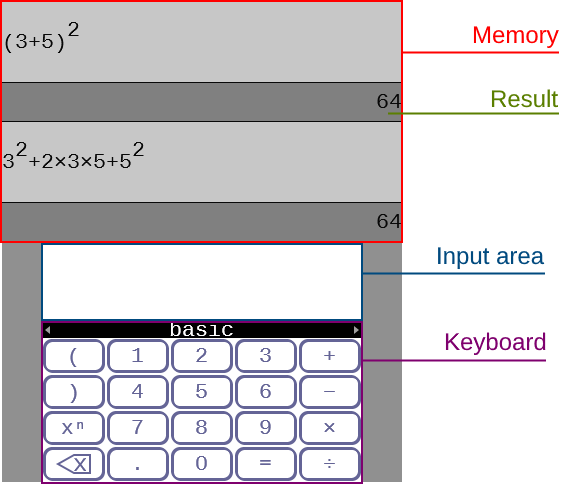
The interface is split between 4 parts:
- Memory on the top screen, up to 12 calculations can be remembered and copied back to the working board.
- Input area on the bottom screen, where what you type will appear, using a custom pretty-printing system (freely sized fractions, exponents, and square roots).
- Keyboard panel selector on a black background.
- An intuitive touch keyboard with all the inputs you will ever need.
The touch keyboard consists of 3 different panels:
- Basic input, for operations and digits.
- Functions (don't forget to put parentheses after).
- User variables (10 of them) and user functions (3, TODO) with an assignment (arrow) sign that can appear anywhere in a calculation.
Controls
D-Pad or Touchscreen - Move the cursor after you typed things out
B or Delete Key - Remove content
A or Equals key - Launch the calculation
Screenshots
Changelog
v0.2 2021/01/10
- Added complex numbers and the conjugate function to work with them.
- Added implicit multiplications.
v0.1 2021/01/10
- First testing release.
Credits
LiquidFenrir for writing the application.
devkitPro for devkitARM and libctru/libcitro3d/libcitro2d.
Wikipedia article on the Shunting-Yard algorithm/Reverse Polish Notation for interpreting the calculations.