
3dfetch 3DS: Difference between revisions
More actions
No edit summary |
No edit summary |
||
| (26 intermediate revisions by the same user not shown) | |||
| Line 1: | Line 1: | ||
{{Infobox 3DS | {{Infobox 3DS Homebrews | ||
| title = 3dfetch | |title=3dfetch | ||
| image = | |image=3dfetch3.png | ||
| type = | |description=Displays various information about your Nintendo 3DS in pretty colors. | ||
| version = 1. | |author=aliceinpalth | ||
| | |lastupdated=2017/07/01 | ||
| | |type=System Tools | ||
|version=1.10/11 | |||
| | |license=Mixed | ||
| source = https:// | |download=https://dlhb.gamebrew.org/3dshomebrews/3dfetch.7z | ||
|website=https://github.com/yyualice/3dfetch | |||
|source=https://github.com/yyualice/3dfetch | |||
}} | }} | ||
3dfetch is a 3DS homebrew application that can display varies information of your 3DS in pretty colors. | 3dfetch is a 3DS homebrew application that can display varies information of your 3DS in pretty colors. | ||
| Line 24: | Line 23: | ||
* New 3DS and old 3DS compatible. | * New 3DS and old 3DS compatible. | ||
* Press select for a configuration menu. | * Press select for a configuration menu. | ||
* Use in tandem with [ | * Use in tandem with [[imgurup-3ds]] for an easy sharing experience. | ||
==Installation== | ==Installation== | ||
===Installing=== | ===Installing=== | ||
Available as a CIA/QR code. | |||
Copy .cia to your SD card and install it with the CIA manager of your choice. Or you can get it on TitleDB within [[FBI 3DS|FBI]]. | |||
===Building=== | ===Building=== | ||
| Line 34: | Line 35: | ||
* [https://github.com/dnasdw/3dstool/releases 3ds-tool] to recompile the ROM filesystem. | * [https://github.com/dnasdw/3dstool/releases 3ds-tool] to recompile the ROM filesystem. | ||
* [https://github.com/Steveice10/bannertool bannertool] to create the banner and icon files. | * [https://github.com/Steveice10/bannertool bannertool] to create the banner and icon files. | ||
* A fork of lpp-3ds found [https://github.com/daedreth/lpp-3ds here] which includes expanded functionality. | * A fork of lpp-3ds found [https://github.com/daedreth/lpp-3ds here] which includes expanded functionality. It is advised to use the compiled binary (lpp-3ds.elf) included in the repository. | ||
To compile: | |||
* CIA - Run <code>make</code> to build an installable CIA-file. | |||
* 3DSX - Run <code>make 3dfetch.3dsx</code> instead and merge the <code>/3ds</code> folder with the one on your SD card. | |||
* Network-sent 3DSX - If you would like to have 3dfetch be sent via network to your console, open up Homebrew Launcher, press <code>Y</code> and run <code>make 3dsx</code> instead. | |||
==User guide== | ==User guide== | ||
| Line 48: | Line 48: | ||
* showSplash:true | false - Enable/disable the CFW splash on the bottom. | * showSplash:true | false - Enable/disable the CFW splash on the bottom. | ||
* showCFW:true | false to Enable/disable CFW detection. | * showCFW:true | false to Enable/disable CFW detection. | ||
You can also use the configuration menu within the homebrew. All changes to the configuration are saved in a config file. | |||
==Controls== | ==Controls== | ||
| Line 54: | Line 56: | ||
D-Pad - Cycle through text colors | D-Pad - Cycle through text colors | ||
L/R - Change background colors | L/R - Change background colors | ||
Select - Config menu | |||
==Screenshots== | ==Screenshots== | ||
https://dlhb.gamebrew.org/3dshomebrews/3dfetch4.png | |||
''' | ==Changelog== | ||
'''v1.10/11 2017/07/01''' | |||
* (1.11) Fixed white background not being properly available. | |||
* Added a pretty animation to simulate typing a shell command. | |||
* Cycling left text colors now additionally cycles the CFW logo color. | |||
* Exact battery percentage is shown. | |||
* Luma CFW now displays the version number with it. | |||
* Added detection for Cakes CFW. | |||
* Added detection for Corbenik CFW. | |||
* Added detection for RX Tools CFW. | |||
* Added detection for Rei CFW. | |||
==External links== | |||
* GitHub - https://github.com/aliceinpalth/3dfetch | |||
Latest revision as of 12:12, 26 July 2024
| 3dfetch | |
|---|---|
 | |
| General | |
| Author | aliceinpalth |
| Type | System Tools |
| Version | 1.10/11 |
| License | Mixed |
| Last Updated | 2017/07/01 |
| Links | |
| Download | |
| Website | |
| Source | |
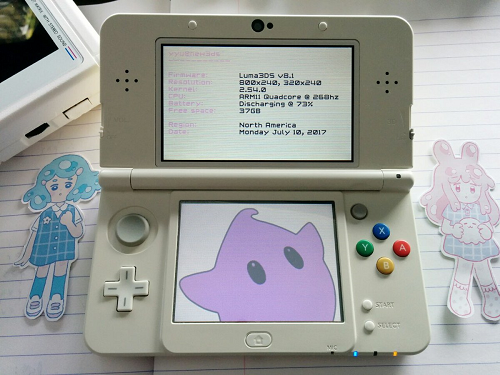
3dfetch is a 3DS homebrew application that can display varies information of your 3DS in pretty colors.
Similar to Linux's screenfetch script, but unsigned and executed on a Nintendo 3DS. RSF file based off of this dummy RSF. Mainly developed as a method for learning 3DS homebrew toolkits, libraries, and build environments.
Features
- Pretty colors.
- Cycle through text colors using the d-pad, and background colors using the L and R buttons.
- Press the A button to take a screenshot, saved to the SD card root as 3dfetch_day_month_year_x.jpg.
- All information dynamically grabbed from 3DS' hardware.
- New 3DS and old 3DS compatible.
- Press select for a configuration menu.
- Use in tandem with imgurup-3ds for an easy sharing experience.
Installation
Installing
Available as a CIA/QR code.
Copy .cia to your SD card and install it with the CIA manager of your choice. Or you can get it on TitleDB within FBI.
Building
- makerom to create the CIA.
- 3ds-tool to recompile the ROM filesystem.
- bannertool to create the banner and icon files.
- A fork of lpp-3ds found here which includes expanded functionality. It is advised to use the compiled binary (lpp-3ds.elf) included in the repository.
To compile:
- CIA - Run
maketo build an installable CIA-file. - 3DSX - Run
make 3dfetch.3dsxinstead and merge the/3dsfolder with the one on your SD card. - Network-sent 3DSX - If you would like to have 3dfetch be sent via network to your console, open up Homebrew Launcher, press
Yand runmake 3dsxinstead.
User guide
Configuration
3dfetch can optionally be configured by creating a file at the root of your SD card called 3dfetch.conf. At present, the following options are available:
- showAnimation:true | false - Enable/disable the little shell animation on startup.
- showSplash:true | false - Enable/disable the CFW splash on the bottom.
- showCFW:true | false to Enable/disable CFW detection.
You can also use the configuration menu within the homebrew. All changes to the configuration are saved in a config file.
Controls
A - Take screenshots
D-Pad - Cycle through text colors
L/R - Change background colors
Select - Config menu
Screenshots
Changelog
v1.10/11 2017/07/01
- (1.11) Fixed white background not being properly available.
- Added a pretty animation to simulate typing a shell command.
- Cycling left text colors now additionally cycles the CFW logo color.
- Exact battery percentage is shown.
- Luma CFW now displays the version number with it.
- Added detection for Cakes CFW.
- Added detection for Corbenik CFW.
- Added detection for RX Tools CFW.
- Added detection for Rei CFW.