
Comprobación de Botones: Difference between revisions
From GameBrew
More actions
No edit summary |
No edit summary |
||
| (14 intermediate revisions by the same user not shown) | |||
| Line 1: | Line 1: | ||
{{Infobox | {{Infobox DS Homebrews | ||
| title | |title=Comprobación de Botones | ||
| image | |image=comprobacion.jpg | ||
| type | |description=Buttons tester for DS. | ||
| version | |author=cheleon15 | ||
| | |lastupdated=2010/06/22 | ||
| | |type=System Tools | ||
| website | |version=Final | ||
|license=Mixed | |||
|download=https://dlhb.gamebrew.org/dshomebrew2/comprobacionds.rar | |||
}} | |website=http://nds.scenebeta.com/noticia/comprobacion-de-botones | ||
}} | |||
This is a homebrew buttons tester for the DS. | |||
==User guide== | ==User guide== | ||
| Line 32: | Line 32: | ||
Start - Back to menu | Start - Back to menu | ||
==Screenshots== | |||
https://dlhb.gamebrew.org/dshomebrew/comprobacion2.png | |||
==Compatibility== | ==Compatibility== | ||
Tested on: | Tested on: | ||
M3i Zero | M3i Zero (Sakura firmware 1.48X) <br> | ||
M3DS Real | M3DS Real (firmware 4.8) <br> | ||
==External links== | |||
* SceneBeta - http://nds.scenebeta.com/noticia/comprobacion-de-botones | |||
Latest revision as of 11:59, 20 August 2024
| Comprobación de Botones | |
|---|---|
| Error creating thumbnail: Unable to save thumbnail to destination | |
| General | |
| Author | cheleon15 |
| Type | System Tools |
| Version | Final |
| License | Mixed |
| Last Updated | 2010/06/22 |
| Links | |
| Download | |
| Website | |

This is a homebrew buttons tester for the DS.
User guide
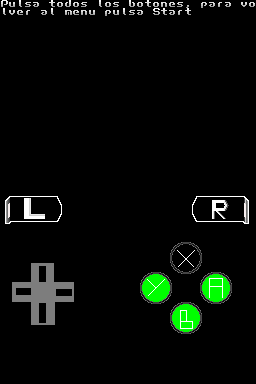
It tests the buttons on DS including Digital Pad, buttons A, B, Y, X, and L and R triggers.
Controls
Menu:
Up/Down - Navigate menu
A - Select an option
Test:
D-Pad/A/B/Y/X/L/R - Verify proper operation
Start - Back to menu
Tutorial:
Start - Back to menu
Screenshots
Compatibility
Tested on:
M3i Zero (Sakura firmware 1.48X)
M3DS Real (firmware 4.8)