
Sudoku DS: Difference between revisions
More actions
No edit summary |
No edit summary |
||
| (18 intermediate revisions by the same user not shown) | |||
| Line 1: | Line 1: | ||
{{Infobox | {{Infobox DS Homebrews | ||
| title | |title=Sudoku | ||
| image | |image=sudokudsmor.png | ||
| type | |description=Sudoku on NDS. | ||
| version | |author=Morgan Robertson (morganDS) | ||
| | |lastupdated=2007/11/18 | ||
| | |type=Puzzle | ||
| website | |version=1.0 | ||
|license=Mixed | |||
|download=https://dlhb.gamebrew.org/dshomebrew2/sudokuds_morgan_1.0.zip | |||
}} | |website=http://nds.scenebeta.com/noticia/sudoku | ||
}} | |||
Sudoku DS is a remake of the puzzle game Sudoku for the NDS, with the options to change the background and music. | Sudoku DS is a remake of the puzzle game Sudoku for the NDS, with the options to change the background and music. | ||
==User guide== | ==User guide== | ||
===How to play=== | |||
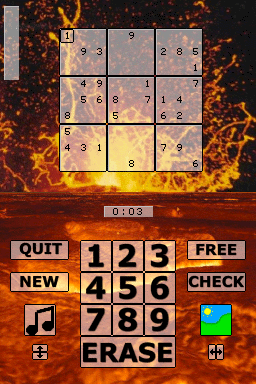
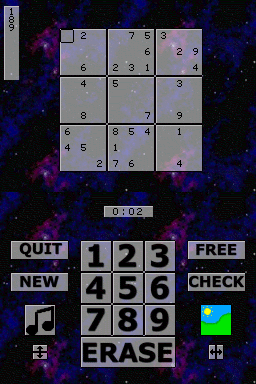
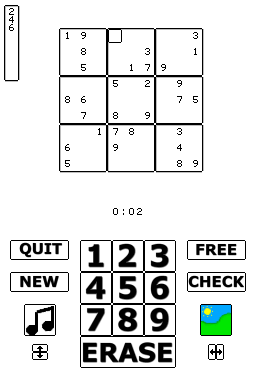
The objective is to fill a 9×9 grid with digits so that each column, each row, and each of the nine 3×3 sub-grids that compose the grid (also called boxes, blocks, regions or sub-squares) contains all of the digits from 1 to 9. | |||
===Options menu=== | |||
* Givens - Select how many numbers are given in a game. | * Givens - Select how many numbers are given in a game. | ||
* Freebies - Select the maximum number of freebies that can be used during a game. | * Freebies - Select the maximum number of freebies that can be used during a game. | ||
| Line 38: | Line 39: | ||
==Screenshots== | ==Screenshots== | ||
https://dlhb.gamebrew.org/dshomebrew/sudokudsmor2.png | |||
https://dlhb.gamebrew.org/dshomebrew/sudokudsmor3.png | |||
https://dlhb.gamebrew.org/dshomebrew/sudokudsmor4.png | |||
https://dlhb.gamebrew.org/dshomebrew/sudokudsmor5.png | |||
<!--BEGIN Online Emulator Section--> | |||
==Online emulator== | |||
{{EmulatorJS Main | |||
|width=515px | |||
|height=384px | |||
|EJS_backgroundImage=https://www.gamebrew.org/images/f/f2/Sudokudsmor.png | |||
|EJS_core=desmume2015 | |||
|EJS_gameName=Sudoku | |||
|EJS_gameUrl=https://dlhb.gamebrew.org/onlineemulators/nds/sudokudsmor.7z | |||
}} | |||
{{DS Control Settings}} | |||
<!--END Online Emulator Section--> | |||
==Known issues== | ==Known issues== | ||
Occasionally the program will freeze while trying to generate a puzzle. This happens, however, very rarely. Seeded puzzle #10 cause the program to freeze. | Occasionally the program will freeze while trying to generate a puzzle. This happens, however, very rarely. Seeded puzzle #10 cause the program to freeze. | ||
| Line 58: | Line 74: | ||
* Friends for the support in all programming endeavors. | * Friends for the support in all programming endeavors. | ||
==External links== | |||
* SceneBeta - http://nds.scenebeta.com/noticia/sudoku | |||
Latest revision as of 06:23, 21 August 2024
| Sudoku | |
|---|---|
 | |
| General | |
| Author | Morgan Robertson (morganDS) |
| Type | Puzzle |
| Version | 1.0 |
| License | Mixed |
| Last Updated | 2007/11/18 |
| Links | |
| Download | |
| Website | |
Sudoku DS is a remake of the puzzle game Sudoku for the NDS, with the options to change the background and music.
User guide
How to play
The objective is to fill a 9×9 grid with digits so that each column, each row, and each of the nine 3×3 sub-grids that compose the grid (also called boxes, blocks, regions or sub-squares) contains all of the digits from 1 to 9.
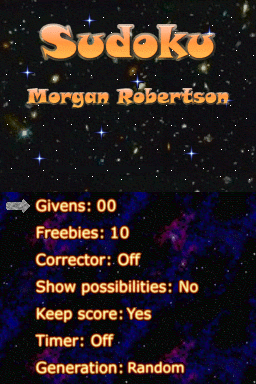
- Givens - Select how many numbers are given in a game.
- Freebies - Select the maximum number of freebies that can be used during a game.
- Corrector - Turn the corrector on/off. When on, you will be informed if you entered an incorrect number.
- Show/hide possibilities - This option can show you the possible entries for the currently selected space based on the numbers that you have entered into the puzzle.
- Keep score - A scoring grid will be displayed after the puzzle is completed if this option is turned on.
- Timer - Turn the timer on or off.
- Generation - Determine how puzzles will be generated.
- In seeded mode, the same puzzle will always be generated for a given seed.
- Tap the seed number on the touch screen to change the seed.
- The seed number will automatically increase by one when a puzzle is completed or if New is selected during gameplay.
Controls
Stylus - Select menu options, Enter numbers on the grid
A - Select menu options, Use a freebie
B - Back from options screen, Erase a number on the grid
D-Pad - Move cursor
Screenshots
Online emulator
| Nintendo DS | Keyboard |
|---|---|

|

|

|

|

|

|

|

|

|

|

|

|

|

|

|

|

|

|
Known issues
Occasionally the program will freeze while trying to generate a puzzle. This happens, however, very rarely. Seeded puzzle #10 cause the program to freeze.
The sound file for Crossbones is a little fuzzy due to several files conversions and compression.
Credits
Programmed by Morgan Robertson.
Graphics by Morgan Robertson.
Music by Morgan Robertson.
Special Thanks To:
- Mollusk and everyone at PAlib for writing a great library and other resources.
- Everyone who offered help and support in the PAlib forums.
- Everyone at devkitPro.
- Friends for the support in all programming endeavors.
External links
- SceneBeta - http://nds.scenebeta.com/noticia/sudoku