PandaFlow 3DS: Difference between revisions
More actions
Created page with "{{Infobox 3DS Homebrews |title=PandaFlow |image=PandaFlow3DS.png |description=Music player for Nintendo 3DS (plays with the lid closed, Mixtape-style). MP3/FLAC/WAV/AAC support, album covers, .lrc lyrics, shuffle/repeat. |author=PandaAkiraNakai |lastupdated=2026/06/11 |type=Media Players |version=1.1.0 |license=GPL-2.0 |download=https://dlhb.gamebrew.org/3dshomebrews/PandaFlow3DS.7z |website=https://github.com/PandaAkiraNakai/PandaFlow |source=https://github.com/PandaAki..." |
No edit summary |
||
| (One intermediate revision by the same user not shown) | |||
| Line 12: | Line 12: | ||
|source=https://github.com/PandaAkiraNakai/PandaFlow | |source=https://github.com/PandaAkiraNakai/PandaFlow | ||
}} | }} | ||
PandaFlow is a music player homebrew where audio would continue to play even when the console lid is closed (similar to the official Nintendo 3DS Sound app). | PandaFlow is a music player homebrew where audio would continue to play even when the console lid is closed (similar to the official Nintendo 3DS Sound app). | ||
| Line 56: | Line 55: | ||
Press Select to show/hide lyrics (bottom screen). | Press Select to show/hide lyrics (bottom screen). | ||
=== Music library ( | === Music library (albums) === | ||
PandaFlow scans <code>sdmc:/music</code> recursively. Each folder containing audio files is treated as an album. | PandaFlow scans <code>sdmc:/music</code> recursively. Each folder containing audio files is treated as an album. | ||
Latest revision as of 02:16, 28 June 2026
| PandaFlow | |
|---|---|
 | |
| General | |
| Author | PandaAkiraNakai |
| Type | Media Players |
| Version | 1.1.0 |
| License | GPL-2.0 |
| Last Updated | 2026/06/11 |
| Links | |
| Download | |
| Website | |
| Source | |
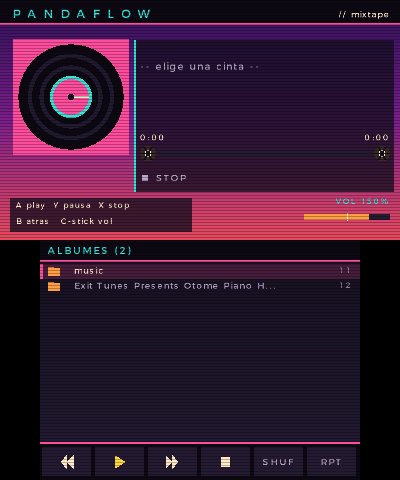
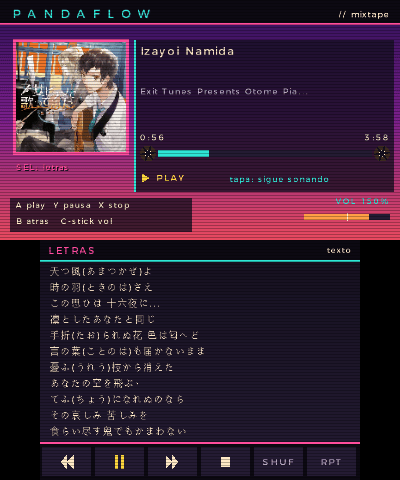
PandaFlow is a music player homebrew where audio would continue to play even when the console lid is closed (similar to the official Nintendo 3DS Sound app).
Written in C with devkitPro / libctru + citro2d.
Features
- Audio streaming via NDSP from a dedicated thread.
- Supports MP3/FLAC/WAV (dr_libs) and AAC (.m4a/.mp4/.aac) via faad2 + minimp4 (MP4 demux).
- Recursive music library organized by albums with cover art support (stb_image -> GPU texture)
- Synchronized .lrc lyrics (and .txt).
- Shuffle/Repeat modes
- Touch controls.
- Mixtape-style UI with a vinyl record aesthetic.
Installation
PandaFlow is distributed as a .3dsx homebrew application. You need a modded 3DS with CFW (such as Luma3DS) and the Homebrew Launcher.
Option 1: Universal Updater (recommended)
- Open Universal Updater on your 3DS.
- Search for PandaFlow and install it.
- It will download the .3dsx from the latest release and place it in
sdmc:/3ds/PandaFlow/. - Launch it from the Homebrew Launcher.
Option 2: Manual Installation
- Download PandaFlow.3dsx from the latest release.
- Copy it to
sdmc:/3ds/on your SD card. - Launch it via the Homebrew Launcher.
Adding your own music:
- Create a folder at
sdmc:/music. - Add music organized into album folders (or loose files).
User guide
Launch PandaFlow.
Browse albums and tracks; “Now Playing” and cover art appear on the top screen.
Lyrics
Place a file next to the audio with the same name:
- song.lrc - Synchronized lyrics (auto-scroll, current line highlighted)
- song.txt - Plain text (scrollable with D-Pad)
Press Select to show/hide lyrics (bottom screen).
Music library (albums)
PandaFlow scans sdmc:/music recursively. Each folder containing audio files is treated as an album.
Example structure:
sdmc:/music/
 Circles (Deluxe) - Mac Miller/
  01 - Mac Miller - Circles.flac
  01 - Mac Miller - Circles.lrc
  cover.jpg
- Album artwork:
cover.jpg,cover.png, orfolder.jpginside the album directory. - Images are decoded using stb_image and converted to GPU textures.
- Track metadata (track number, artist, title) is parsed from filenames in the format of
NN - Artist - Title. - Tracks are grouped and displayed under album headers.
Controls
D-Pad Up/Down - Move through list
D-Pad Left/Right - Page up/down
A - Play selected track, Enter album
Y - Pause/Resume
X - Stop playback
B - Go back
Select - Toggle lyrics
C-Stick Up/Down (New 3DS) - Volume control
Touch bar - Playback controls
Start - Exit
Screenshots