
Chex Quest Vita: Difference between revisions
From GameBrew
More actions
Created page with "{{Infobox Vita Homebrews |title=Chex Quest Vita |image=ChexQuestVita.png |description=Port of doomgeneric for PSVita. |author=DraxTube |lastupdated=2026/02/24 |type=Shooter |version=1.0 |license=N/A |download=https://dlhb.gamebrew.org/vitahomebrews/ChexQuestVita.7z |website=https://github.com/DraxTube/chexquest-vita |source=https://github.com/DraxTube/chexquest-vita |donation= }} {{#seo: |title=Vita Homebrew Games (Shooter) - GameBrew |title_mode=append |image=ChexQuestV..." |
No edit summary |
||
| (3 intermediate revisions by the same user not shown) | |||
| Line 19: | Line 19: | ||
|image_alt=Chex Quest Vita | |image_alt=Chex Quest Vita | ||
}} | }} | ||
Port of [https://en.wikipedia.org/wiki/Chex_Quest Chex Quest] (1996) to the PlayStation Vita, built on top of the [https://github.com/ozkl/doomgeneric doomgeneric] source port of Doom. | |||
A PSP version is also available: [https://github.com/DraxTube/Chex-Quest-PSP Chex Quest PSP]. | A PSP version is also available: [https://github.com/DraxTube/Chex-Quest-PSP Chex Quest PSP]. | ||
| Line 28: | Line 26: | ||
*Native Vita backend (no SDL), with video, audio, and input implemented directly against Vita system libraries. | *Native Vita backend (no SDL), with video, audio, and input implemented directly against Vita system libraries. | ||
*OPL3 FM music synthesis via Nuked-OPL3. | *OPL3 FM music synthesis via Nuked-OPL3. | ||
*Supports chex.wad, doom1.wad | *Supports chex.wad, doom1.wad and doom.wad. | ||
*Quick save/load functionality. | *Quick save/load functionality. | ||
*Dual analog stick controls. | *Dual analog stick controls. | ||
==Installation== | ==Installation== | ||
'''Requirements:''' | |||
*PS Vita or PSTV running HENkaku/Enso (firmware 3.60-3.74). | |||
*[[VitaShell]]. | |||
*<code>chex.wad</code> or <code>doom1.wad</code> or <code>doom.wad</code>. | |||
'''Instructions:''' | |||
*Download the VPK from the [https://github.com/DraxTube/chexquest-vita/releases Releases] page. | |||
*Transfer it to the Vita and install it using VitaShell. | |||
*Place your WAD file at <code>ux0:/data/chexquest/chex.wad</code> | |||
*Launch the game from the LiveArea. | |||
*Save files and debug logs are written to the same directory. | |||
==Controls== | |||
Left Analog - Move | |||
Right Analog - Turn | |||
Square or R - Fire | |||
Cross - Use / Open | |||
L - Run | |||
Triangle - Automap | |||
Circle - Strafe Modifier | |||
Start - Menu | |||
Select - Confirm | |||
D-Pad Left/Right - Weapon Cycle | |||
D-Pad Up - Quick Save (saves to slot 0) | |||
D-Pad Down - Quick Load (saves to slot 0) | |||
Quick Save and Quick Load have a 1-second cooldown. The in-game save/load menu does not work; use these button combos instead. | Quick Save and Quick Load have a 1-second cooldown. The in-game save/load menu does not work; use these button combos instead. | ||
==Screenshots== | ==Screenshots== | ||
| Line 89: | Line 74: | ||
https://dlhb.gamebrew.org/vitahomebrews/images/ChexQuestVita-02.png | https://dlhb.gamebrew.org/vitahomebrews/images/ChexQuestVita-02.png | ||
==Media== | |||
'''Chex Quest (PC) - Angry Video Game Nerd (AVGN)''' ([https://www.youtube.com/watch?v=Vg0y9i5E7nY Cinemassacre]) <br> | |||
<youtube width="640">Vg0y9i5E7nY</youtube> | |||
==Known issues== | ==Known issues== | ||
| Line 110: | Line 99: | ||
== External links == | == External links == | ||
* | * GitHub - https://github.com/DraxTube/chexquest-vita | ||
* VitaDB - https://www.rinnegatamante.eu/vitadb/#/info/1370 | * VitaDB - https://www.rinnegatamante.eu/vitadb/#/info/1370 | ||
Latest revision as of 13:39, 2 March 2026
| Chex Quest Vita | |
|---|---|
 | |
| General | |
| Author | DraxTube |
| Type | Shooter |
| Version | 1.0 |
| License | N/A |
| Last Updated | 2026/02/24 |
| Links | |
| Download | |
| Website | |
| Source | |
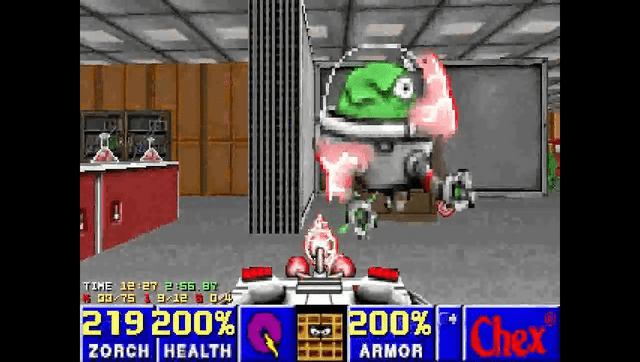
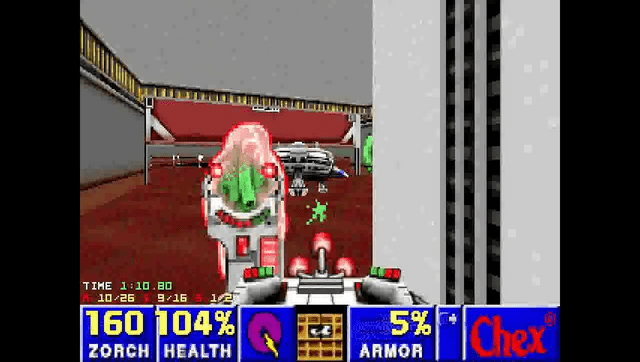
Port of Chex Quest (1996) to the PlayStation Vita, built on top of the doomgeneric source port of Doom.
A PSP version is also available: Chex Quest PSP.
Features
- Native Vita backend (no SDL), with video, audio, and input implemented directly against Vita system libraries.
- OPL3 FM music synthesis via Nuked-OPL3.
- Supports chex.wad, doom1.wad and doom.wad.
- Quick save/load functionality.
- Dual analog stick controls.
Installation
Requirements:
- PS Vita or PSTV running HENkaku/Enso (firmware 3.60-3.74).
- VitaShell.
chex.wadordoom1.wadordoom.wad.
Instructions:
- Download the VPK from the Releases page.
- Transfer it to the Vita and install it using VitaShell.
- Place your WAD file at
ux0:/data/chexquest/chex.wad - Launch the game from the LiveArea.
- Save files and debug logs are written to the same directory.
Controls
Left Analog - Move
Right Analog - Turn
Square or R - Fire
Cross - Use / Open
L - Run
Triangle - Automap
Circle - Strafe Modifier
Start - Menu
Select - Confirm
D-Pad Left/Right - Weapon Cycle
D-Pad Up - Quick Save (saves to slot 0)
D-Pad Down - Quick Load (saves to slot 0)
Quick Save and Quick Load have a 1-second cooldown. The in-game save/load menu does not work; use these button combos instead.
Screenshots
Media
Chex Quest (PC) - Angry Video Game Nerd (AVGN) (Cinemassacre)
Known issues
- Music is simplified: only 9 OPL voices, single-voice instruments only. Two-voice GENMIDI patches are not rendered correctly. Music sounds noticeably different from the original PC version.
- Pitch bend is parsed but ignored. Notes play at fixed pitch regardless of MUS pitch bend events.
- No gamma control (
usegammais hardcoded to 0). - Nearest-neighbor scaling only. The 320x200 framebuffer is scaled to 960x544 without filtering.
- No external controller or mouse support.
- If no WAD file is found, the game logs an error and exits after 5 seconds with no on-screen message.
Changelog
v1.0
- First Release.
Credits
- id Software - Doom
- Digital Café - Chex Quest
- ozkl - doomgeneric
- LatinWizard99 - Completing the assets and testing
- DraxTube - Porting work