
NekoDrome Vita: Difference between revisions
From GameBrew
More actions
No edit summary |
No edit summary Tag: Manual revert |
||
| (2 intermediate revisions by the same user not shown) | |||
| Line 9: | Line 9: | ||
|license=Mixed | |license=Mixed | ||
|download=https://dlhb.gamebrew.org/vitahomebrews/NekoDromeVita.7z | |download=https://dlhb.gamebrew.org/vitahomebrews/NekoDromeVita.7z | ||
|website=https:// | |website=https://nekomimi.tilde.team/docs/nekodrome/ | ||
|source=https://github.com/NekoMimiOfficial/NekoDrome | |source=https://github.com/NekoMimiOfficial/NekoDrome | ||
|donation= | |donation= | ||
| Line 19: | Line 19: | ||
|image_alt=NekoDrome | |image_alt=NekoDrome | ||
}} | }} | ||
NekoDrome is a Navidrome/Subsonic music streaming client for PS Vita | NekoDrome is a Navidrome/Subsonic music streaming client for PS Vita. | ||
It supports online playback from a Navidrome server and an offline mode for cached music. | |||
==Features== | ==Features== | ||
| Line 28: | Line 30: | ||
*Settings: The app is configured with a simple settings view (accessed by pressing START) | *Settings: The app is configured with a simple settings view (accessed by pressing START) | ||
*Custom Font: You can set your own fonts by placing it as ux0:/data/nekodrome/font.ttf | *Custom Font: You can set your own fonts by placing it as ux0:/data/nekodrome/font.ttf | ||
==User guide== | |||
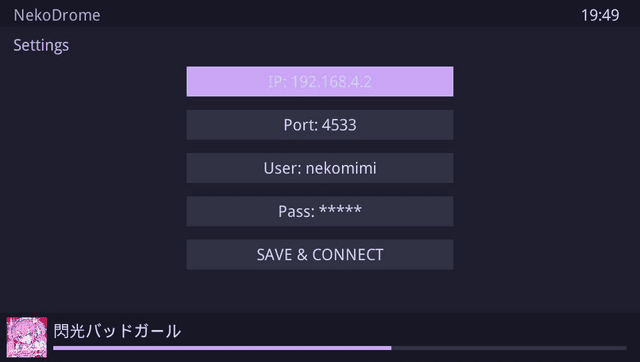
Connect to your Navidrome server. Input your IP and Credentials. | |||
Hit START anytime to recalibrate your connection settings. | |||
Allow the initial handshake to finish. NekoDrome will pull your latest Navidrome indexes automatically. | |||
==Controls== | |||
D-Pad Up/Down - Move between entries | |||
D-Pad Left/Right - Skip 50 albums at a time (changes album pages) | |||
Cross - Action (Enter albums, Toggle Play/Pause) | |||
Square - Capture (Download track to local storage for offline use) | |||
Triangle - Find (Trigger the system keyboard to search) | |||
L/R - Switch (Change the current page) | |||
==Screenshots== | ==Screenshots== | ||
| Line 41: | Line 63: | ||
== External links == | == External links == | ||
* | * Project Page - https://nekomimi.tilde.team/docs/nekodrome/ | ||
* GitHub - https://github.com/NekoMimiOfficial/NekoDrome | |||
* VitaDB - https://www.rinnegatamante.eu/vitadb/#/info/1359 | * VitaDB - https://www.rinnegatamante.eu/vitadb/#/info/1359 | ||
Latest revision as of 05:08, 11 January 2026
| NekoDrome | |
|---|---|
 | |
| General | |
| Author | NekoMimi |
| Type | Media Players |
| Version | 1.0 |
| License | Mixed |
| Last Updated | 2026/01/09 |
| Links | |
| Download | |
| Website | |
| Source | |
NekoDrome is a Navidrome/Subsonic music streaming client for PS Vita.
It supports online playback from a Navidrome server and an offline mode for cached music.
Features
- Scrobble: scrobbles your track after 40s
- Download: downloads your track for offline play (on the app itself) (press SQUARE on a track)
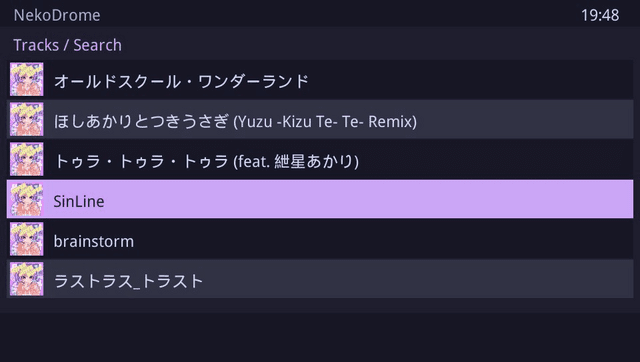
- Search: search you navidrome server with the search3 API (press TRIANGLE)
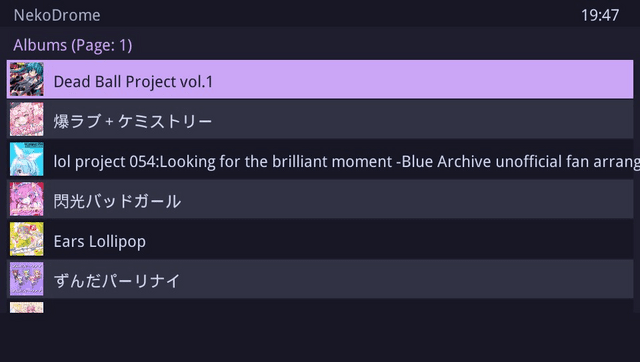
- Player and Queue system: NekoDrome will Queue all items in an album or your liked songs or offline songs, you also have a full screen player (accessed by pressing SELECT)
- Settings: The app is configured with a simple settings view (accessed by pressing START)
- Custom Font: You can set your own fonts by placing it as ux0:/data/nekodrome/font.ttf
User guide
Connect to your Navidrome server. Input your IP and Credentials.
Hit START anytime to recalibrate your connection settings.
Allow the initial handshake to finish. NekoDrome will pull your latest Navidrome indexes automatically.
Controls
D-Pad Up/Down - Move between entries
D-Pad Left/Right - Skip 50 albums at a time (changes album pages)
Cross - Action (Enter albums, Toggle Play/Pause)
Square - Capture (Download track to local storage for offline use)
Triangle - Find (Trigger the system keyboard to search)
L/R - Switch (Change the current page)
Screenshots
Changelog
v1.0
- First Release.
External links
- Project Page - https://nekomimi.tilde.team/docs/nekodrome/
- GitHub - https://github.com/NekoMimiOfficial/NekoDrome
- VitaDB - https://www.rinnegatamante.eu/vitadb/#/info/1359