
PSV Cleaner Vita: Difference between revisions
From GameBrew
More actions
No edit summary |
No edit summary |
||
| (3 intermediate revisions by 2 users not shown) | |||
| Line 4: | Line 4: | ||
|description=A powerful and user-friendly temporary files cleaner. | |description=A powerful and user-friendly temporary files cleaner. | ||
|author=theheroGAC | |author=theheroGAC | ||
|lastupdated= | |lastupdated=2026/05/09 | ||
|type=Utilities | |type=Utilities | ||
|version=1. | |version=1.12 | ||
|license=N/A | |license=N/A | ||
|download=https://dlhb.gamebrew.org/vitahomebrews/PSVCleanerVita.7z | |download=https://dlhb.gamebrew.org/vitahomebrews/PSVCleanerVita.7z | ||
| Line 88: | Line 88: | ||
==Changelog== | ==Changelog== | ||
'''1.12''' | |||
* Added new folders and orphaned files for cleaning. | |||
* We now have a more thorough control of temporary files additional options inserted. | |||
'''1.11''' | |||
* Speeded up the home screen. | |||
'''1.10''' | |||
* What's New | |||
** Folders checked for each installed app: | |||
*** ux0:data/[TITLEID]/ - The app's main data folder | |||
*** ux0:patch/[TITLEID]/ - The app's patches folder | |||
*** ux0:addcont/[TITLEID]/ - The app's DLC/addons folder | |||
*** What is cleaned in each folder: | |||
*** Subfolders: cache/, temp/, tmp/, logs/, log/ | |||
*** Temporary files in the root with extensions: .tmp, .temp, .log, .cache, .bak, .old, .swp | |||
*** Files with names containing: "temp", "tmp", "cache", "log" | |||
*** Folders NOT touched (for security): | |||
*** ux0:user/00/savedata/[TITLEID]/ - Saved files (never touched) | |||
*** ux0:app/[TITLEID]/ - Files from the app itself (never touched) | |||
*** The feature now scans all three folders for each app installed, finding more temporary files and freeing up more space. | |||
** Implemented feature: Selective cleaning for individual apps: Press SELECT in the main menu to open the app list. | |||
*** The list shows all installed apps with occupied space. | |||
*** Navigate with the D-Pad, clean with X, go back with O. | |||
*** How it works: | |||
*** Press SELECT in the main menu. | |||
*** A list of all installed apps is displayed. | |||
*** Each app displays its TITLE ID and the space occupied by temporary files. | |||
*** Navigate with the D-Pad ↑↓ to select an app. | |||
*** Press X to clean that app's temporary files. | |||
*** A confirmation message appears with freed space. | |||
*** The list updates automatically after cleaning. | |||
'''1.09''' | |||
* What's New | |||
** Enhanced User Experience | |||
*** Intuitive navigation: Up/Down profile selection with arrows | |||
*** Optimized menu: Texts and elements repositioned | |||
*** Now you have the ability to delete temporary files if a game or app is uninstalled from the livearea | |||
** Advanced Features | |||
*** Direct flow: "Complete Clean" skips to file preview | |||
*** Extended orphan cleanup: License and patch directories beyond apps | |||
'''1.08''' | '''1.08''' | ||
* What's New | * What's New | ||
Latest revision as of 02:58, 10 May 2026
| PSV Cleaner | |
|---|---|
 | |
| General | |
| Author | theheroGAC |
| Type | Utilities |
| Version | 1.12 |
| License | N/A |
| Last Updated | 2026/05/09 |
| Links | |
| Download | |
| Website | |
| Source | |
A powerful and user-friendly temporary files cleaner for the PS Vita. It can help you free up valuable storage space by safely removing temporary files, cache data, and system dumps that accumulate over time.
Features
- Removes 90+ types of temporary files including system cache, homebrew logs, and application data.
- Only deletes temporary files, never touches your games, saves, or important data.
- See exactly which files will be deleted before cleaning with detailed list view.
- Choose what to clean with an intuitive options menu.
- Provide real-time statistics of how much space you can free before cleaning with recursive calculation.
- Clean, professional UI with smooth animations and scrollable file list.
- GPU Optimized.
Installation
Download the VPK file.
Install using VitaShell or PKGi.
User guide
What it cleans
- System Files:
- System temporary files and cache
- System logs and SQLite temporary databases
- System update and patch temporary files
- Shader compilation logs
- File Managers & Package Installers:
- VitaShell file manager cache, logs, and trash
- PKGi package installer temporary files and cache
- Package installation temporary files
- App metadata temporary files
- Emulators:
- RetroArch emulator cache, logs, and shader cache
- Adrenaline PSP emulator cache and crash dumps
- PSP emulator temporary files
- Homebrew Applications:
- VitaGrafix, reF00D, NoNpDrm cache
- Autoplugin 1 & 2 cache and logs
- PSVshell, SaveManager logs
- VitaCheat, rinCheat, TropHAX logs
- Henkaku, TAI, 0syscall6 cache
- Moonlight streaming cache
- Media & Web:
- Browser and WebKit cache
- Picture, video, music thumbnails (regenerable)
- Network temporary files
- Other:
- Crash dump files (
psp2core,psp2dmp) - USB/SD card storage temporary files
- Background download temporary files
- License temporary files
- Crash dump files (
Important notes
- Backup important data before first use (though it's safe, it's always good practice).
- Works best with regular use to maintain optimal performance.
- Compatible with all major PS Vita homebrew applications.
How to use
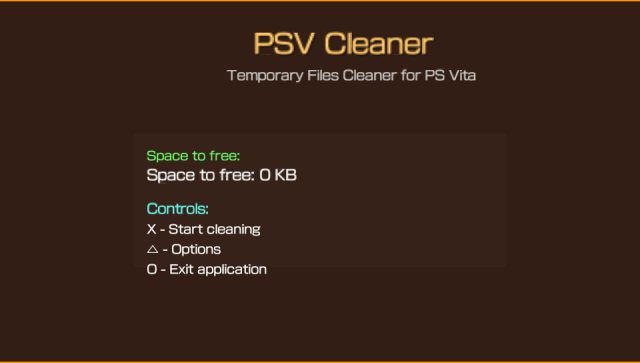
- Launch the application.
- View how much space can be freed (calculated recursively).
- Press Cross to preview all files that will be deleted.
- Review the detailed file list with sizes.
- Press Cross again to confirm and start cleaning.
- Watch the progress bar complete.
- See results and updated space available.
Optional: Press Triangle on main screen to access selective cleaning options.
Screenshots
Changelog
1.12
- Added new folders and orphaned files for cleaning.
- We now have a more thorough control of temporary files additional options inserted.
1.11
- Speeded up the home screen.
1.10
- What's New
- Folders checked for each installed app:
- ux0:data/[TITLEID]/ - The app's main data folder
- ux0:patch/[TITLEID]/ - The app's patches folder
- ux0:addcont/[TITLEID]/ - The app's DLC/addons folder
- What is cleaned in each folder:
- Subfolders: cache/, temp/, tmp/, logs/, log/
- Temporary files in the root with extensions: .tmp, .temp, .log, .cache, .bak, .old, .swp
- Files with names containing: "temp", "tmp", "cache", "log"
- Folders NOT touched (for security):
- ux0:user/00/savedata/[TITLEID]/ - Saved files (never touched)
- ux0:app/[TITLEID]/ - Files from the app itself (never touched)
- The feature now scans all three folders for each app installed, finding more temporary files and freeing up more space.
- Implemented feature: Selective cleaning for individual apps: Press SELECT in the main menu to open the app list.
- The list shows all installed apps with occupied space.
- Navigate with the D-Pad, clean with X, go back with O.
- How it works:
- Press SELECT in the main menu.
- A list of all installed apps is displayed.
- Each app displays its TITLE ID and the space occupied by temporary files.
- Navigate with the D-Pad ↑↓ to select an app.
- Press X to clean that app's temporary files.
- A confirmation message appears with freed space.
- The list updates automatically after cleaning.
- Folders checked for each installed app:
1.09
- What's New
- Enhanced User Experience
- Intuitive navigation: Up/Down profile selection with arrows
- Optimized menu: Texts and elements repositioned
- Now you have the ability to delete temporary files if a game or app is uninstalled from the livearea
- Advanced Features
- Direct flow: "Complete Clean" skips to file preview
- Extended orphan cleanup: License and patch directories beyond apps
- Enhanced User Experience
1.08
- What's New
- Support for storage uma0!
- Selective Cleaning
- Removed unnecessary plugin cleaning!
- Fixes
- Fixed some wrong folder paths that were in there
- Better multi-partition support
- More accurate file detection
v1.07
- New Stuff
- Smart Preview Mode: You can now see all files before deleting them, sort by name or size, and filter by file type (tmp, log, cache, etc.). Super helpful for knowing exactly what you're cleaning!
- VitaDB Support: Added full support for cleaning VitaDB's cache and temp files. You can choose to exclude VitaDB cache if you want to keep it fast.
- Better Exclusions: Added options to exclude picture folders and VPK files from cleaning. More control over what gets deleted.
- Improved Controls
- Preview Screen: Use △ to sort files, □ to filter by type, D-Pad to navigate, X to clean, O to cancel
- Menu Scrolling: Long menus now scroll properly with a visual scrollbar
- Better Feedback: Everything feels more responsive and clear
- Expanded cleanup to cover even more temp files and caches
v1.06
- Codebase Cleanup
- Removed ALL comments - Completely comment-free codebase for cleaner, more professional code
- Streamlined structure - Minimalist C code with zero unnecessary documentation
- Critical Bug Fixes
- Fixed VPK file deletion - Now properly deletes
.vpkfiles fromux0:/root directory - Fixed UI button labels - Corrected duplicate and inaccurate button descriptions in advanced options
- Fixed wildcard pattern handling - VPK files now use proper directory scanning instead of broken wildcards
- Fixed VPK file deletion - Now properly deletes
- Enhanced User Experience
- Animated progress bars - Added particle effects and smooth animations during cleaning
- Improved button labels - X button shows "Toggle", Triangle shows "Back", O shows "Preview"
- Better visual feedback - Enhanced UI with pulsing effects and animated borders
- Expanded Cleanup Coverage
- VPK files - Complete support for Vita app installation files
- RetroArch temp files - Comprehensive cleanup of emulator cache, logs, and temp data
- Crash dump files - Enhanced
.psp2dmp.tmpand related file detection - Screenshot cleanup - Automatic removal of
ux0:picture/SCREENSHOT/files - Package temp files - Added
pkgjtemporary file cleanup
- Performance & Features
- Intelligent caching system -
scan_cache.binspeeds up subsequent scans - Emergency stop functionality - Safe interruption with O button during cleaning
- Profile-based cleaning - Quick, Complete, and Selective cleaning modes
- Preview before delete - See exactly what files will be removed
- Intelligent caching system -
- UI/UX Improvements
- Particle effects - Animated progress bars with flying particles
- Better color scheme - Improved contrast and readability
- Responsive controls - Clear button mappings for all screens
- Status indicators - Real-time feedback during operations
v1.05
- Added
- Intelligent Caching System - Revolutionary performance improvement for file scanning
- Smart Cache Storage - Saves scan results to avoid rescanning unchanged directories
- Directory Change Detection - Automatically detects when directories have been modified
- Cache Expiration - 24-hour cache validity with automatic refresh
- Instant Loading - Up to 5x faster startup times for subsequent app launches
- Memory Efficient - Optimized cache structure with validation and error handling
- Code Optimization & Cleanup - Streamlined codebase for better maintainability
- Removed Legacy Code - Eliminated CloneDVD sound references and unused functions
- Splash Screen Removal - Removed unnecessary splash screen for faster app startup
- Comment Cleanup - Removed obsolete comments and improved code documentation
- Resource Optimization - Eliminated unused assets and reduced package size
- Intelligent Caching System - Revolutionary performance improvement for file scanning
- Performance Improvements
- Intelligent Scanning - Cache-based directory scanning with change detection
- Faster Startup - Reduced initialization time through caching system
- Memory Optimization - Better memory management for large file operations
- I/O Reduction - Minimized disk access through intelligent caching
- Technical Enhancements
- Cache Management - Automatic cache invalidation after cleaning operations
- Error Handling - Robust cache validation and fallback mechanisms
- Version Control - Cache versioning for future compatibility
- Resource Cleanup - Proper cleanup of cache files and temporary resources
- UI/UX Improvements
- Faster Response - Instant app responsiveness through caching
- Cleaner Interface - Removed visual clutter and unnecessary elements
- Improved Performance - Smoother operation with reduced loading times
v1.04
- Added
- Emergency Stop System - Safe interruption of cleaning operations
- Real-time Stop - Press Circle button during cleaning to stop safely
- Operation Tracking - Monitors active operations and cleanup state
- Emergency Screen - Clear feedback when operation is interrupted
- Partial Results - Shows statistics of files actually deleted before interruption
- Safe Cleanup - Proper resource cleanup when stopping mid-operation
- Visual Feedback - Progress bar shows "Stopping operation..." when stopping
- Enhanced User Safety - Improved operation control
- Graceful Interruption - Handling of operation interruption with user feedback
- System State Preservation - Recovery options after emergency stop
- Informative Emergency Screen - Details about what happened during interruption
- Emergency Stop System - Safe interruption of cleaning operations
- Technical
- Emergency Stop Flags - Global flags for operation state tracking
- Safe Operation Lifecycle - Start/end/cleanup operation management
- Improved Progress Bar - Visual feedback for emergency stop requests
- Resource Cleanup Functions - Proper cleanup when operations are interrupted
- UI & UX Improvements
- Operation Management - Better handling of long-running operations
- Emergency Stop Request Handling - Safe state transitions during interruptions
- User Confirmation for Interrupted Operations - Clear messaging about operation status
v1.03
- Added
- Cleaning Profiles System - Three intelligent cleaning modes
- Quick Profile - Only safe cache files (VitaShell, PKGi, RetroArch, Browser, etc.)
- Complete Profile - All temporary files and system cleanup (default mode)
- Selective Profile - User manually chooses which categories to clean
- Profile Selection Screen - Elegant initial screen at app startup
- Navigate profiles with D-Pad Up/Down
- Detailed descriptions for each profile mode
- One-time selection that configures the entire session
- Cleanup Counter System - Persistent statistics tracking
- Saves total number of cleaning sessions
- Displays "Cleanup #X" on completion screen
- Persistent storage in ux0:data/PSV_Cleaner/counter.txt
- Additional Cleaning Paths - Extended coverage
- ux0:download/ and ux0:downloads/ complete directory scanning
- Enhanced download temporary file detection
- Cleaning Profiles System - Three intelligent cleaning modes
- Improved
- User Interface Centering - Professional text positioning
- All main titles perfectly centered on screen
- Consistent button alignment and spacing
- Improved visual hierarchy
- Profile-Based Menu Initialization - Dynamic menu configuration
- Menu options automatically set based on selected profile
- Quick mode: only cache categories enabled by default
- Complete mode: all cleaning options enabled
- Selective mode: nothing pre-selected for manual choice
- Navigation Experience - Enhanced user flow
- Square Button: Change cleaning profile anytime
- Seamless switching between profile modes
- Persistent profile memory during session
- User Interface Centering - Professional text positioning
- Technical
- Added PROFILE_QUICK, PROFILE_COMPLETE, PROFILE_SELECTIVE enum system
- Dynamic menu initialization with profile parameter
- Persistent counter file management
- Enhanced download path coverage (now 95 cleaning paths total)
- Improved text positioning calculations for perfect centering
v1.02
- Added
- File Preview System - View all files that will be deleted before cleaning with detailed list
- Scrollable file list supporting thousands of files
- Individual file sizes displayed
- Total files count and size summary
- Navigate with D-Pad Up/Down
- Confirm with X or cancel with O
- Enhanced File Detection - Added 40+ new cleaning paths
- VitaGrafix cache and logs
- reF00D cache
- NoNpDrm temporary files
- 0syscall6 cache
- TAI plugin system cache
- PSVshell logs and cache
- SaveManager logs
- VitaCheat, rinCheat, TropHAX logs
- WebKit cache and localstorage
- Network temporary files
- SQLite temporary databases
- Package installation temp files
- Media thumbnails (picture, video, music)
- RetroArch shader cache
- Background download temp files
- And more...
- Statistics Display - Detailed completion screen showing:
- Total space freed
- Number of files deleted
- Visual success indicator
- Dump File Detection - Special scanning for crash dump files
- Detects .psp2dmp files in ux0:data/
- Detects .psp2core files in ux0:data/
- Shows in preview list before deletion
- File Preview System - View all files that will be deleted before cleaning with detailed list
- Improved
- Recursive Space Calculation - Fixed space calculation to scan subdirectories
- Now correctly calculates all temporary files in nested folders
- More accurate space estimation before cleaning
- Auto-Refresh After Cleaning - Space available automatically recalculates after each cleaning session
- No more stuck at zero after cleaning
- Fresh calculation on every app launch
- Memory Management - Dynamic file list with automatic expansion
- Efficient memory allocation for large file lists
- Proper cleanup to prevent memory leaks
- Recursive Space Calculation - Fixed space calculation to scan subdirectories
- Fixed
- Space calculation showing zero after cleaning
- Missing files in subdirectories during scan
- Crash dump files not appearing in preview
- Technical
- Total cleaning paths increased from 54 to 94
- Added global file counter for deletion tracking
- Improved recursive directory scanning algorithm
- Enhanced preview system with scrollbar for large lists
v1.01
- Bug fix and other features.
v1.0
- First Release.