Makerom GUI 3DS: Difference between revisions
From GameBrew
More actions
Created page with "{{Infobox 3DS homebrew | title = Makerom GUI | image = https://dlhb.gamebrew.org/3dshomebrew/MakeromGUI.jpg|250px | type = PC Utilities | version = | licence = Mixed | author..." |
No edit summary |
||
| (16 intermediate revisions by the same user not shown) | |||
| Line 1: | Line 1: | ||
{{Infobox 3DS | {{Infobox 3DS Homebrews | ||
| title = | |title=CCI/CIA Command Builder | ||
| image = | |image=makeromgui02.png | ||
| type = | |description=Command Builder for 3DSGuy makerom. | ||
| version = | |author=TiniVi | ||
| | |lastupdated=2015/01/21 | ||
| | |type=File Operation | ||
|version=2015 | |||
| | |license=Mixed | ||
| source = https:// | |download=https://dlhb.gamebrew.org/3dshomebrews/makeromgui.7z | ||
|website=https://github.com/TiniVi/CCI-CIA-Command-Builder | |||
|source=https://github.com/TiniVi/CCI-CIA-Command-Builder/tree/master/bin/Release | |||
}} | }} | ||
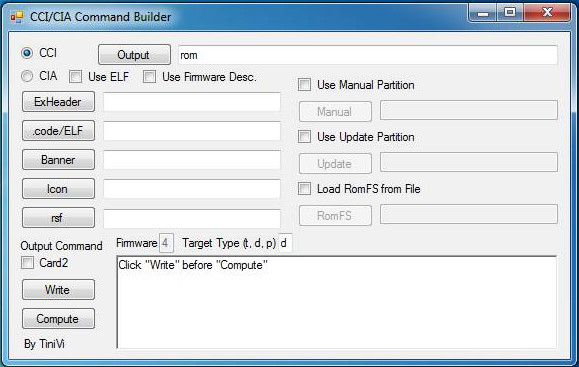
CCI/CIA Command Builder is a makerom GUI, written based on 3DSGuy's makerom, which gives you options necessary to ouput CCI (.3ds ROMs) or CIA (installable .cia archives). | |||
==User guide== | |||
Requirements: | |||
* makerom as an environment variable (or makerom in same directory). | |||
* .net 4.5. | |||
* Windows, maybe windows emulation. | |||
* Decrypted rom contents/your own files to create a rom. | |||
* An rsf for the rom you are creating. | |||
See the [https://gbatemp.net/threads/tool-makerom-gui.376540 discussion thread] for more information. | |||
==Screenshots== | |||
https://dlhb.gamebrew.org/3dshomebrews/makeromgui4.png | |||
==External links== | |||
* GitHub - https://github.com/TiniVi/CCI-CIA-Command-Builder | |||
* GBAtem - https://gbatemp.net/threads/tool-makerom-gui.376540 | |||
Latest revision as of 13:50, 6 July 2024
| CCI/CIA Command Builder | |
|---|---|
 | |
| General | |
| Author | TiniVi |
| Type | File Operation |
| Version | 2015 |
| License | Mixed |
| Last Updated | 2015/01/21 |
| Links | |
| Download | |
| Website | |
| Source | |
CCI/CIA Command Builder is a makerom GUI, written based on 3DSGuy's makerom, which gives you options necessary to ouput CCI (.3ds ROMs) or CIA (installable .cia archives).
User guide
Requirements:
- makerom as an environment variable (or makerom in same directory).
- .net 4.5.
- Windows, maybe windows emulation.
- Decrypted rom contents/your own files to create a rom.
- An rsf for the rom you are creating.
See the discussion thread for more information.
Screenshots