
Bugdom 3DS: Difference between revisions
More actions
Created page with "{{Infobox 3DS Homebrews |title=Bugdom |image=Bugdom3DS.png |description=This is a port of Pangea Software’s 3D adventure game Bugdom to the Nintendo 3DS, based off Jorio’s amazing port. |author=fordcars |lastupdated=2025/01/26 |type=Platform |version=1.0 |license=CC BY-NC-SA 4.0 |download=https://dlhb.gamebrew.org/3dshomebrews/Bugdom3DS.7z |website=https://github.com/fordcars/Bugdom |source=https://github.com/fordcars/Bugdom |donation= }} {{#seo: |title= (Platform) -..." |
No edit summary |
||
| Line 2: | Line 2: | ||
|title=Bugdom | |title=Bugdom | ||
|image=Bugdom3DS.png | |image=Bugdom3DS.png | ||
|description= | |description=Port of Pangea Software's 3D adventure game Bugdom to the Nintendo 3DS, based off Jorio's amazing port. | ||
|author=fordcars | |author=fordcars | ||
|lastupdated=2025/01/26 | |lastupdated=2025/01/26 | ||
| Line 21: | Line 21: | ||
This is a port of Pangea Software's 3D adventure game Bugdom to the Nintendo 3DS, based off [https://github.com/jorio/Bugdom Jorio's amazing port]. | This is a port of Pangea Software's 3D adventure game Bugdom to the Nintendo 3DS, based off [https://github.com/jorio/Bugdom Jorio's amazing port]. | ||
Bugdom is a 1999 Macintosh game by Pangea Software. You play as Rollie McFly, a pill bug on a quest to save ladybugs from King Thorax’s iron grip on the Bugdom. There will be water to cross, bugs to ride, and plenty of enemy forces to defeat, but once the Fire Ants and King Thorax have been defeated, you will become the new ruler of the Bugdom and peace will be restored. | Bugdom is a 1999 Macintosh game by Pangea Software. You play as Rollie McFly, a pill bug on a quest to save ladybugs from King Thorax’s iron grip on the Bugdom. There will be water to cross, bugs to ride, and plenty of enemy forces to defeat, but once the Fire Ants and King Thorax have been defeated, you will become the new ruler of the Bugdom and peace will be restored. | ||
==Installation== | ==Installation== | ||
Download the 3dsx file from [https://github.com/fordcars/Bugdom/releases releases] and place on your SD card in the 3ds directory. | |||
DSP firmware must be present at sdmc:/3ds/dspfirm.cdc. This can be obtained with [[Luma3DS]] simply select "Miscellaneous options..." in the Rosalina menu, then "Dump DSP firmware" from there. If running on an emulator, just copy an empty file named dspfirm.cdc to a folder named 3ds on your virtual SD card. | |||
DSP firmware must be present at sdmc:/3ds/dspfirm.cdc. This can be obtained with [[Luma3DS]] simply select "Miscellaneous options..." in the Rosalina menu, then "Dump DSP firmware" from there. If running on an emulator, | |||
== | ==Controls== | ||
Circle Pad/D-Pad - Walk, Roll | |||
A - Jump, Boost | |||
B - Morph | |||
X - Buddy bug | |||
Y - Kick | |||
L/R - Look left/right | |||
Start - Pause | |||
==Screenshots== | ==Screenshots== | ||
https://dlhb.gamebrew.org/3dshomebrews/images/Bugdom3DS-01.png | https://dlhb.gamebrew.org/3dshomebrews/images/Bugdom3DS-01.png | ||
https://dlhb.gamebrew.org/3dshomebrews/images/Bugdom3DS-02.png | https://dlhb.gamebrew.org/3dshomebrews/images/Bugdom3DS-02.png | ||
https://dlhb.gamebrew.org/3dshomebrews/images/Bugdom3DS-03.png | https://dlhb.gamebrew.org/3dshomebrews/images/Bugdom3DS-03.png | ||
https://dlhb.gamebrew.org/3dshomebrews/images/Bugdom3DS-04.png | |||
https:// | ==Media== | ||
'''Bugdom on Nintendo 3DS''' ([https://www.youtube.com/watch?v=MO9qfsuxTUs Carl]) <br> | |||
<youtube width="640">MO9qfsuxTUs</youtube> | |||
==Known | ==Known issues== | ||
* Long loading times | * Long loading times. | ||
* No proper lighting | * No proper lighting. | ||
==Changelog== | ==Changelog== | ||
| Line 62: | Line 63: | ||
== External links == | == External links == | ||
* | * GitHub - https://github.com/fordcars/Bugdom | ||
Latest revision as of 05:17, 22 June 2025
| Bugdom | |
|---|---|
 | |
| General | |
| Author | fordcars |
| Type | Platform |
| Version | 1.0 |
| License | CC BY-NC-SA 4.0 |
| Last Updated | 2025/01/26 |
| Links | |
| Download | |
| Website | |
| Source | |
This is a port of Pangea Software's 3D adventure game Bugdom to the Nintendo 3DS, based off Jorio's amazing port.
Bugdom is a 1999 Macintosh game by Pangea Software. You play as Rollie McFly, a pill bug on a quest to save ladybugs from King Thorax’s iron grip on the Bugdom. There will be water to cross, bugs to ride, and plenty of enemy forces to defeat, but once the Fire Ants and King Thorax have been defeated, you will become the new ruler of the Bugdom and peace will be restored.
Installation
Download the 3dsx file from releases and place on your SD card in the 3ds directory.
DSP firmware must be present at sdmc:/3ds/dspfirm.cdc. This can be obtained with Luma3DS simply select "Miscellaneous options..." in the Rosalina menu, then "Dump DSP firmware" from there. If running on an emulator, just copy an empty file named dspfirm.cdc to a folder named 3ds on your virtual SD card.
Controls
Circle Pad/D-Pad - Walk, Roll
A - Jump, Boost
B - Morph
X - Buddy bug
Y - Kick
L/R - Look left/right
Start - Pause
Screenshots
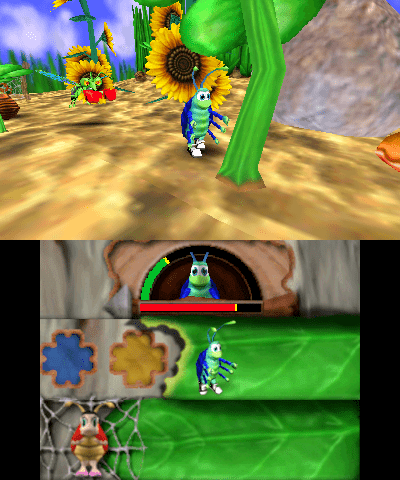
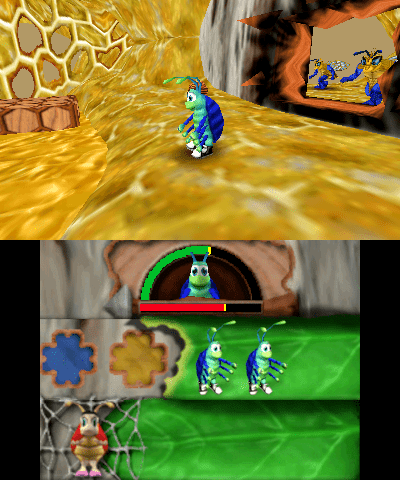
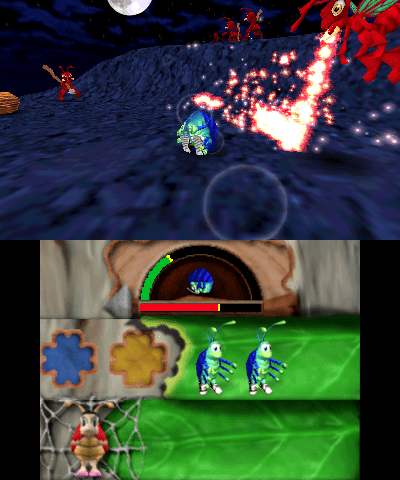
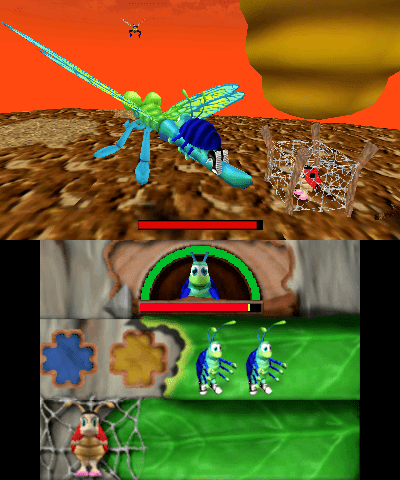
Media
Bugdom on Nintendo 3DS (Carl)
Known issues
- Long loading times.
- No proper lighting.
Changelog
v1.0
- First Release.
External links
- GitHub - https://github.com/fordcars/Bugdom