
Appzer PSP: Difference between revisions
From GameBrew
More actions
Created page with "{{Infobox PSP Homebrews |title=Appzer |image=appzerpsp.png |description=Lua browser for the PGE version of Lua Player. |author=FaT3oYCG |lastupdated=2009/07/06 |type=File Browsers |format= |version=RC 0.01 |license=Mixed |download=https://dlhb.gamebrew.org/psphomebrew/AppzerRC0.01.rar |website=http://forums.qj.net/psp-development-forum/154112-release-appzer-rc-0-01-a.html |source=https://dlhb.gamebrew.org/psphomebrew/AppzerRC0.01.rar }} Lua browser for the PGE version of..." |
No edit summary |
||
| Line 64: | Line 64: | ||
== External links == | == External links == | ||
* QuickJump - http://forums.qj.net/psp-development-forum/154112-release-appzer-rc-0-01-a.html | * QuickJump - http://forums.qj.net/psp-development-forum/154112-release-appzer-rc-0-01-a.html | ||
[[Category:Lua applications on PSP]] | |||
Latest revision as of 07:04, 4 February 2025
| Appzer | |
|---|---|
 | |
| General | |
| Author | FaT3oYCG |
| Type | File Browsers |
| Version | RC 0.01 |
| License | Mixed |
| Last Updated | 2009/07/06 |
| Links | |
| Download | |
| Website | |
| Source | |
Lua browser for the PGE version of Lua Player.
Supported file types: LUA, PNG, TTF.
Controls
Browser mode:
L - Enable/Disable USB mode
Up - Move up one item in the file list
Down - Move down one item in the file list
Triangle - Navigate up one directory
Cross - Execute file/application, Open directory
Start - Exit Appzer
Select - Take a screenshot
Image view mode:
Triangle - Exit image view mode
Font view mode:
Triangle - Exit font view mode
Screenshots
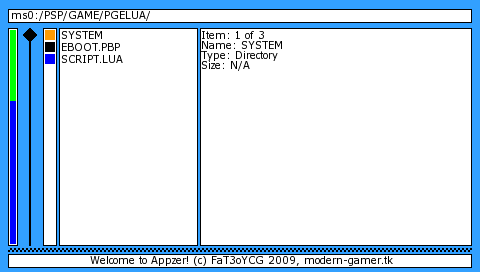
Changelog
RC 0.01
- Displays current directory.
- Displays up to 18 files at a time.
- Scroll bar to show current position in overall items (this is more useful for when you have more than 18 files in a directory).
- Selected item indicator.
- Colour coded squares next to item names.
- Green is a folder that has an index.lua file in it (Appzer will try to launch that file if you click on the folder).
- Orange is a normal folder that has no index.lua file inside it.
- Blue currently means any file that Appzer can open.
- Black is for anything else.
- Displays some basic file information about each file on the right hand side.
- Browser status is displayed at the bottom, this currently does not change.
- Enable / Disable USB mode.
- Take multiple screenshots.
- For other features refer to the controls in the Readme.txt file.