
DynaFreq PSP: Difference between revisions
More actions
Created page with "{{Infobox PSP Homebrews |title=DynaFreq |image=dynafreqpsp.png |description=Change CPU clock frequency. |author=pen (ClassG) |lastupdated=2018/12/07 |type=Plugins |format= |version=BETA |license=Mixed |download=https://dlhb.gamebrew.org/psphomebrew/dynafreqpsp.7z |website=http://classg.sytes.net/products/psp/ |source=https://dlhb.gamebrew.org/psphomebrew/dynafreqpsp.7z }} DynaFreq is a CPU clock frequency management plugin. It dynamically adjusts the CPU clock frequency..." |
|||
| (One intermediate revision by the same user not shown) | |||
| Line 34: | Line 34: | ||
<pre>DynaFreq BETA: Dynamic frequency scaling has been enabled. | <pre>DynaFreq BETA: Dynamic frequency scaling has been enabled. | ||
</pre> | |||
You can manually adjust the frequency even when the automatic clock adjustment feature is enabled. | You can manually adjust the frequency even when the automatic clock adjustment feature is enabled. | ||
| Line 56: | Line 56: | ||
== Compatibility == | == Compatibility == | ||
Tested on: | |||
5.00 M33-4 <br> | |||
6.60 PROMOD-C2p | |||
It seems it does not work on 3.71 M33 or lower Firmware versions. | It seems it does not work on 3.71 M33 or lower Firmware versions. | ||
Latest revision as of 14:04, 31 January 2025
| DynaFreq | |
|---|---|
 | |
| General | |
| Author | pen (ClassG) |
| Type | Plugins |
| Version | BETA |
| License | Mixed |
| Last Updated | 2018/12/07 |
| Links | |
| Download | |
| Website | |
| Source | |
DynaFreq is a CPU clock frequency management plugin. It dynamically adjusts the CPU clock frequency according to the load.
You can toggle the ON/OFF state with key operations. It is also possible to manually adjust the CPU clock frequency.
Installation
Copy the following files to ms0:/seplugins/:
- dynafreq.prx
- dynafreq.ini
Then, add the following path to vsh.txt, game and/or pops.txt:
ms0:/seplugins/dynafreq.prx 1
Go to Recovery Mode and reset VSH.
User guide
By default, the automatic clock frequency adjustment feature is off when the program starts.
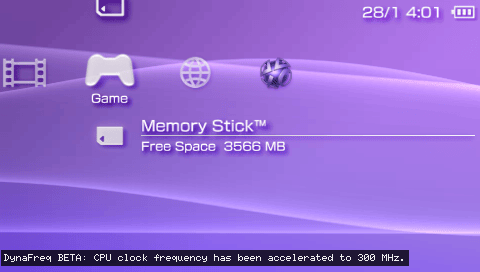
Once enabled, the following message will appear at the bottom right of the screen:
DynaFreq BETA: Dynamic frequency scaling has been enabled.
You can manually adjust the frequency even when the automatic clock adjustment feature is enabled.
However, if the manually set frequency is too high or too low for the load, the system will override it and automatically select the appropriate clock frequency.
Notes
The plugin doesn’t always select the optimal speed.
While connected to a network, the clock frequency can go above 222MHz (up to 333MHz).
- DynaFreq will not allow the clock to exceed 222MHz after enabling it while using the internet browser. (There might be a limitation either from the browser or the system.)
- But if DynaFreq is enabled before connecting to the internet browser, the clock will rise to 333MHz after connection.
Controls
R+Analog Left - Enable the plugin
R+Analog Up/Down - Manually increase/decrease the CPU clock frequency
Screenshots
Compatibility
Tested on:
5.00 M33-4
6.60 PROMOD-C2p
It seems it does not work on 3.71 M33 or lower Firmware versions.
Known issues
If the PSP goes into sleep mode, the automatic clock frequency change feature malfunctions and drops the clock to the lowest speed. If this happens, turn off the automatic frequency adjustment and manually increase the clock speed.
If "DynamicFrequency" is set to ON in the config file, and the automatic frequency change is enabled from the start, it fails to detect the load and nothing happens. Currently, it needs to be enabled manually after starting.
Changelog
BETA 2008/12/07
- Rewritten the code.
- Changed the method for calculating CPU load.
- Fixed the controller operations to be obtained in real-time.
- Changed all the settings in the configuration file.
ALPHA 2008/09/12
- Released.
External links
- Author's website - http://classg.sytes.net/products/psp/