
LivePatch PSP: Difference between revisions
More actions
No edit summary |
No edit summary |
||
| Line 41: | Line 41: | ||
== Screenshots == | == Screenshots == | ||
'''Without the patch''' | '''Without the patch''' <br> | ||
https://dlhb.gamebrew.org/psphomebrew/images/livepatchpsp2.png | https://dlhb.gamebrew.org/psphomebrew/images/livepatchpsp2.png | ||
'''With the patch''' | '''With the patch''' <br> | ||
https://dlhb.gamebrew.org/psphomebrew/images/livepatchpsp3.png | https://dlhb.gamebrew.org/psphomebrew/images/livepatchpsp3.png | ||
Latest revision as of 12:12, 31 January 2025
| LivePatch | |
|---|---|
 | |
| General | |
| Author | Archaemic |
| Type | Plugins |
| Version | 0.1.3 |
| License | Mixed |
| Last Updated | 2012/03/01 |
| Links | |
| Download | |
| Website | |
| Source | |
LivePatch is a generic utility for enabling mod developers and hackers to apply patches to legally owned UMDs or PSN titles when the game runs, instead of having to patch and use ISOs or CSOs. This allows for easier game patching, as patch files are generally smaller than full ISOs, as well as not requiring the distribution of ISOs or clunky patching utilities.
This version comes with 2 patches for Final Fantasy Tactics: The War of the Lions:
- fast.live: removes the slowdown so the game runs at a reasonable speed.
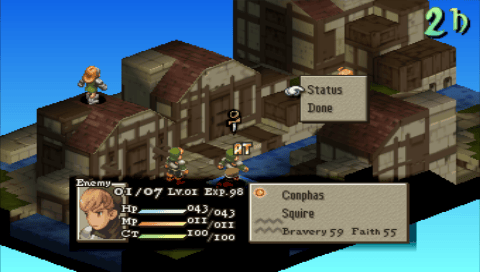
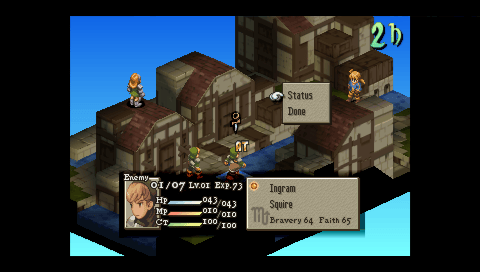
- unstretch.live: unstretches the screen so that it is no longer blurred.
Installation
Installing LivePatch
Create a folder called livepatch at the root of your Memory Stick and put the file livepatch.prx inside this folder.
Next, you must ensure there is a folder in the root of the memory stick called seplugins. If it does not exist, create it.
Open seplugins/GAME.TXT (you must create the file if it doesn't exist already) and add a line:
ms0:/livepatch/livepatch.prx 1
You are now ready to install patches.
Installing patches
Currently, patches can only apply to the game's main executable, as LivePatch works by patching memory directly when the game starts.
To install the FFT:WotL patches, unpack wotl-patches.zip and place the fftpsp folder in the livepatch folder in the root of your Memory Stick.
If you have the Japanese version of the game, there are versions of the patches that work with this region in the fftpsp-jp folder. It is installed the same way, but make sure to rename the fftpsp-jp folder to fftpsp when in the livepatch folder.
Note that this is an early beta and might not work properly in all places.
Screenshots
Without the patch
With the patch
Changelog
0.1.3 2012/03/01
- [BUGFIX] Fixed a bug where having plugins enabled might prevent patches from being found.
- Added more debugging code for debug builds.
0.1.2 2012/03/01
- [BUGFIX] Disable building PIC to ensure that LivePatch doesn't stomp on other modules' memory.
- [BUGFIX] Properly export functions, enabling shutdown code to run.
- Restructure synchronization code for simplicity's sake.
- Miscellaneous smaller fixes.
0.1 2012/02/27
- Initial public build.