
Go! Clock For Fatties PSP: Difference between revisions
From GameBrew
More actions
Created page with "{{Infobox PSP Homebrews |title=Go! Clock For Fatties |image=gcffpsp.png |description=Use the PSP Go clock on PSP 1000s, 2000s and 3000s. |author=DeViAnTe |lastupdated=2010/04/22 |type=Plugins |format= |version=0.1 |license=Mixed |download=https://dlhb.gamebrew.org/psphomebrew/gcffv01.zip |website=https://psp.scenebeta.com/noticia/go-clock-fatties |source= }} This is a plugins for PSP Fat and Slim that emulates the PSP Go clock feature (POC). == Installation == Copy gcff..." |
No edit summary |
||
| Line 31: | Line 31: | ||
https://dlhb.gamebrew.org/psphomebrew/images/gcffpsp.png | https://dlhb.gamebrew.org/psphomebrew/images/gcffpsp.png | ||
== | == Compatibility == | ||
Tested on 6.60 PROMOD-C2p. | Tested on 6.60 PROMOD-C2p. | ||
Latest revision as of 12:18, 11 January 2025
| Go! Clock For Fatties | |
|---|---|
 | |
| General | |
| Author | DeViAnTe |
| Type | Plugins |
| Version | 0.1 |
| License | Mixed |
| Last Updated | 2010/04/22 |
| Links | |
| Download | |
| Website | |
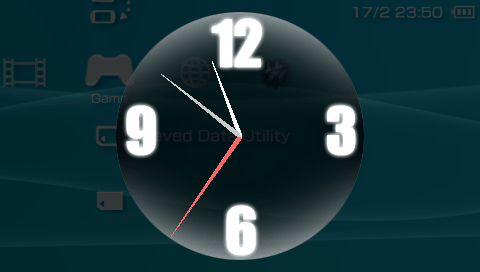
This is a plugins for PSP Fat and Slim that emulates the PSP Go clock feature (POC).
Installation
Copy gcff.prx to ms0:/seplugins/.
Write the following line in ms0:/seplugins/vsh.txt
ms0:/seplugins/gcff.prx 1
Go to Recovery Menu and reset VSH.
Controls
L+R+Square - Bring up the clock
Circle - Return to XMB
Screenshots
Compatibility
Tested on 6.60 PROMOD-C2p.
Known issues
- Sometimes the screen flickers (try disabling other vsh plugins, or resetting the vsh).
- On 5.50GEN-D3, activating the plugin may cause the internet browser to stop working.