
T-Rex Game 3DS: Difference between revisions
From GameBrew
More actions
m Text replacement - "Copy .3dsx the 3ds folder" to "Copy .3dsx to the 3ds folder" |
|||
| (5 intermediate revisions by 2 users not shown) | |||
| Line 1: | Line 1: | ||
{{Infobox 3DS Homebrews | {{Infobox 3DS Homebrews | ||
|title=T-Rex Game 3DS | |title=T-Rex Game 3DS | ||
|image= | |image=TRexGame3DS2.png | ||
|description=Google Chrome T-Rex game clone that runs natively on the Nintendo 3DS. | |description=Google Chrome T-Rex game clone that runs natively on the Nintendo 3DS. | ||
|author=BlyZeYT | |author=BlyZeYT | ||
|lastupdated= | |lastupdated=2025/06/29 | ||
|type=Action | |type=Action | ||
|version=1. | |version=1.3.0 | ||
|license=MIT | |license=MIT | ||
|download=https://dlhb.gamebrew.org/3dshomebrews/TRexGame3DS.7z | |download=https://dlhb.gamebrew.org/3dshomebrews/TRexGame3DS.7z | ||
| Line 23: | Line 23: | ||
==Installation== | ==Installation== | ||
Available in 3DSX and CIA formats. | Available in 3DSX and CIA formats. | ||
* 3DSX - Copy .3dsx the 3ds folder on your SD card and | * 3DSX - Copy .3dsx to the 3ds folder on your SD card and run it via Homebrew Launcher. | ||
* CIA - Install the .cia with the CIA manager of your choice. | * CIA - Install the .cia with the CIA manager of your choice. | ||
==Screenshots== | ==Screenshots== | ||
[[image: | [[image:TRexGame3DS2.png|link=]] | ||
==Media== | ==Media== | ||
| Line 33: | Line 33: | ||
<youtube width="400">L989S2QxXUU</youtube> | <youtube width="400">L989S2QxXUU</youtube> | ||
==Changelog== | ==Changelog== | ||
'''v1.3.0''' | |||
*@MillKeny reported and fixed the startup sound issue. | |||
'''v1.2.0''' | |||
* Highscore is now saved in sd/config/APP_TITLE/highscore.dat instead of sd/3ds/APP_TITLE/highscore.dat. | |||
* Existing highscore is automatically migrated to the new location and the old location folder is deleted. | |||
* Enabled wide mode usage for all models except Old2DS (sorry guys). | |||
'''v1.1.0''' | |||
* Mapped restart to the A button instead of only the touchscreen. | |||
* Added a highscore to the score display and saves the current highscore. | |||
'''v1.0''' | '''v1.0''' | ||
* First Release. | * First Release. | ||
Latest revision as of 02:36, 2 July 2025
| T-Rex Game 3DS | |
|---|---|
 | |
| General | |
| Author | BlyZeYT |
| Type | Action |
| Version | 1.3.0 |
| License | MIT License |
| Last Updated | 2025/06/29 |
| Links | |
| Download | |
| Website | |
| Source | |
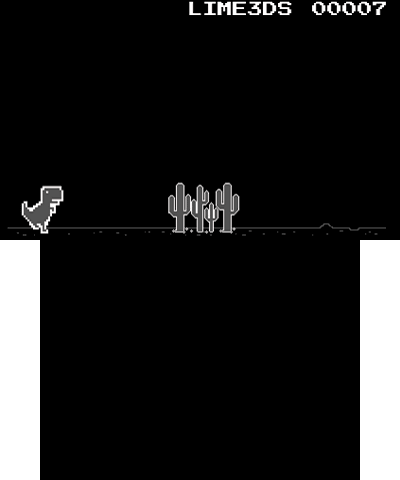
A simple clone of Google Chrome T-Rex game that runs on the 3DS.
Installation
Available in 3DSX and CIA formats.
- 3DSX - Copy .3dsx to the 3ds folder on your SD card and run it via Homebrew Launcher.
- CIA - Install the .cia with the CIA manager of your choice.
Screenshots
Media
Chrome Dino Game (Kertor)
Changelog
v1.3.0
- @MillKeny reported and fixed the startup sound issue.
v1.2.0
- Highscore is now saved in sd/config/APP_TITLE/highscore.dat instead of sd/3ds/APP_TITLE/highscore.dat.
- Existing highscore is automatically migrated to the new location and the old location folder is deleted.
- Enabled wide mode usage for all models except Old2DS (sorry guys).
v1.1.0
- Mapped restart to the A button instead of only the touchscreen.
- Added a highscore to the score display and saves the current highscore.
v1.0
- First Release.