
MACXT PSP: Difference between revisions
More actions
No edit summary |
|||
| (4 intermediate revisions by the same user not shown) | |||
| Line 1: | Line 1: | ||
{{Infobox PSP Homebrews | {{Infobox PSP Homebrews | ||
|title= | |title=MACXT | ||
|image=macxtpsp.png | |image=macxtpsp.png | ||
|description=Mac OS X shell for PSP. | |description=Mac OS X shell for PSP. | ||
|author=Luaacro | |author=Luaacro | ||
|lastupdated=2008/08/28 | |lastupdated=2008/08/28 | ||
|type=Operating | |type=Operating Systems | ||
|version=4 | |version=4 | ||
|license=Mixed | |license=Mixed | ||
| Line 61: | Line 61: | ||
== External links == | == External links == | ||
* XtreamLua - [https://web.archive.org/web/20080911211542/http://xtreamlua.com/modules.php?name=Forums& | * XtreamLua - [https://web.archive.org/web/20080911211542/http://xtreamlua.com/modules.php?name=Forums&file=viewtopic&t=4146 http://xtreamlua.com/modules.php?name=Forums&file=viewtopic&t=4146] (archived) | ||
* XtreamLua - [https://web.archive.org/web/20080905120228/http://xtreamlua.com/modules.php?name=Forums& | * XtreamLua - [https://web.archive.org/web/20080905120228/http://xtreamlua.com/modules.php?name=Forums&file=viewtopic&t=4035 http://xtreamlua.com/modules.php?name=Forums&file=viewtopic&t=4035] (archived) | ||
* XtreamLua - [https://web.archive.org/web/20080420235848/http://xtreamlua.com/modules.php?name=Forums& | * XtreamLua - [https://web.archive.org/web/20080420235848/http://xtreamlua.com/modules.php?name=Forums&file=viewtopic&t=3630 http://xtreamlua.com/modules.php?name=Forums&file=viewtopic&t=3630] (archived) | ||
* XtreamLua - [https://web.archive.org/web/20080320000227/http://xtreamlua.com/modules.php?name=Forums& | * XtreamLua - [https://web.archive.org/web/20080320000227/http://xtreamlua.com/modules.php?name=Forums&file=viewtopic&t=3291 http://xtreamlua.com/modules.php?name=Forums&file=viewtopic&t=3291] (archived) | ||
* XtreamLua - [https://web.archive.org/web/20080216162556/http://xtreamlua.com/modules.php?name=Forums& | * XtreamLua - [https://web.archive.org/web/20080216162556/http://xtreamlua.com/modules.php?name=Forums&file=viewtopic&t=2669 http://xtreamlua.com/modules.php?name=Forums&file=viewtopic&t=2669] (archived) | ||
* Make an application for MACXT - [https://web.archive.org/web/20080921231245/http://xtreamlua.com/modules.php?name=Forums&file=viewtopic&t=3873 http://xtreamlua.com/modules.php?name=Forums&file=viewtopic&t=3873] (archived) | |||
[[Category:Lua applications on PSP]] | |||
Latest revision as of 04:09, 9 December 2024
| MACXT | |
|---|---|
 | |
| General | |
| Author | Luaacro |
| Type | Operating Systems |
| Version | 4 |
| License | Mixed |
| Last Updated | 2008/08/28 |
| Links | |
| Download | |
| Website | |
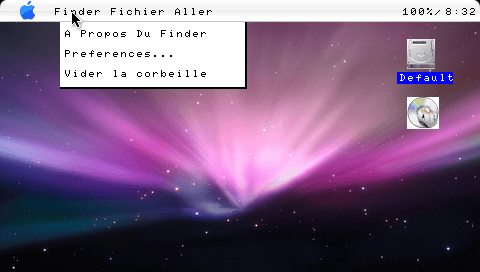
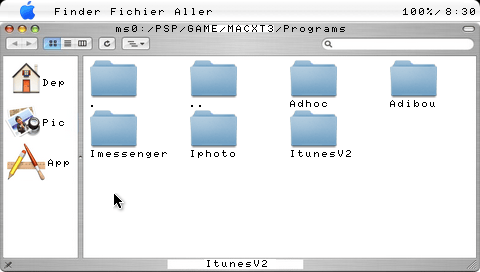
MACXT (French) is Lua-based shell that resembles Mac OS X. It comes with a few applications, including a music player, an image viewer, and an application that allows you to transfer files via Adhoc (works occasionally).
Features
- MS Explorer.
- Easy program creation.
- Startup menu by pressing select in case of problems.
- iTunes.
- IPhoto (created by Bizous).
- Registry Editor, meaning any modification will be automatically saved.
- A welcome message is available at the end of the explanations.
User guide
To launch the programs, drag the mouse all the way down to the bottom of the screen, and a thing called a dock will appear. There you will find all your programs.
You also have the Apple menu (click on the apple at the top left to access it).
Note: If you insert a UMD into the drive, you can launch it at the same time.
iPhoto
Go to Files > Open Image, then in the "Module_Finder," select the image you want, and click Ok. Once the image is loaded, it will appear.
To view it in full screen, go to Presentation > Full Screen.
To set the image as wallpaper, right-click on the image (circle on the PSP) and click on Set as Wallpaper.
To exit iPhoto, go to iPhoto > Quit, that's it.
iTunes
It checks for music within ms0:/MUSIC and ms0:/PSP/MUSIC, so when in the folders, just select the music and click on it (with Cross).
iMessenger
This is a new application added in version 4, it was designed for 2 PSPs but has not been tested (requires Adhoc).
Controls
Cross - Left mouse click
Circle - Right mouse click
Start - (iTunes) Pause the music
Select - (iTunes) Stop the music
D-Pad or Analog - Cursor
Screenshots
External links
- XtreamLua - http://xtreamlua.com/modules.php?name=Forums&file=viewtopic&t=4146 (archived)
- XtreamLua - http://xtreamlua.com/modules.php?name=Forums&file=viewtopic&t=4035 (archived)
- XtreamLua - http://xtreamlua.com/modules.php?name=Forums&file=viewtopic&t=3630 (archived)
- XtreamLua - http://xtreamlua.com/modules.php?name=Forums&file=viewtopic&t=3291 (archived)
- XtreamLua - http://xtreamlua.com/modules.php?name=Forums&file=viewtopic&t=2669 (archived)
- Make an application for MACXT - http://xtreamlua.com/modules.php?name=Forums&file=viewtopic&t=3873 (archived)