
Dice Roller DS: Difference between revisions
From GameBrew
More actions
No edit summary |
No edit summary |
||
| (12 intermediate revisions by the same user not shown) | |||
| Line 1: | Line 1: | ||
{{Infobox | {{Infobox DS Homebrews | ||
| title | |title=Dice Roller DS | ||
| image | |image=dicerollerdsw.png | ||
| type | |description=Tabletop dice roller. | ||
| version | |author=Wisen | ||
| | |lastupdated=2010/01/10 | ||
| | |type=Other Apps | ||
| website | |version=1.1 | ||
|license=Mixed | |||
|download=https://dlhb.gamebrew.org/dshomebrew2/dicerollerds_1.1_wisen.rar | |||
|website=http://onirik-production.fr/dicerollerds.php | |||
}} | }} | ||
DiceRoller is a Dice Roller, useful for board (tabletop games) such as Dungeons & Dragons. | DiceRoller is a Dice Roller, useful for board (tabletop games) such as Dungeons & Dragons. | ||
| Line 19: | Line 19: | ||
* Details each roll. | * Details each roll. | ||
* Two languages (auto-detection): French and English. | * Two languages (auto-detection): French and English. | ||
* Stand by mode . | * Stand by mode. | ||
==Installation== | ==Installation== | ||
| Line 42: | Line 42: | ||
'''Note:''' The 10+ button allows you to enter numbers above 9. A cross, the red number, blue for the Bonus, appears when this mode is activated 10+. | '''Note:''' The 10+ button allows you to enter numbers above 9. A cross, the red number, blue for the Bonus, appears when this mode is activated 10+. | ||
==Screenshots== | |||
https://dlhb.gamebrew.org/dshomebrew/dicerollerdsw2.png | |||
https://dlhb.gamebrew.org/dshomebrew/dicerollerdsw3.png | |||
==Changelog== | ==Changelog== | ||
'''v1.1 | '''v1.1 2010/01/10''' | ||
* New G.U.I. | * New G.U.I. | ||
* More intuitive controls. | * More intuitive controls. | ||
| Line 63: | Line 67: | ||
Font: Estrya's Handwriting by [http://www.cuttyfruty.com Jellyka Nerevan]. | Font: Estrya's Handwriting by [http://www.cuttyfruty.com Jellyka Nerevan]. | ||
==External links== | |||
* Author's website - http://onirik-production.fr/dicerollerds.php | |||
Latest revision as of 12:08, 20 August 2024
| Dice Roller DS | |
|---|---|
| Error creating thumbnail: Unable to save thumbnail to destination | |
| General | |
| Author | Wisen |
| Type | Other Apps |
| Version | 1.1 |
| License | Mixed |
| Last Updated | 2010/01/10 |
| Links | |
| Download | |
| Website | |

DiceRoller is a Dice Roller, useful for board (tabletop games) such as Dungeons & Dragons.
Features
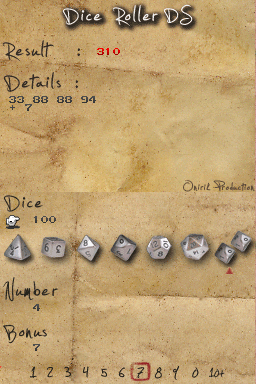
- Roll seven differents dices: D4, D6, D8, D10, D12, D20, D100.
- Roll 1 to 99 dices.
- Add bonus (1 to 99).
- Details each roll.
- Two languages (auto-detection): French and English.
- Stand by mode.
Installation
Download and extract file.
Copy DiceRoller_DS.nds on your SD Card (root directory or any folder).
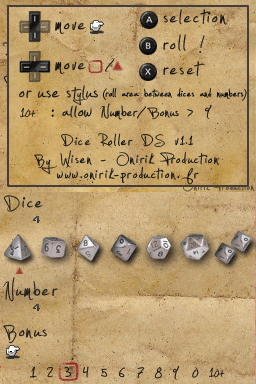
Controls
Up/Down - Move principal cursor (hand)
Left/Right - Move secondaries cursors (square and triangle)
A - Selection
B - Roll
X - Reset
Start - Help
With Stylus, roll area is between dices and numbers.
Note: The 10+ button allows you to enter numbers above 9. A cross, the red number, blue for the Bonus, appears when this mode is activated 10+.
Screenshots
Changelog
v1.1 2010/01/10
- New G.U.I.
- More intuitive controls.
- Stylus detection.
- Adding stand by mode, help screen and reset.
- Now in English.
1.0
- Seven types of dice.
- Run from 1 to 99 dice.
- Added bonus.
- Details of each roll.
Credits
Library: PALib by Mollusk.
Background texture: Aged Paper Texture by Nevermoregraphix.
Font: Estrya's Handwriting by Jellyka Nerevan.
External links
- Author's website - http://onirik-production.fr/dicerollerds.php